Best Reading App for 6-Year-Olds: 6 Tested & Compared (2026)

What You'll Learn
- Why most "top rated" reading apps teach your 6-year-old to guess — and how to spot the red flags in under 30 seconds
- The single phonics feature that separates real reading apps from digital babysitters (hint: if the app doesn't have it, delete it today)
- How one first-grade teacher's mid-year curriculum switch boosted every kid's decoding scores — and what that tells us about choosing the right app
- My ranked breakdown of 6 reading apps I actually tested, with specific pros, cons, and the ages they're best for
The Uncomfortable Truth About Reading Apps for 6-Year-Olds
Here's what nobody in the App Store reviews will tell you: most reading apps for 6-year-olds don't teach reading.
They teach tapping. Swiping. Collecting stars. Watching animations. And occasionally — if your kid is lucky — guessing at words based on picture clues.
Sound familiar?
I've been homeschooling four kids. My oldest two (now 10 and 7) read above grade level. My 4-year-old is in the thick of phonics right now — CVC words at the kitchen table every single morning, no exceptions. And my 1-year-old? She eats the flashcards. We're working on it.
The point is: I've downloaded, tested, deleted, and re-downloaded more reading apps than I can count. And I can tell you that the gap between what parents think these apps do and what they actually do is enormous.
A 6-year-old doesn't need another game. A 6-year-old needs to learn to decode — to look at letters, map them to sounds, blend those sounds together, and read real words. That's it. That's the whole job. And if an app can't do that systematically, it's not a reading app. It's Candy Crush with an alphabet skin.
The Tiger Truth: What Happens When Your 6-Year-Old Can't Actually Read
Let me hit you with some numbers that should make your stomach drop.
Only 33% of 4th graders read at proficient level on the 2022 NAEP — the Nation's Report Card. That means two out of three kids hit 4th grade unable to read well enough to learn from a textbook. The 2023 scores were even worse — reading dropped 3 points since 2019, the largest decline in 30 years.
Your 6-year-old is in first grade right now. Third grade is two years away. That's the cliff.
The Annie E. Casey Foundation's 2010 study found that kids who can't read by 3rd grade are 4x more likely to drop out of high school. Four times. Not a little more likely. Four times.
And here's the kicker: by the time most parents realize there's a problem, private reading intervention can easily run thousands per year — we're talking $100 to $200 per session, and most kids need multiple sessions a week. Insurance doesn't cover it. School waitlists for reading specialists can stretch 6 months or longer. The "Wait and See" approach that your pediatrician or teacher might suggest? That's not patience. That's a ticking time bomb.
So when I say choosing the right reading app matters, I'm not being dramatic. I'm being a mom who's read the research and refuses to gamble with her kids' futures.
What Makes a Reading App Actually Work (The Non-Negotiables)
Before I get into the apps themselves, you need to know what to look for. Because the App Store ratings are useless — parents rate apps based on whether their kid was entertained, not whether their kid learned to read.
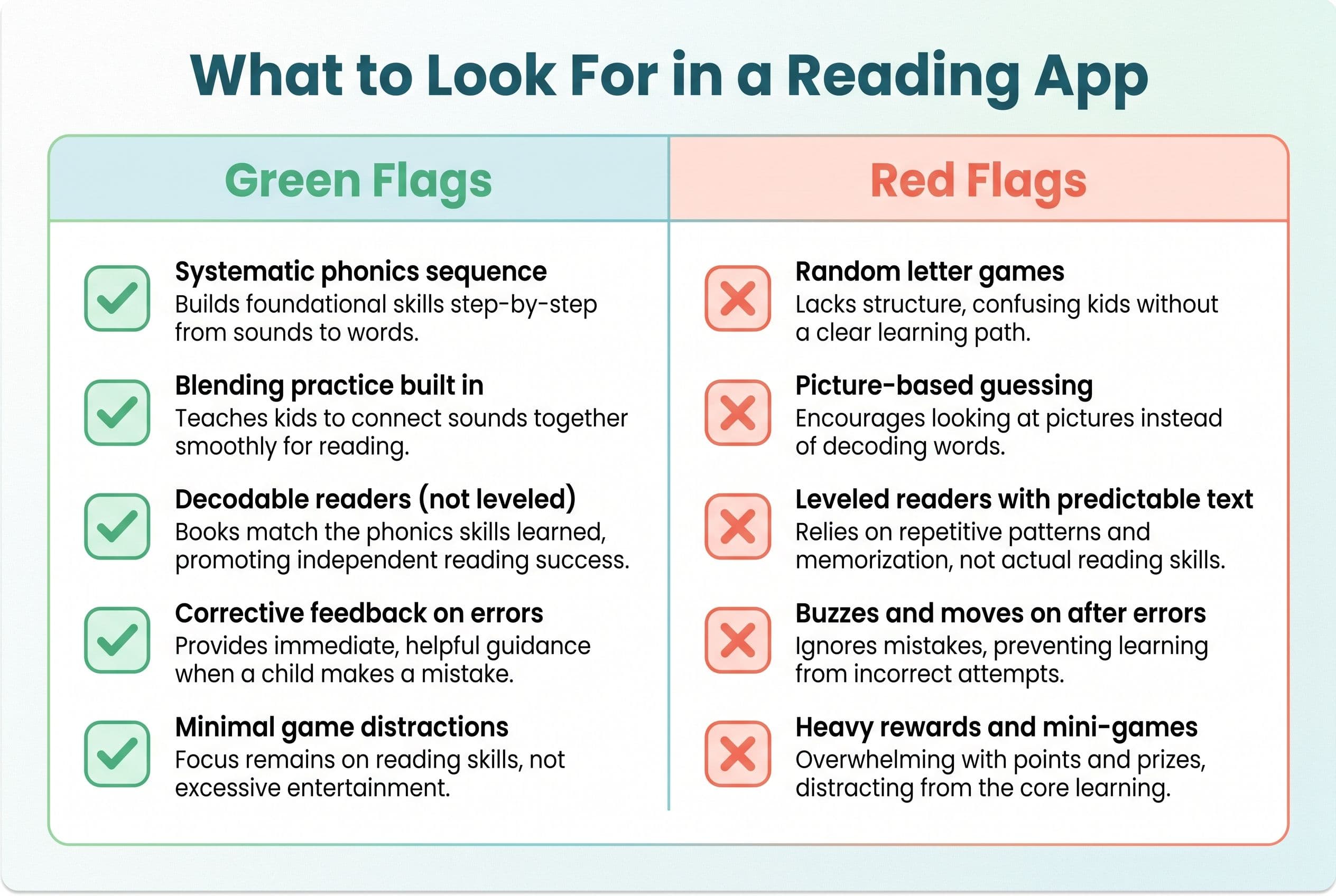
Here's my checklist. If an app doesn't hit at least 4 out of 5, delete it.
1. Systematic Synthetic Phonics Instruction
The National Reading Panel report from 2000 — the one Congress actually commissioned — found that systematic phonics instruction produces significant benefits for reading achievement. "Systematic" means the app teaches sounds in a deliberate, sequential order. Not random letter games. Not "letter of the week." A structured scope and sequence that builds skill on skill.
This is structured literacy — explicit, systematic phonics instruction, the kind you'll find in well-known approaches like Orton-Gillingham. Programs like UFLI Foundations and Fundations follow a structured scope and sequence aligned with the science of reading. If the app doesn't follow a systematic phonics sequence, it's not teaching reading. Period.
2. Blending Practice (Not Just Letter ID)
Your 6-year-old probably already knows the alphabet. Great. That's step one of a twenty-step process. The real skill is blending — taking /c/ /a/ /t/ and smoothing it into "cat." An app that only drills letter names or isolated sounds without teaching blending is like giving someone a pile of lumber and calling it a house.
3. Decodable Text (Not Leveled Readers)
This one drives me crazy. So many apps use leveled readers — the kind based on Fountas & Pinnell levels — where kids are supposed to "read" books by looking at pictures and guessing. That's not reading. That's a parlor trick.
Good apps use decodable readers: texts where every word can be sounded out using the phonics patterns the child has already learned. No guessing. No picture clues. Just real decoding.
4. Immediate Corrective Feedback
When your kid taps the wrong answer, the app shouldn't just buzz and move on. It should show the correct answer, model the sound, and make the kid try again. David Kilpatrick's research in Equipped for Reading Success (2016) makes it clear: orthographic mapping — the brain's process of permanently storing words — requires accurate phonological processing. Every uncorrected error is a missed mapping opportunity.
5. Minimal Distracting "Rewards"
Stickers, coins, characters, mini-games between lessons — all of this pulls attention away from the actual reading. If your kid is spending more time decorating a virtual fish tank than sounding out words, that app was designed by game developers, not reading specialists.
How a First-Grade Teacher Changed Everything Mid-Year
Let me tell you a story that changed how I think about this stuff.
After Emily Hanford's Sold a Story investigation came out in 2023, my neighbor — a first-grade teacher for 18 years — called me almost in tears. She'd been using Lucy Calkins' Units of Study curriculum her entire career. Three-cueing, MSV, teaching kids to look at the picture and guess the word. The whole nine yards.
She told me, "I've been teaching kids to guess for two decades and I didn't even know it."
That conversation shook me. Here was a dedicated, smart teacher who genuinely cared about her students, and she'd been given the wrong tools for her entire career. She switched her classroom to UFLI Foundations mid-year. It was messy — she had to relearn everything herself first, staying up late watching training videos, rebuilding her lesson plans from scratch. But by spring, her kids' nonsense word fluency scores had climbed significantly — kids who couldn't decode CVC words in January were reading 20 to 30 simple nonsense words per minute by March. She told me that was the first time in her career where every single kid in her class could decode CVC words by February.
Every. Single. Kid.
That's what systematic phonics does. And that's exactly the methodology you should demand from any reading app you put in front of your 6-year-old. If my neighbor can overhaul 18 years of classroom practice mid-year and see results that dramatic, you can absolutely find an app that does the same thing at home.
The 6 Best Reading Apps for 6-Year-Olds: Tested and Ranked
OK, here's the main event. I tested these apps with my own kids and got feedback from three other homeschooling families and my neighbor's first-grade class. I'm ranking them based on phonics quality, engagement without distraction, decodable text access, and whether they actually move the needle on reading ability.
#1: Teach Your Kid to Read
The Bottom Line: This is the one I use with my own kids. Full stop.
Teach Your Kid to Read is built on structured literacy principles — systematic synthetic phonics with a carefully structured scope and sequence. It starts with letter-sound correspondence, moves through blending CVC words, progresses to digraphs and blends, and builds all the way to fluent decoding of multi-syllable words.
What I love about it:
- No guessing allowed. Kids sound out every word. There are no picture clues to lean on.
- Decodable readers built right in. After learning a set of phonics patterns, kids read texts that use only those patterns. Real reading, not memorization.
- Immediate corrective feedback. When my 7-year-old hit a wrong answer, the app modeled the correct sound and made her try again before moving forward.
- Minimal fluff. No virtual pets. No coin systems. No mini-games between lessons. The reward is reading — which, honestly, is how it should be.
- Parent dashboard that shows exactly which phonics patterns your child has mastered and where they're struggling.
I had my 7-year-old use this app for 15 minutes a day alongside our kitchen-table phonics drills last year, and she went from blending CVC words to reading early chapter books in about 5 months. My 4-year-old just started the beginning levels, and she's already mapping letter sounds with scary accuracy.
The methodology aligns with what Linnea Ehri's phases of word reading development describe — moving kids from pre-alphabetic (guessing) through partial alphabetic, full alphabetic, and into consolidated alphabetic (automatic reading). That progression is baked into the app's structure.
Best for: Kids ages 4-7 who need systematic phonics from the ground up, or 6-year-olds who've been "reading" at school but are actually guessing.
#2: HOMER
The Bottom Line: Solid phonics content, but buried under too much extra stuff.
HOMER has a decent phonics pathway — it does teach letter-sound correspondence and blending. The scope and sequence exists. But the app is also packed with stories, drawing activities, social-emotional lessons, and other content that dilutes the phonics instruction.
For a 6-year-old who already has solid decoding skills and needs comprehension practice? Fine. For a 6-year-old who still guesses at words? Too much noise. You'll find your kid gravitating toward the story animations and skipping the phonics lessons entirely.
Pros: Good letter-sound instruction in the early levels. Nice variety of content. Cons: Not enough focus on blending and decoding. Too many distractions. Uses some leveled-reader-style texts alongside decodable ones.
Best for: Kids who already decode CVC words confidently and need broader literacy exposure.
#3: Hooked on Phonics
The Bottom Line: A legacy name that's been updated, but shows its age.
Hooked on Phonics has been around since the '80s — your parents might have used the cassette tapes. The app version follows a phonics-first approach, which I appreciate. It moves through short vowels, consonant blends, digraphs, and long vowel patterns in a logical sequence.
The problem? The app feels dated. The interface isn't as polished as newer competitors, and the decodable readers — while present — are limited in volume. My 7-year-old blew through the available content in about two months and needed more.
Also, the "reward" system (stickers, songs) leans a little heavy for my taste. Not the worst offender, but enough that my kids sometimes wanted to skip ahead just to get to the fun part.
Pros: Real phonics instruction. Follows a systematic sequence. Decodable stories included. Cons: Limited content depth for advanced first graders. Dated interface. Reward system can distract.
Best for: Beginning readers (ages 4-5) more than 6-year-olds, unless your first grader is still at the CVC word stage.
#4: Reading Eggs
The Bottom Line: Gamification on steroids. Proceed with caution.
Reading Eggs teaches some real phonics — I'll give it that. The early levels cover letter sounds, CVC words, and basic blending. But the app is drowning in game mechanics. Virtual eggs to hatch, coins to collect, houses to build, characters to dress up. My 7-year-old spent an entire 20-minute session decorating her avatar's treehouse and read exactly zero words.
The phonics lessons themselves are OK — not great, not terrible. But the ratio of game-to-instruction is way too high. A 6-year-old with any impulse control challenges (so... every 6-year-old) will spend their time playing, not reading.
Pros: Some systematic phonics content. Engaging for kids who need heavy motivation. Cons: Way too gamified. Low reading-to-playing ratio. Some levels use picture-based guessing.
Best for: Kids who absolutely refuse to do any phonics work and need to be tricked into it. (But honestly? If that's your kid, the issue isn't the app — it's the habit. Build the habit first.)
#5: ABCmouse
The Bottom Line: An educational buffet where reading is just one dish. And not the main course.
ABCmouse covers reading, math, science, art, music — everything. Which means the reading instruction is shallow. The phonics lessons exist but they're scattered across a massive platform with no clear, focused reading pathway.
I've talked to parents who say their kid "learned to read" on ABCmouse. When I ask what that means, it's usually: "He can recognize sight words and likes the stories." That's not reading. That's memorization plus listening comprehension. Two very different things.
The app also relies heavily on repetitive tapping and reward animations. It's designed to maximize screen time, not reading ability.
Pros: Broad content coverage. Affordable. Kids enjoy it. Cons: No systematic phonics pathway. Heavy guessing-based approach in reading sections. Maximizes engagement over learning.
Best for: General early learning exposure for ages 2-4. Not a serious reading tool for 6-year-olds.
#6: Starfall
The Bottom Line: Free, which is nice. But you get what you pay for.
Starfall has been around forever and it's free (with a paid version available). The phonics content is basic but legitimate — it does teach letter sounds and CVC blending. The interface is simple and clean, without tons of distracting rewards.
The problem is depth. The free version is extremely limited, and even the paid version doesn't provide the kind of systematic, comprehensive phonics instruction a struggling first grader needs. It's a fine supplement but can't serve as a primary reading tool.
Also, the content skews young. My 7-year-old found it babyish. A 6-year-old might tolerate it, but a first grader who's already doing some reading at school will get bored fast.
Pros: Free version available. Clean interface. Real phonics instruction. Cons: Very limited content. Skews young. Not comprehensive enough for first-grade decoding work.
Best for: Budget-conscious parents who need a free supplement alongside a stronger primary program.
Quick Comparison: All 6 Apps at a Glance
| App | Systematic Phonics | Decodable Readers | Low Distraction | Best Age | My Rating |
|---|---|---|---|---|---|
| Teach Your Kid to Read | ✅ Yes | ✅ Yes | ✅ Yes | 4-7 | ⭐⭐⭐⭐⭐ |
| HOMER | Partial | Some | ❌ No | 5-8 | ⭐⭐⭐½ |
| Hooked on Phonics | ✅ Yes | ✅ Yes (limited) | Moderate | 4-6 | ⭐⭐⭐ |
| Reading Eggs | Partial | Some | ❌ No | 4-7 | ⭐⭐½ |
| ABCmouse | ❌ No | ❌ No | ❌ No | 2-4 | ⭐⭐ |
| Starfall | Basic | Basic | ✅ Yes | 3-5 | ⭐⭐½ |
How to Actually Use a Reading App With Your 6-Year-Old (The Tiger Mom Protocol)
Downloading the right app is step one. But an app sitting on a tablet doesn't teach reading any more than a gym membership builds muscle. Here's how I structure app-based phonics with my kids.
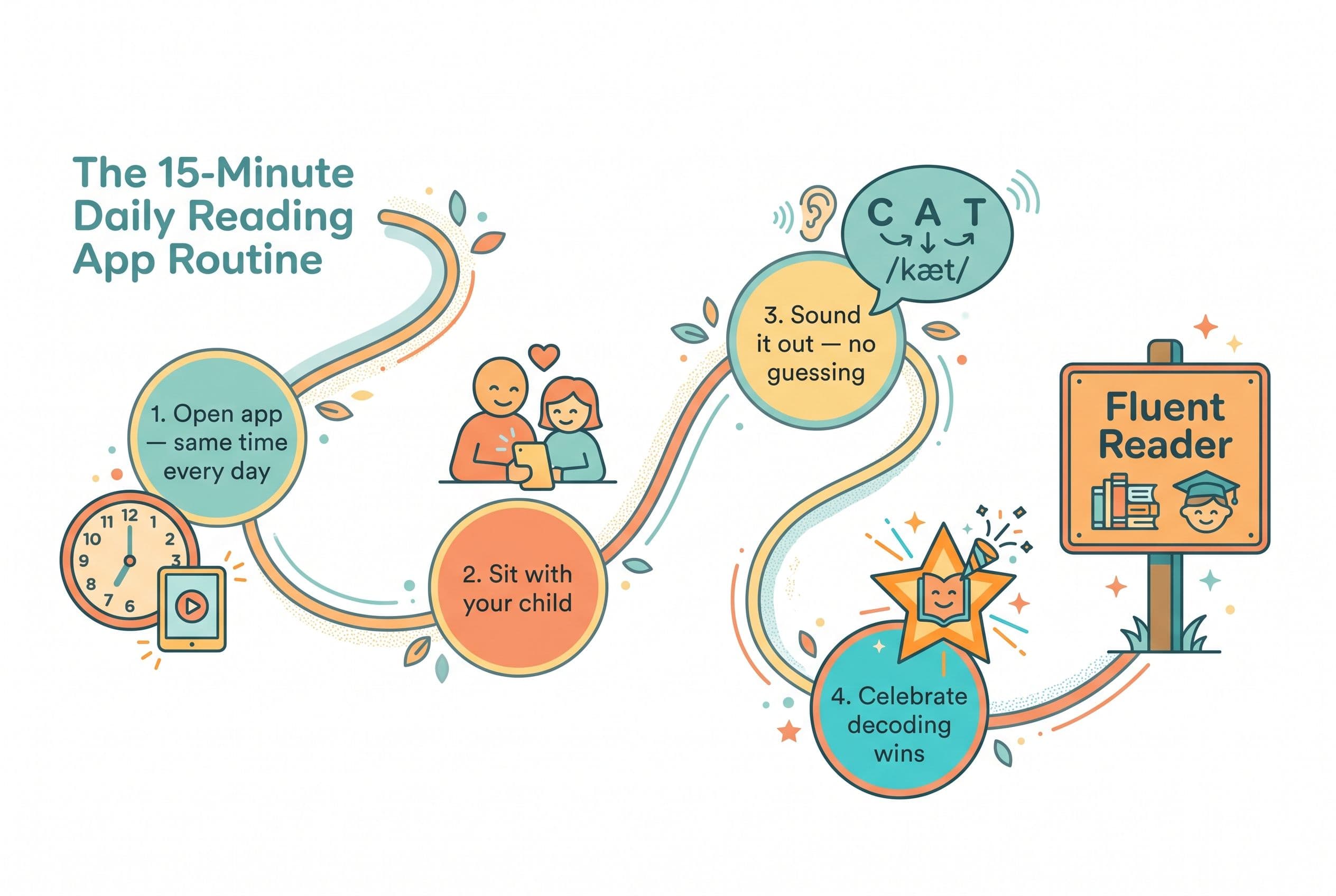
Step 1: Set a Non-Negotiable Daily Schedule
Fifteen minutes a day. Every day. Birthdays, holidays, vacation — we never skip. I call it Tiger Rules, and yes, my kids groan about it. But my 10-year-old now reads at an 8th-grade level, so she can groan all she wants.
The Clackmannanshire study (Johnston & Watson, 2005) out of Scotland tracked kids for 7 years and found that systematic phonics instruction produced lasting, significant reading gains. Seven years of data. Consistency wins.
Step 2: Sit With Them (At Least At First)
Do not hand your 6-year-old a tablet and walk away. Sit next to them. When they hit a word they don't know, don't let them guess. Say: "What does that first letter say? Good. Now the next one. Now blend them together."
The app handles the instruction. You handle the accountability.
Step 3: Test Monthly With a Quick Assessment
You don't need anything fancy. Kilpatrick's PAST test (Phonological Awareness Screening Test) takes about 5 minutes and tells you exactly where your child's phonological processing breaks down. You can also look at nonsense word fluency — the key thing is that your child should show steady growth in decoding fluency month over month. If scores are flat after 6-8 weeks of consistent app use, something needs to change — either the app, the schedule, or the amount of adult support.
If they're not making measurable progress, don't wait around hoping it clicks. Adjust now.
Step 4: Pair the App With Real Books
An app is a tool, not the whole toolbox. Pair it with physical decodable readers. Bob Books are the classic choice. Flyleaf Publishing makes excellent decodable texts. High Noon Books works well for older struggling readers. Skip the Fountas & Pinnell leveled readers you might find at the school book fair — those are whole-language aligned and encourage guessing.
Step 5: Celebrate Decoding, Not Guessing
When your kid sounds out a hard word — even slowly, even with mistakes — that's the moment to go crazy. High-five. Fist bump. Do a little dance. That struggle IS the learning.
When your kid looks at the picture and guesses? Redirect immediately. "Don't look at the picture. Look at the letters. What do they say?" No guessing. Ever.
What About Kids Who Are Already Behind?
Real talk — if your 6-year-old is already struggling, an app alone might not be enough.
Mississippi passed the Literacy-Based Promotion Act in 2013 and went from 49th to 21st in national reading scores in 6 years. How? They didn't just add apps. They retrained every teacher in systematic phonics, screened every kid with real assessments, and intervened early and aggressively.
If your first grader can't blend CVC words — can't look at "sit" and sound it out — you need more than 15 minutes on an app. You need:
- A formal phonological awareness assessment (the PAST test or PALS screening)
- Possible evaluation for dyslexia indicators (the International Dyslexia Association has screening guidelines)
- A structured intervention program like Wilson Reading System, Barton Reading & Spelling, or Lindamood-Bell
- An app like Teach Your Kid to Read as the daily practice layer on top of that intervention
The app is the drill. The intervention is the game plan. You need both.
Frequently Asked Questions
How much time should a 6-year-old spend on a reading app each day?
Fifteen to twenty minutes of focused phonics work is the sweet spot. More than that and you'll hit diminishing returns — 6-year-old attention spans have limits. But those 15 minutes need to be every single day. Consistency beats volume. I'd rather see 15 minutes daily than 45 minutes three times a week.
Can a reading app replace phonics instruction at school?
It depends on what your school is teaching. If your child's school uses a structured literacy curriculum like UFLI Foundations or Fundations, the app is a great reinforcement tool. If your school is still using Balanced Literacy or three-cueing methods (and many still are — check by asking your child's teacher what they do when a kid gets stuck on a word), then the app might actually be your child's primary source of real phonics instruction. That's a problem with the school, not the app.
My 6-year-old hates phonics apps. What do I do?
Stop looking for an app your kid "loves." Your 6-year-old also doesn't love brushing their teeth. They do it because it's non-negotiable. Build the habit first — same time, same place, same duration, every day. The resistance usually fades within 2-3 weeks. And when they successfully sound out a word they've been struggling with? That moment of genuine pride does more for motivation than any virtual sticker ever could.
How do I know if the app is actually working?
Track decoding ability, not app progress. A child can "complete" levels in an app without actually learning to read (ask me how I know). The real test: hand your child a decodable book with words they haven't seen before. Can they sound them out? If yes, the app is working. If they're guessing from pictures or memorized patterns, it's not. Kilpatrick's PAST test is a free, quick way to check phonological awareness progress.
Are free reading apps as good as paid ones?
Sometimes — but usually no. Free apps like Starfall offer legitimate but limited phonics content. Paid apps like Teach Your Kid to Read provide comprehensive, systematic scope and sequence with decodable readers and parent tracking. Think of it this way: a free app is a sample spoon at the ice cream shop. It gives you a taste, but it's not dinner. For a 6-year-old who needs real, structured reading instruction, invest in the real deal.
The Bottom Line
Your 6-year-old has roughly two years before the 3rd grade cliff. That's not a lot of runway.
The right reading app — one built on systematic synthetic phonics, with decodable texts, corrective feedback, and minimal distraction — can put your child on a path to fluent, independent reading. The wrong one wastes months of precious time while your kid collects virtual coins and learns nothing.
I've tested these apps. I've used them with my own kids. And the one I keep coming back to is Teach Your Kid to Read — because it does what a reading app is supposed to do: teach reading. Not entertain. Not babysit. Teach.
Don't wait for the school to catch up. Don't wait for your kid to be "ready." Get the app, set the timer for 15 minutes, sit down next to your child, and start today.
Ready to get your 6-year-old reading — for real? Try Teach Your Kid to Read and see the difference systematic phonics makes. Visit start lesson one free or call (407) 707-6850 to get started.
Part of these guides

Xia Brody
Co-Founder, Teach Your Kid to Read
Mom of 4 who has successfully taught her kids to read. Currently in the trenches with her 4-year-old while her two oldest (10 and 7) devour books on their own. Passionate about phonics-based methods and building a lifelong love of reading.
Related Articles

Best Reading App for 1st Graders in 2026: 6 Apps Tested Side by Side
Not all reading apps are created equal — most first grade reading apps teach kids to guess, not read. I tested 6 of the most popular ones with my own kids and broke down exactly which ones use real phonics and which are dressed-up screen time.
Read More →
Reading Eggs vs ABCmouse for 5-Year-Olds: Best Pick
Choosing between Reading Eggs and ABCmouse? Here’s the no-fluff mom verdict on which app actually teaches a 5-year-old to read — and where both fall short.
Read More →
Reading Apps for 5-Year-Olds: 6 Skill-Level Picks
Most reading apps for 5-year-olds look cute. Too many teach guessing, tapping, and screen-zombie habits instead of real decoding. Here’s how I’d pick a phonics app by skill level if I were sitting at your kitchen table.
Read More →