Best Reading Apps for 1st Graders: 6 Skill Picks
What You'll Learn
- The one app type I won't let near a struggling 1st grader (ages 6-7)
- Which apps teach real phonics and which ones lean too hard on games
- The red flag hiding inside many “cute” first grade reading apps
- How to pick a reading app for 1st grade without falling for reward-button nonsense
Reality Check
Your 1st grader doesn't need a prettier screen. Your 1st grader needs to decode.
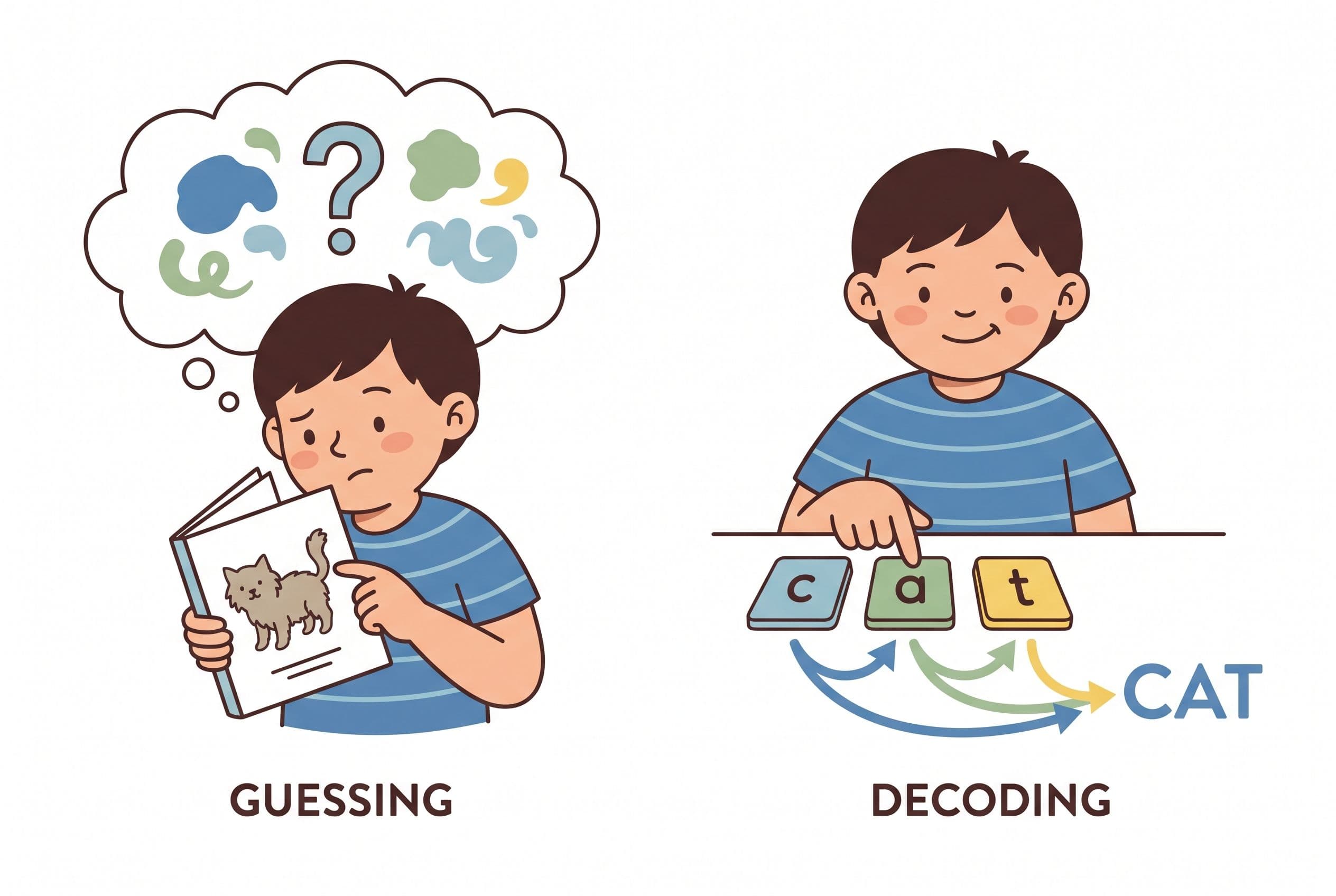
If your child sees ship and says “boat” because the picture has water in it, that's not reading. That's guessing with a soundtrack. And yes, this drives me slightly bananas because parents get told it's “using context.” No. It's avoiding the word.
The best reading apps for 1st graders teach the code: sounds, letters, blending, spelling, decodable words, sentence reading, fluency. Cute animals can stay if they serve the lesson. If they replace the lesson, they're out.
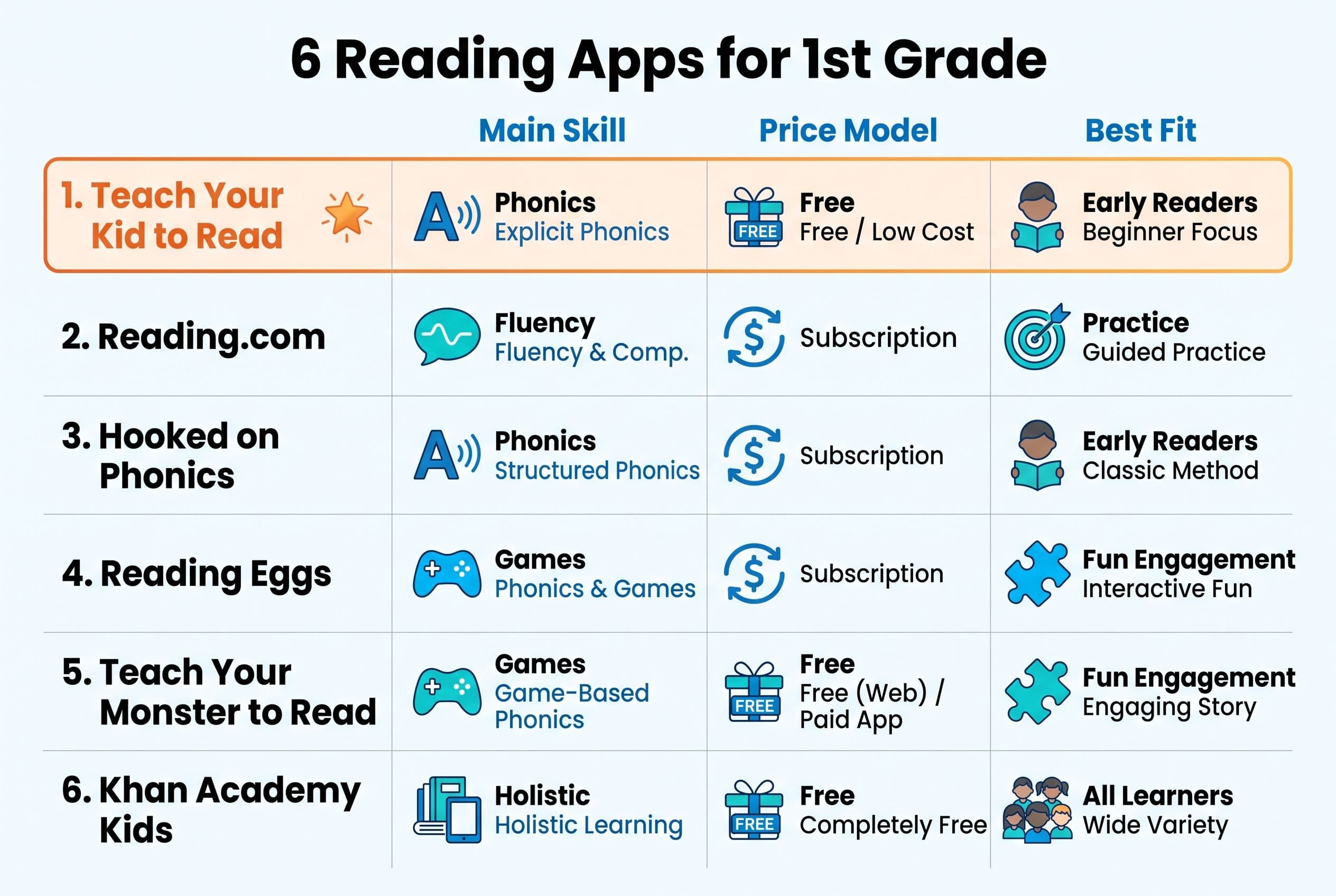
The Verdict: Best Reading Apps for 1st Graders
| Rank | App | What it teaches | Price model | Best fit |
|---|---|---|---|---|
| 1 | Teach Your Kid to Read | Systematic phonics, decoding, fluency, no guessing | Lesson one free with no card and nothing to cancel; from lesson two, 7-day free trial, then US$9.95/month | 1st graders who need phonics mastery |
| 2 | Reading.com | Parent-led phonics and early reading practice | Subscription; check current price | Ages 3-8, especially parent-supported learners |
| 3 | Hooked on Phonics | Phonics sequence with app-based practice | Subscription with 7-day free trial in the app; check current price | Preschool to 2nd grade |
| 4 | Reading Eggs | Broad literacy practice, including Fast Phonics | Subscription with 30-day free trial; check current price | Ages 3-7 for Reading Eggs, 5-10 for Fast Phonics |
| 5 | Teach Your Monster to Read | Early phonics and game-based practice | Free on computers; paid one-time app | Ages 3-6, best as extra practice |
| 6 | Khan Academy Kids | Free early literacy, stories, and broad learning | Free, no ads, no subscriptions | Ages 2-8, best as a supplement |
My top pick is Teach Your Kid to Read because it keeps the main thing the main thing: explicit phonics, blending, decoding, and fluency practice. If your child is in 1st grade and still guessing from pictures, start with start lesson one free and watch how they handle the first lesson.
Tiger Truth: 1st Grade Is Not “Wait and See” Time
Look, I say this with love and a little fire in my mom voice: 1st grade is not the year to “wait and see.” This is the year kids move from learning letters to reading words, sentences, and short books with independence.
The National Reading Panel report in 2000 found that systematic phonics instruction gives children significant benefits in learning to read. Stanislas Dehaene's Reading in the Brain (2009) explains why: the brain doesn't naturally read. We train it to connect speech sounds to print.
And the US numbers? Brutal. On the 2022 NAEP / The Nation's Report Card, only 33% of US 4th graders read at or above NAEP Proficient in reading. Quick mom-note before anyone panics in the wrong direction: NAEP Proficient is a specific achievement standard, not the same thing as “reading at grade level.” Still? That's not a tiny problem. That's a five-alarm literacy fire.
After Emily Hanford's 2023 APM Reports series Sold a Story came out, my neighbor — a 1st-grade teacher for 18 years — called me almost in tears. She'd been using Lucy Calkins' Units of Study her whole career. Three-cueing, MSV, the whole parade. She told me, “I've been teaching kids to guess for two decades and I didn't even know it.”
Then she switched her classroom to UFLI Foundations mid-year. Messy? Oh yes. She had to relearn the method herself first, which is humbling when you've taught for 18 years. But by spring, she told me her students' DIBELS nonsense word fluency scores had jumped an average of 15 points. She also said it was the first time in her career every child in her class could decode CVC words by February.
That's one classroom story, not a controlled study. I am not pretending my neighbor's class is a peer-reviewed journal article with a fancy chart and a cardigan. But it matches the bigger point from reading research: the method matters.
1. Teach Your Kid to Read: Best Overall Phonics App for First Grade
Teach Your Kid to Read ranks first because it focuses on the skill your 1st grader needs most: accurate decoding.
No guessing from pictures. No “look at the first letter and make something up.” No endless reward screen that trains your kid to tap like a lab mouse. The app teaches phonics in a structured sequence so your child learns grapheme-phoneme correspondence — the sound-symbol map that makes reading possible.
This is what I want for a 1st grader:
- Short lessons that parents can actually fit between breakfast dishes and math
- Clear sound-by-sound practice
- Blending drills
- Decodable words
- Fluency practice without fake reading
- Enough repetition for mastery, not so much that everyone cries into the cereal
I had my 4-year-old practicing CVC words at the kitchen table last Tuesday while my 1-year-old tried to eat a crayon. Glamorous? Not even slightly. But this is how reading gets built: sound, blend, read, repeat.
Teach Your Kid to Read works best for parents who want a reading app for 1st grade that acts like a coach, not a babysitter. You still sit nearby. You listen. You correct guessing. You celebrate accuracy like your child just won Olympic gold.
The offer is straightforward: lesson one is free with no card and nothing to cancel; from lesson two the whole program is a 7-day free trial, then US$9.95 a month.
Best for: 1st graders who need systematic phonics, blending practice, and a no-nonsense path toward fluent reading.
Watch for: You can't outsource the whole job to any app. Sit with your child for the first few lessons. Tiger rule: we supervise the code.
2. Reading.com: Strong Parent-Led Reading Practice
Reading.com states that it serves ages 3-8 and uses a subscription model. It's made by Teaching.com, the company behind Typing.com and Nitro Type.
For parents searching for apps to help 1st graders read, Reading.com lands high because it centers the parent-child lesson. That's a big deal. A 6-year-old doesn't need to vanish into an app for 45 minutes while you answer emails. A 6-year-old needs guided practice, fast feedback, and a parent who says, “Try that sound again.”
From a reading science lens, I look for whether an app teaches the alphabetic principle directly. Does the child learn that letters represent sounds? Does the app ask them to blend? Does it avoid picture guessing? Those questions matter more than cartoon polish.
Best for: Parents who want a shared reading routine with clear daily practice.
Watch for: Check the current subscription price and make sure your child gets enough decoding, not just exposure to books.
3. Hooked on Phonics: Familiar Name, Phonics-Focused Structure
Hooked on Phonics has been around since 1987, and the current app lists ages 3-8, with the site describing preschool to 2nd grade. Its app uses a subscription with a 7-day free trial in the app.
The reason it belongs on a list of best reading apps for 1st graders is simple: it focuses on phonics. That puts it ahead of apps that give kids leveled readers and tell them to use the picture, the first letter, and a wild guess. No thank you.
A solid phonics app should move from sounds to words to sentences. It should give children practice reading words they can decode. That matters because decodable text builds orthographic mapping, the process David Kilpatrick explains in Equipped for Reading Success (2016). Kids bond the word's spelling, sound, and meaning in memory. That's how words become instantly recognized later.
Best for: Families who want a well-known phonics sequence for early readers.
Watch for: Don't let the app replace oral reading with you. Listen to your child read out loud. Yes, every day. Even when you're tired.
4. Reading Eggs: Broad Literacy With a Phonics Lane
Reading Eggs is made by Blake eLearning, an Australian-owned company that merged with 3P Learning in 2021. It states ages 2-13 overall, with Reading Eggs for ages 3-7 and Fast Phonics for ages 5-10. The pricing model is subscription with a 30-day free trial.
This one has a lot inside it. That can help or hurt, depending on your child. Some 1st graders love variety. Others click around like tiny raccoons in a pantry and somehow avoid the hard lesson every time.
If you use Reading Eggs, I recommend steering your child toward the phonics-heavy sections, especially if decoding is weak. For a 1st grader who can't read CVC words like map, sit, and run, vocabulary games and story exposure won't fix the root problem. You need sound work.
Best for: Kids who enjoy game-like practice and need broad literacy exposure.
Watch for: Too many activities can hide whether your child can actually decode. Ask them to read five decodable words after the session. That's the receipt.
5. Teach Your Monster to Read: Fun Extra Practice, Especially for Early Phonics
Teach Your Monster to Read is made by Teach Your Monster Limited in the UK and was developed by the Usborne Foundation, a charity set up by Peter Usborne. The organisation renamed itself Teach Your Monster in 2021. It states ages 3-6, and the pricing model is free on computers with a paid one-time app.
I like that this app can give early phonics practice without a subscription. For a younger 1st grader or a child who still needs letter-sound work, it can work as extra drill.
But here's my tiger-mom warning: if your child already struggles in 1st grade, don't rely on “fun” to do the heavy lifting. Fun is fine. Mastery is better. The app can support practice, but you still need a direct plan for blending, spelling, and reading decodable text.
Best for: Extra phonics practice, especially for younger or less confident readers.
Watch for: Game energy can outrun skill practice. Keep sessions short and ask for real reading afterward.
6. Khan Academy Kids: Best Free Supplement
Khan Academy Kids is made by Khan Academy, a 501(c)(3) nonprofit. It states ages 2-8 and is free with no ads or subscriptions; the site asks for donations.
For families who need a no-cost option, this is a no-brainer supplement. It includes early literacy, stories, and broader learning activities. I respect the access piece here because not every family can add another subscription.
But for the primary keyword here — best reading apps for 1st graders — I wouldn't make Khan Academy Kids the only reading plan for a child who's behind in decoding. It's broad. A child with weak phonemic awareness needs targeted sound work, blending drills, and decodable reading.
Best for: Free enrichment and light literacy practice.
Watch for: Broad learning apps can look productive while avoiding the exact reading skill your child needs most.
The Disqualifier: Guessing Is Not Reading
Here's the feature that knocks an app down my list fast: it teaches or rewards guessing.
If an app shows a picture of a dog and asks your child to choose dog from a list where the other words look nothing alike, your child may succeed without reading. If it uses leveled books that push picture clues before decoding, be careful. Fountas & Pinnell levels are everywhere, but that system grew out of a whole-language-aligned world. For a struggling 1st grader, I want decodable readers, not “look at the picture and predict” books.
I prefer apps and programs that line up with Orton-Gillingham principles: explicit, sequential, multisensory, and cumulative. UFLI Foundations, Fundations, Logic of English, and All About Reading all give parents useful reference points for what structured literacy looks like, even though they aren't all apps.
Real reading starts when the child looks at the word and says the sounds.
How to Choose a Reading App for 1st Grade
Use this checklist before you pay for anything:
- Check the method. Does it teach phonics directly, or does it let kids guess from pictures?
- Look for blending. Your child should practice pushing sounds together: /m/ /a/ /t/, mat.
- Demand decodable text. The words in the lesson should match the phonics pattern taught.
- Watch one full lesson. Don't assume “educational” means useful. Sit there. Be nosy.
- Test after the app. Ask your child to read 5-10 words on paper with no pictures.
- Track fluency. A reading fluency app should build accuracy first, then speed.
- Use a quick screen. DIBELS and AIMSweb screen specific literacy skills and risk. Kilpatrick's PAST samples phonological awareness skills. These tools can point you toward the weak spot, but they don't diagnose the whole reason a child is struggling. If the pattern keeps showing up, ask the school for a fuller look at phonemic awareness, decoding, language, and fluency.
DIBELS benchmarks vary by edition, grade, testing window, and measure, so don't turn one number into a family emergency. Benchmark scores are risk indicators, not a diagnosis and not a universal developmental deadline. Don't panic over one score, but don't ignore a pattern. That's the tiger line.
If your 1st grader can't read short vowel words like fan, lip, hop, and mud, choose the best phonics app for first grade you can, then practice daily.
My 15-Minute App Routine for 1st Graders
Here's exactly what I'd do at home. No drama. No 90-minute “literacy block” with a sad child and a cold coffee.
- Two minutes: Review letter sounds with cards or tiles.
- Five minutes: Use the app lesson. Sit beside your child.
- Three minutes: Read decodable words on paper.
- Three minutes: Read one short decodable sentence or book page.
- Two minutes: End with spelling: say ship, child taps /sh/ /i/ /p/ and writes it.
We Never Skip. Birthdays, holidays, vacation, grandma's house — we do a tiny lesson. Reading is a survival skill, not a seasonal hobby.
And our other rule? No Guessing. If my child guesses, I cover the picture and say, “Sound it out.” Warm voice. Steel spine.
Bottom Line: Pick the App That Teaches the Code
The best reading apps for 1st graders don't entertain first and teach later. They teach the code, give practice, and help your child read words without guessing.
My pick is Teach Your Kid to Read because it puts phonics, decoding, and fluency at the center. Lesson one is free with no card and nothing to cancel; from lesson two the whole program is a 7-day free trial, then US$9.95 a month.
FAQ
What is the best reading app for 1st graders?
My top pick is Teach Your Kid to Read because it focuses on systematic phonics, blending, decoding, and fluency. For 1st graders, those skills matter more than games, points, or cute characters.
Are phonics apps better than sight word apps?
For most beginning readers, yes. Kids need phonemic awareness and phonics so they can decode unfamiliar words. Sight word practice helps more when it supports orthographic mapping, not when it asks kids to memorize word shapes.
How long should a 1st grader use a reading app each day?
Start with 10-15 minutes a day, then add 5 minutes of reading aloud from decodable text. Short and daily beats long and random. Trust me on this.
What if my 1st grader hates reading apps?
Use the app for the smallest useful chunk: one lesson, one sound, one blending drill. Then switch to magnetic letters, a whiteboard, or decodable books. The goal isn't app loyalty. The goal is reading mastery.
When should I worry about my 1st grader's reading?
Worry if your child guesses from pictures, can't blend CVC words, avoids reading, or forgets letter sounds after repeated practice. Don't wait a full school year. Use a screener like DIBELS, AIMSweb, or the PAST to spot risk and skill gaps, then get targeted help.
From teachyourkidtoread.org/blog/best-reading-apps-for-1st-graders-6-skill-picks
Part of these guides

Xia Brody
Co-Founder, Teach Your Kid to Read
Mom of 4 who has successfully taught her kids to read. Currently in the trenches with her 4-year-old while her two oldest (10 and 7) devour books on their own. Passionate about phonics-based methods and building a lifelong love of reading.
Related Articles

Best Reading App for 4th Graders Behind + Free Plan
Your 9-year-old is guessing at words and hiding books in his backpack. Most reading apps are built for 5-year-olds and will waste his time. Here's what a real 4th grade reading intervention app has to do — and the exact daily plan I use.
Read More →
Best Reading App for a 1st Grader Who Guesses Words
If your 1st grader guesses words from pictures, that’s not reading — that’s coping. Here’s the no-nonsense app comparison I’d use with my own kids.
Read More →
Best App to Teach Sight Words: 2026 Age Picks
Looking for the best app to teach sight words? Here’s my no-nonsense 2026 ranking by age, with phonics-first picks, guessing-method red flags, and the exact action plan I’d use with my own kids.
Read More →