HOMER Learning App vs ABCmouse: Reading Skills Compared
What You'll Learn
- The reading feature that sounds harmless but quietly trains kids to guess
- Why HOMER and ABCmouse aren’t equal if your real goal is decoding
- The one app I’d pick first if I wanted daily phonics practice without circus-level distractions
- How to test whether your child is reading or just memorizing screens
Reality Check
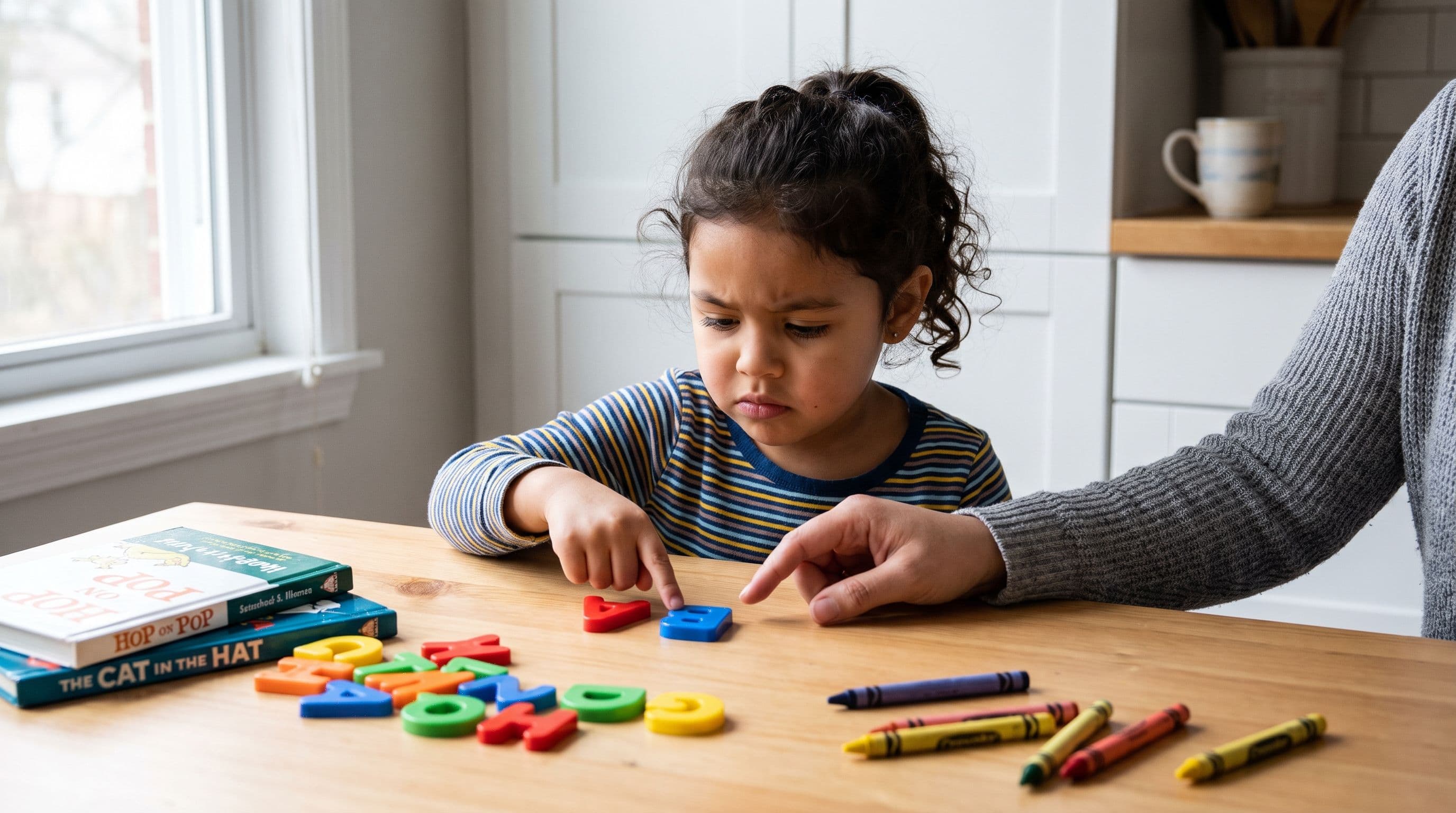
Your kid can tap animated animals all day and still not read the word mat.
That’s the problem with a lot of “learning apps.” They look busy. They feel educational. Grandma sees badges and songs and says, “Wow, she’s learning!” But if your child can’t connect graphemes to phonemes — letters to sounds — then the app entertained them, not taught them to read.
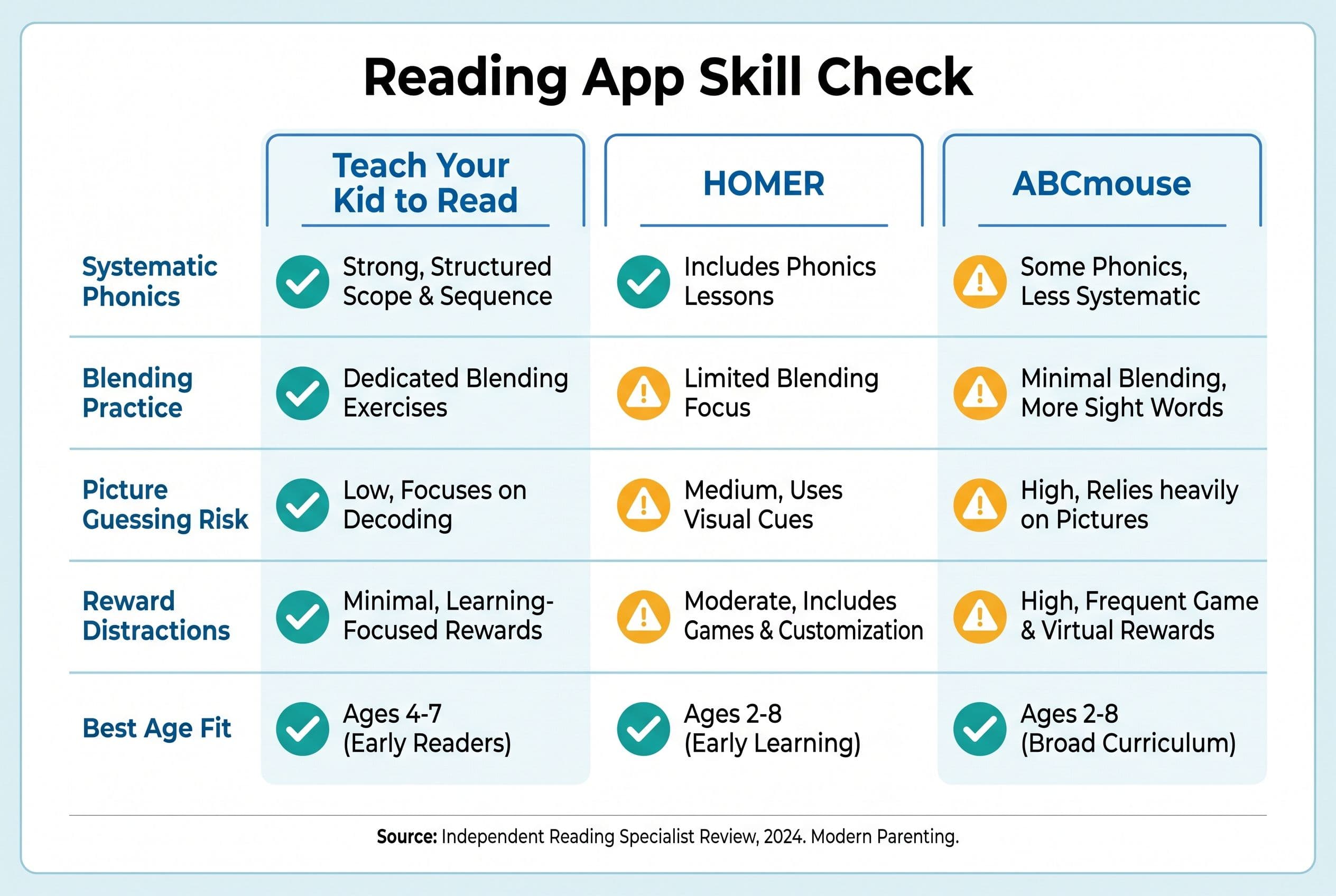
So if you’re comparing homer learning app vs abcmouse, here’s the short version: HOMER feels more reading-focused than ABCmouse, ABCmouse has more general preschool content, and neither is the app I’d choose first for systematic phonics mastery.
The Verdict: HOMER Learning App vs ABCmouse for Reading
| Rank | App | What it teaches | Price snapshot | Best age fit |
|---|---|---|---|---|
| #1 | Teach Your Kid to Read | Systematic synthetic phonics, blending, decoding, no guessing | Lesson one is free with no card and nothing to cancel; from lesson two the whole program is a 7-day free trial, then US$9.95/month | Ages 4-7 |
| #2 | HOMER Reading App | Personalized early literacy, stories, some phonics, vocabulary | Usually subscription-based; pricing changes by plan | Ages 2-8 |
| #3 | ABCmouse Reading App | Broad early learning, songs, games, leveled activities, some phonics | Usually subscription-based; pricing changes by plan | Ages 2-8 |
If your main question is “What’s the best app to help kids read?” I’d start with Teach Your Kid to Read because it keeps the mission tight: teach the code, drill the sounds, blend the words, stop the guessing. You can start lesson one free — lesson one is free with no card and nothing to cancel; from lesson two the whole program is a 7-day free trial, then US$9.95 a month.
Tiger Truth: Cute Apps Don’t Save Struggling Readers
Look, I’m not anti-app. I’m anti-fake-reading.
The National Reading Panel report in 2000 found that systematic phonics instruction gives kids significant reading benefits. Louisa Moats said it plainly in her 1999 paper, Teaching Reading IS Rocket Science: reading instruction requires explicit knowledge of how language works. Stanislas Dehaene’s Reading in the Brain (2009) backs up the neuroscience piece — the brain doesn’t naturally read the way it naturally learns speech. We train it.
And the stakes? In the US, only 33% of 4th graders (ages 9-10) read at or above proficient on the 2022 NAEP / The Nation’s Report Card. That is not a tiny “some kids need time” issue. That’s a national alarm bell.
I saw this play out on a playground in Raleigh. Another mom told me her child’s school had switched from Lucy Calkins to a Science of Reading curriculum because of North Carolina’s SB 387 — the Excellent Public Schools Act, a US state law. She sounded annoyed. “He was doing fine before,” she told me.
So I asked one question: “Can he read splint?”
He was in 2nd grade (ages 7-8). He could not.
I spent 20 minutes on that playground bench explaining why schools were changing course — Emily Hanford’s APM Reports / Sold a Story, the NAEP data, Dehaene’s brain research, the whole mess. That night she watched the podcast and texted me at 11 p.m.: “I had no idea. Why didn’t anyone tell us this sooner?”
Exactly.
That’s why this reading app comparison matters. You’re not choosing digital babysitting. You’re choosing whether your child practices real decoding or builds slick little guessing habits that bite later.
App Deep Dive: Which One Builds Real Reading Skill?
#1 Teach Your Kid to Read: Best for Actual Phonics Mastery
Teach Your Kid to Read wins for me because it acts like reading is a skill, not a carnival.
The lessons follow the logic of systematic synthetic phonics: teach the sound-spelling pattern, practice it, blend it, read it in words, repeat until mastery. That sounds boring to some people. Good. Boring often works. My 4-year-old practiced CVC words at our kitchen table last Tuesday while my 1-year-old tried to eat a crayon and my 7-year-old asked if “snack” counted as a subject. Real homeschool glamour, folks.
But here’s the kicker: she read sat, map, pin, and mud because she sounded them out. She didn’t stare at a picture and yell “dog!” because the illustration looked dog-ish.
That’s the hill I’ll die on.
The app keeps the path direct:
- Letter-sound practice
- Blending practice
- Decodable word reading
- Short, repeatable lessons
- Parent-friendly structure
- No reward loop that replaces instruction
This matters because orthographic mapping — the process David Kilpatrick explains in Equipped for Reading Success (2016) — happens when kids connect sounds in spoken words to letters in printed words. They don’t map words by guessing from pictures. They map words by hearing sounds, matching symbols, and reading the word accurately enough times that it sticks.
If your child struggles, you can also pair app practice with the PAST test — Kilpatrick’s Phonological Awareness Screening Test. It checks phonological awareness manipulation at the syllable, onset-rime, and phoneme levels, including accuracy and automaticity. Read the administration directions first, because this is not a “wing it while stirring pasta” situation. And no, it doesn’t diagnose every possible reading problem by itself. It’s one useful piece of the puzzle — a much better piece than “he just needs confidence,” but still one piece.
Best for: parents who want a phonics app for kids that teaches decoding without fluff.
Watch for: you still need to sit nearby. No app replaces a parent listening for errors. Tiger Rule: No Guessing. Sound it out.
#2 HOMER Reading App: Stronger Reading Focus Than ABCmouse
The HOMER reading app has a lot going for it. It feels calmer than ABCmouse, and its personalized pathway can work nicely for younger kids who need gentle exposure to letters, stories, vocabulary, and early phonics.
If we’re strictly comparing HOMER vs ABCmouse for reading, HOMER usually wins on focus. It doesn’t feel quite as much like an everything-bagel preschool platform. It tries to build literacy through stories, songs, phonics activities, and comprehension prompts.
That’s useful.
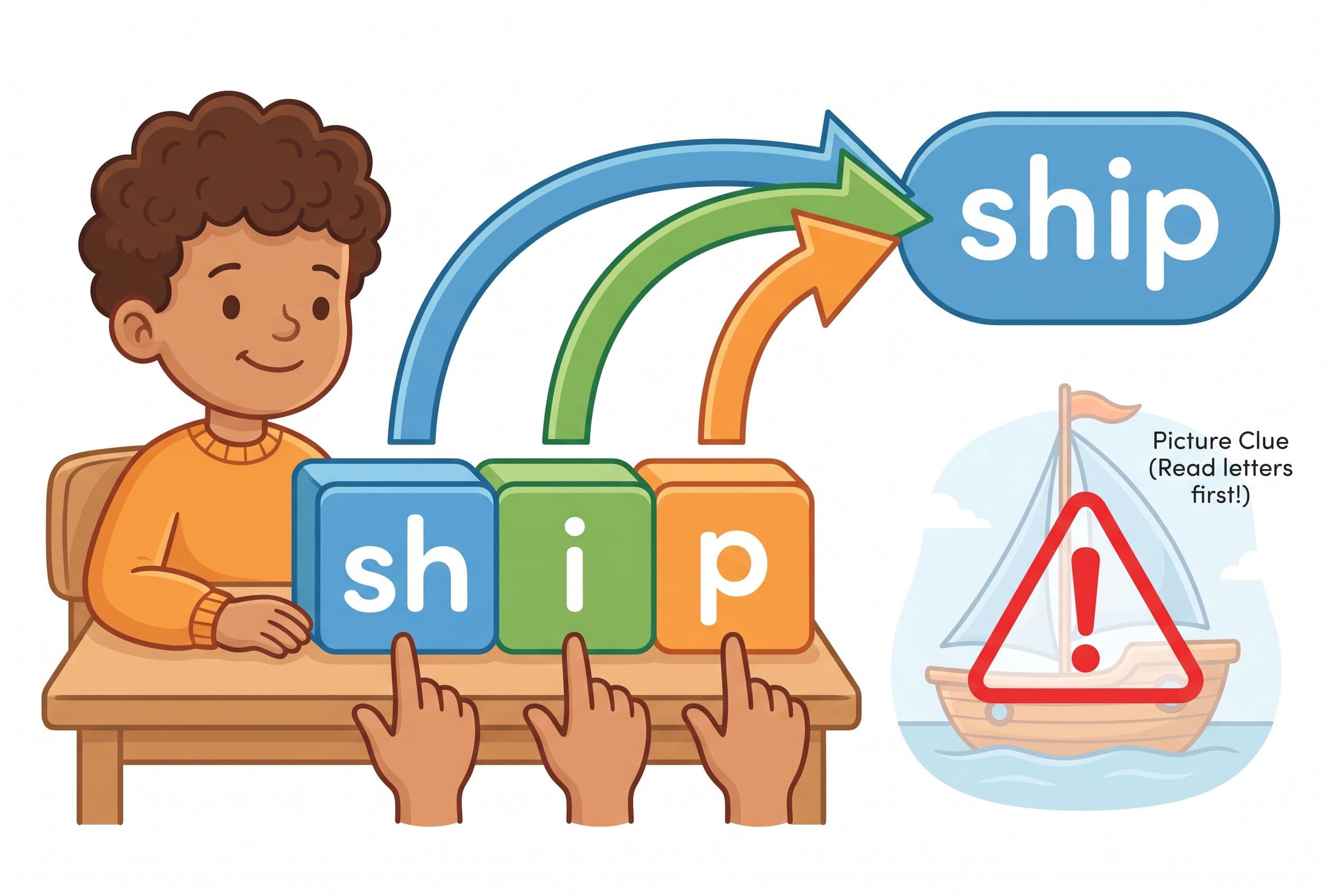
But here’s my mom-with-coffee-and-a-red-pen concern: parents often mistake exposure for mastery. Your child may hear a letter sound in HOMER, tap through a story, answer a comprehension question, and look productive. But can they decode ship, thin, flag, and best without picture clues?
That’s the test.
Linnea Ehri’s 2005 work on phases of word reading development explains why kids must move from partial alphabetic reading to full alphabetic reading. Translation: they can’t keep using the first letter, a picture, and vibes. They need to process every sound in the word.
HOMER can support early literacy. I just wouldn’t make it the backbone if my child showed signs of guessing, weak blending, or poor phonemic awareness.
Best for: preschoolers who need broad early literacy exposure and enjoy story-based learning.
Watch for: don’t let your child race through activities without proving they can sound out unfamiliar words.
#3 ABCmouse Reading App: Broad, Busy, and Easy to Overestimate
The ABCmouse reading app is huge. That’s both the appeal and the problem.
ABCmouse covers reading, math, art, songs, puzzles, games, and a ton of preschool and early elementary content. If you want one subscription for general learning, it can feel like a no-brainer. Kids like it because it gives them lots to do. Parents like it because the dashboard looks official.
But for reading? I’m cautious.
ABCmouse includes phonics activities, letter games, songs, and books. Some kids pick up useful skills there. But the platform can reward completion more than accuracy. A child may bounce from activity to activity, collect digital goodies, and still struggle to read a plain decodable sentence like: Sam sat in the mud.
This one drives me crazy because I’ve seen parents relax too soon. “She’s been doing ABCmouse for six months,” they tell me. Then I hand the child a Bob Books reader or a simple decodable text, and boom — guessing, skipping, looking at me for rescue.
That’s not independence. That’s app familiarity.
Also, be careful with leveled books in general. Fountas & Pinnell levels are everywhere in schools, especially in the US, but they came out of a whole-language aligned reading culture. A level doesn’t guarantee the book matches your child’s phonics knowledge. Decodable readers do that much better.
Best for: families who want broad preschool content beyond reading.
Watch for: game rewards, guessing habits, and too much passive screen time.
The Feature That Disqualifies a Reading App Fast
Here’s my fast test: does the app let the child succeed by guessing from pictures?
Imagine Lily sees a page with a boat and the sentence says, “The ship is big.” She looks at the picture and says, “The boat is big.” A lot of adults smile because the meaning is close.
Nope.
That’s wrong.
Reading means the printed word controls the answer. Ship is not boat. If the app accepts meaning-ish responses or encourages picture-first strategies, it trains the wrong reflex. And once that reflex sticks, you’ll fight it for months.
The Simple View of Reading from Gough and Tunmer (1986) says reading comprehension depends on decoding × language comprehension. A weakness in either can limit understanding. So if decoding stays weak, comprehension problems may become more obvious as texts get harder — especially when the pictures disappear and the vocabulary gets bossy.
That’s the so-called 3rd grade (ages 8-9) cliff people talk about. It’s not magic. It’s not the same for every child. But the pattern is real enough that I don’t play cute games with guessing.
Price and Value: Don’t Pay for Noise
Prices change, so check each company’s current page before buying. But value isn’t just monthly cost. Value means: Did my child become a stronger reader this month?
Here’s how I’d think about it:
- Teach Your Kid to Read: best value if your target is decoding and phonics mastery; lesson one is free with no card and nothing to cancel, then lesson two starts the 7-day free trial, followed by US$9.95/month.
- HOMER: worth considering if you want reading-adjacent enrichment with stories and early literacy activities.
- ABCmouse: worth considering if you want a general preschool learning app, not a focused reading intervention.
If money is tight, don’t buy three apps. Pick the one that teaches the missing skill. Then use free library books, paper, magnetic letters, and your own ears.
Honestly? A parent listening for guessing beats a fancy app running unattended while the child taps through animations.
How to Choose Between HOMER, ABCmouse, and a Phonics App
Use this action step before you subscribe to anything.
- Do an informal nonsense-word check. Try words like mip, lat, sog, fep, and nud only if your child has already learned those sound-spelling patterns. Model one first so they understand the task. If your child can’t sound them out, don’t slap a diagnosis on it — but do investigate phonics and blending.
- Check blending. Say /s/ /a/ /t/. Can your child blend it into sat without you saying it first?
- Watch the eyes. Are they looking at the word from left to right, or scanning the picture for clues?
- Use a named screener if you’re worried. DIBELS and similar school screeners can give quick data on skills like nonsense word fluency, but don’t use random internet benchmark numbers like they’re carved into stone tablets. Ask the teacher which edition, testing window, and scoring rules they’re using.
- Match the app to the gap. Weak phonemic awareness? Drill sounds. Weak blending? Blend daily. Guessing? Ban picture-cueing and use decodable text.
- Set a daily non-negotiable. Ten minutes. Every day. We Never Skip — birthdays, holidays, vacation, grandma’s house, whatever.
- Recheck after 30 days. If your child can’t read more words accurately after a month, change the plan.
If you want the direct route, start with Teach Your Kid to Read and sit beside your child for the first few lessons. Correct guessing instantly. Praise effort, not fake fluency.
My Bottom Line on HOMER Learning App vs ABCmouse
If you want a general early learning app, ABCmouse gives you more categories.
If you want a calmer literacy-centered app, HOMER beats ABCmouse for reading focus.
If you want a phonics app for kids that puts decoding first, I’d pick Teach Your Kid to Read before either one.
That’s not because HOMER and ABCmouse are useless. They’re not. But parents searching homer learning app vs abcmouse usually want to know which app will help their child read. Not sing about reading. Not tap around reading. Read.
And reading starts with the code.
So be the loving tiger. Sit down. Open the lesson. Listen to the sounds. Stop the guessing. Celebrate real decoding like your kid just won Olympic gold, because in my house, reading mud without help absolutely counts as a medal moment.
Want to see where your child stands before you pick? take the 2-minute reading check
FAQ
Is HOMER better than ABCmouse for reading?
For reading specifically, HOMER usually has the edge because it focuses more on early literacy, stories, and phonics-style activities. ABCmouse covers more subjects, which can dilute reading practice. If your child needs decoding help, choose a systematic phonics app first.
Can ABCmouse teach my child to read?
ABCmouse can support early reading exposure, letter recognition, and basic phonics practice. But I wouldn’t rely on it alone for a child who guesses, skips words, or can’t blend CVC words. Test with decodable words before you relax.
What’s the best app to help kids read?
The best app to help kids read is the one that teaches systematic phonics, blending, and accurate decoding. My first pick is Teach Your Kid to Read because it focuses on those skills directly instead of burying them under games.
What age should kids start phonics?
Many kids can start playful phonemic awareness and letter-sound work around age 4, with more structured decoding around kindergarten (age 5). Keep lessons short, direct, and daily. Don’t force long sessions, but don’t “wait and see” if your child is clearly struggling.
How do I know if my child is guessing instead of reading?
Cover the picture and ask them to read the word. Use nonsense words like mip or sog only with sound-spelling patterns your child has learned. If they freeze, guess wildly, or rely on the first letter only, they need more phonics and blending practice.
Part of these guides

Xia Brody
Co-Founder, Teach Your Kid to Read
Mom of 4 who has successfully taught her kids to read. Currently in the trenches with her 4-year-old while her two oldest (10 and 7) devour books on their own. Passionate about phonics-based methods and building a lifelong love of reading.
Related Articles
HOMER vs ABCmouse for Reading: Side-by-Side Breakdown + Better Option
Both HOMER and ABCmouse promise to teach your kid to read. One leans toward personalized phonics pathways, the other is a massive content buffet. But here's what neither app tells you — and what actually matters for early reading.
Read More →
Khan Academy Kids vs HOMER: Reading App Showdown (2026)
Khan Academy Kids and HOMER are the two biggest names in early reading apps. But do either of them actually teach phonics the right way? I broke down both apps lesson by lesson — here's what I found and what your kid actually needs.
Read More →
Reading Eggs vs ABCmouse for 5-Year-Olds: Best Pick
Choosing between Reading Eggs and ABCmouse? Here’s the no-fluff mom verdict on which app actually teaches a 5-year-old to read — and where both fall short.
Read More →