Top 5 Reading Apps for an 8-Year-Old with Dyslexia and ADHD
A subscription receipt doesn't tell you which are the best reading apps for an 8-year-old with dyslexia and ADHD. Neither does a delighted squeal from the couch. For an 8-year-old with dyslexia and ADHD, I want to know what happens after a wrong answer—and whether the child can read that same pattern away from the screen.
What You'll Learn
- Teach Your Kid to Read ranks #1 for parent-led decoding practice, not independent screen time or specialist intervention.
- Nessy ranks #2 for its dyslexia-focused approach; Reading Eggs, Reading.com and Khan Academy Kids fill different needs.
- Start at the missing skill, not the birthday. Check sounds and blending before choosing lessons.
- An app can't diagnose or treat dyslexia or ADHD. Pair practice with qualified support when reading difficulties persist.
An entertaining app can hold attention without teaching the skill your child needs. A serious phonics lesson can also overwhelm a child if the starting point is wrong. Neither outcome means your child isn't trying.
I'm Xia Brody, a Chinese-American homeschooling mom of four, ages 10, 7, 4 and 1. I've taught my two oldest to read, and I'm currently in the trenches with my 4-year-old. My rule for this ranking: judge the reading work, not the celebration animation.
The Verdict
How we ranked
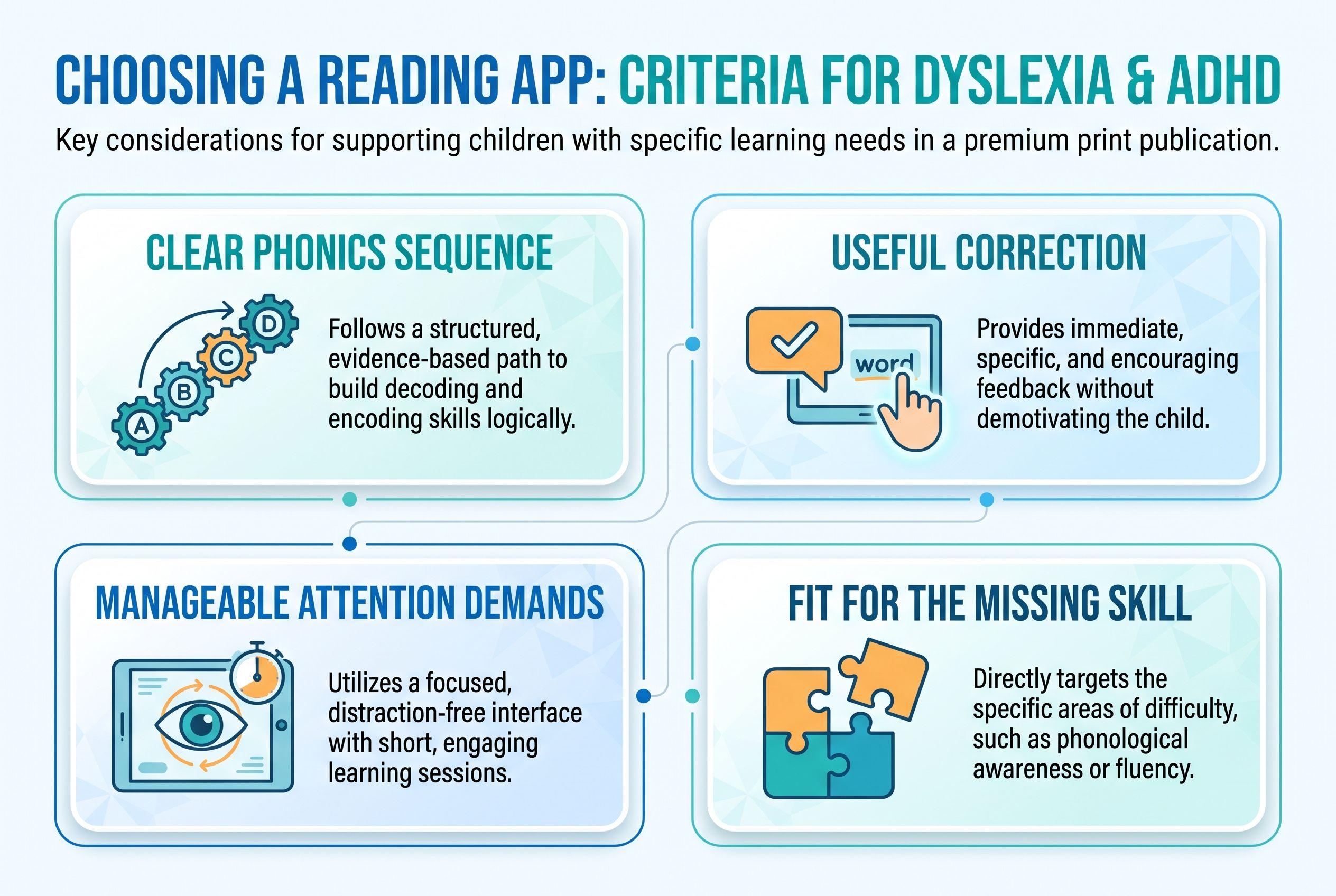
- Clear phonics sequence: sounds and spelling patterns need an organized teaching order.
- Useful correction: children need help with errors, not repeated guessing.
- Manageable attention demands: activities should serve the reading goal, not compete with it.
- Fit for the missing skill: an older beginner needs accessible instruction without a poor age fit.
This is a comparison of product descriptions, not hands-on testing or evidence that one app treats either diagnosis better.
| Rank and app | What it teaches / product description | Price / pricing model | Best-for age or fit |
|---|---|---|---|
| 1. Teach Your Kid to Read | Step-by-step, parent-led phonics and decoding | Lesson one free, then 7-day trial, US$9.95/month | My pick for an 8-year-old rebuilding decoding with an adult |
| 2. Nessy | Describes a structured reading and spelling approach for children with dyslexia | From US$15.50/month (checked October 2026), home subscription | Stated ages 6–11 |
| 3. Reading Eggs | Describes reading instruction across several programs, including Fast Phonics | US$13.99/month (checked October 2026), Reading & Math, up to 4 children | Fast Phonics: stated ages 5–10; Eggspress: 7–13 |
| 4. Reading.com | Describes parent-and-child phonics lessons | US$12.49/month (checked October 2026) | Stated ages 3–8; consider the beginner fit |
| 5. Khan Academy Kids | Describes early literacy alongside broader early learning | Free; no ads or subscriptions | Stated ages 2–8; my pick for supplementary early-skills practice |
Full disclosure: I co-founded Teach Your Kid to Read, so weigh my #1 pick accordingly; the rest of the ranking is based on the criteria above.
Prices checked October 2026.
I recommend Teach Your Kid to Read when you can sit beside your child and work on decoding: start lesson one free. Lesson one is free, with no card and nothing to cancel. From lesson two, the whole program is a 7-day free trial, then US$9.95 a month.
The Tiger Truth: Don't Wait for Another Birthday
Only 31% of US 4th graders (ages 9–10) scored at or above Proficient in reading on the 2024 NAEP. That doesn't mean everyone below Proficient can't read. It does show why “school will sort it out eventually” isn't a plan.
By US 3rd grade (ages 8–9), reading demands reach into math problems and written instructions. Weak decoding can make ordinary schoolwork exhausting. The “3rd grade cliff” describes rising demands, not a deadline after which improvement becomes impossible.
The US National Reading Panel, in its 2000 report, found benefits from systematic phonics instruction. That supports explicit phonics teaching—not a claim that researchers evaluated these five apps. Start support now, and ask for a reading evaluation rather than waiting for an app to solve persistent difficulty.
Ranked: The 5 Best Reading Apps for an 8-Year-Old with Dyslexia and ADHD
1. Teach Your Kid to Read: My Pick for Side-by-Side Decoding
I put Teach Your Kid to Read first for one specific arrangement: an adult and child learning together for about 15 minutes a day. The app guides the parent on what to listen for and how to correct a mistake. Your child does the reading work; you stay involved.
The sequence is concrete. Lesson one introduces m, s, p and short a, one sound at a time. Your child hears a sound, taps the matching letter, then blends and builds am, map and sap. There's no story in lesson one.
From lesson two, each lesson includes a short story built from sounds taught so far. The 50 lessons follow a fixed order through digraphs such as sh and ch, blends, vowel teams, silent e, prefixes and suffixes. The program also teaches a small set of common irregular “leap words” by sight.
For attention demands, the distinction matters: there aren't points, coins or leaderboards, but there are some game-style activities, confetti, avatars and a day streak. I wouldn't call that a distraction-free guarantee. Watch your actual child, not a marketing adjective.
Parents can see every lesson and jump to any lesson. That gives you a way to match practice to a missing skill rather than assuming an 8-year-old must start with unfamiliar material—or repeat everything they already know.
The honest limitation: there's no speech recognition; the parent checks pronunciation. Choose something else if you need independent use or want the software itself to listen and correct reading.
My verdict: a strong fit for adult-supported foundational decoding, not a substitute for individualized dyslexia instruction. A dyslexia-friendly font and high-contrast mode offer display choices; neither feature establishes treatment effectiveness.
2. Nessy: Best Alternative to Investigate for Dyslexia-Focused Practice
Nessy describes its reading and spelling approach around structured instruction for children with dyslexia. Its stated ages, 6–11, include an 8-year-old without asking you to stretch an early-childhood age range.
That earns it second place here. If you want a dyslexia app for 8 year old readers, Nessy deserves a close look—but the label alone doesn't answer the attention question.
Before subscribing, inspect the starting-point guidance and error feedback. Does the activity explain the sound-spelling relationship after a mistake? Can your child return attention to the task after game elements appear? Those questions matter more than whether the characters look appealing.
My verdict: investigate Nessy first among these alternatives when dyslexia-focused reading and spelling practice drives the decision. Ask your child's specialist whether its sequence matches the patterns they're teaching. Don't assume any dyslexia-focused product automatically fits every child with ADHD.
3. Reading Eggs: Best for Choosing Between Different Reading Needs
Reading Eggs covers several programs rather than one narrow teaching path. Its stated Fast Phonics range is 5–10, while Eggspress targets ages 7–13. That distinction matters when a child is eight but still struggles to blend unfamiliar words.
I'd investigate Fast Phonics for decoding needs before choosing a component simply because its age label looks older. If your child already reads words accurately but struggles to understand passages, the decision changes.
Against the ranking criteria, the attraction is the range of reading practice. The caution is the same range: parents need to choose a clear goal instead of letting activity completion stand in for learning.
My verdict: a useful candidate when you want different reading components under one subscription and can supervise the choice. Check the correction process and attention demands during the trial rather than assuming busy means productive.
For a narrower comparison, see Reading Eggs vs ABCmouse for Dyslexia: Parent Pick.
4. Reading.com: Another Parent-Led Phonics Option
Reading.com describes phonics lessons that a parent and child complete together. Its stated ages are 3–8, putting your child at the upper end of that range.
Adult involvement gives you a chance to catch an error immediately. That's valuable if your child guesses from the first letter or rushes through a response. Still, parent-led doesn't automatically mean suitable for a particular dyslexia profile.
Check whether the starting lessons match your child's gaps and whether the presentation feels respectful to an older beginner. An 8-year-old may need early decoding skills without wanting a preschool-style experience. Ask the child. Their answer counts.
My verdict: shortlist Reading.com if you want another adult-supported phonics approach. Compare its sequence and correction guidance against your child's current instruction, rather than picking it because both age and diagnosis appear somewhere in your search.
5. Khan Academy Kids: Best No-Cost Supplement
Khan Academy Kids describes literacy activities within a broader early-learning app. It states ages 2–8 and offers access without ads or subscriptions.
That makes it worth considering when budget limits your options. It doesn't make a broad learning app my first choice for a targeted dyslexia intervention plan.
For this ranking, breadth lowers its position: an activity can be educational without addressing the spelling pattern your child keeps missing. Choose a relevant activity, stay nearby and check whether your child can use the skill afterward.
My verdict: useful supplementary practice for an 8-year-old working on early skills, provided the presentation suits them. If you need an individualized correction routine and tightly targeted teaching, get that support elsewhere rather than expecting general app practice to supply it.
What ADHD and Dyslexia Change About the Choice
Dyslexia commonly affects accurate or fluent word reading and spelling. ADHD can affect attention regulation, working memory and impulse control. The combination doesn't mean your child needs louder entertainment. It means you need to notice which demand causes the breakdown.
Imagine an eight-year-old named Sam reads ship as sip. Start with the letters representing /sh/. If Sam reads accurately at first but rushes after several activities, consider session length and pacing too. Don't interpret every mistake as the same problem.
Linnea Ehri's 2005 review, Learning to Read Words: Theory, Findings, and Issues, explains how connections between spellings and pronunciations support word learning. That's part of orthographic mapping—not taking mental photographs of whole words.
My Tiger Rule is “No Guessing.” Use pictures to discuss meaning after reading, not to identify an unfamiliar printed word. Another rule, “We Never Skip,” means I protect the routine, including on holidays; it doesn't mean pushing through illness or distress. A brief, supported review beats a miserable battle.
No single reading app for dyslexia and adhd replaces skilled teaching. If your child already receives support, ask the teacher or specialist which sound-spelling patterns to practice at home.
The Action Step: Choose One Gap and One App
Here's my practical plan for ADHD dyslexia reading help. Keep the first decision small.
- Check the starting skill. Use our free phonics skill check to hear your child read real and made-up words. Record the first pattern that causes difficulty. This guides practice; it doesn't diagnose dyslexia.
- Compare the broader picture. Read what to expect at age 8 for context. Don't turn an age expectation into a timer or a threat.
- Choose one target. For example, practice sh in ship, shop and shut. If those patterns are too advanced, return to known letter sounds and blending.
- Choose one app. Match its sequence and adult-support requirements to that target. Avoid paying for several subscriptions before you know what you're trying to teach.
- Set up a manageable session. Silence notifications and put unrelated toys aside. For our app, plan about 15 minutes side by side; if attention fades, pause rather than demand rushed answers.
- Check transfer away from the screen. Write another word using the taught pattern. Note whether your child reads independently, needs a prompt or guesses. Ask a qualified educator about an assessment such as DIBELS if difficulties persist; proper administration and interpretation matter.
If parent-led decoding matches the gap you found, begin with lesson one.
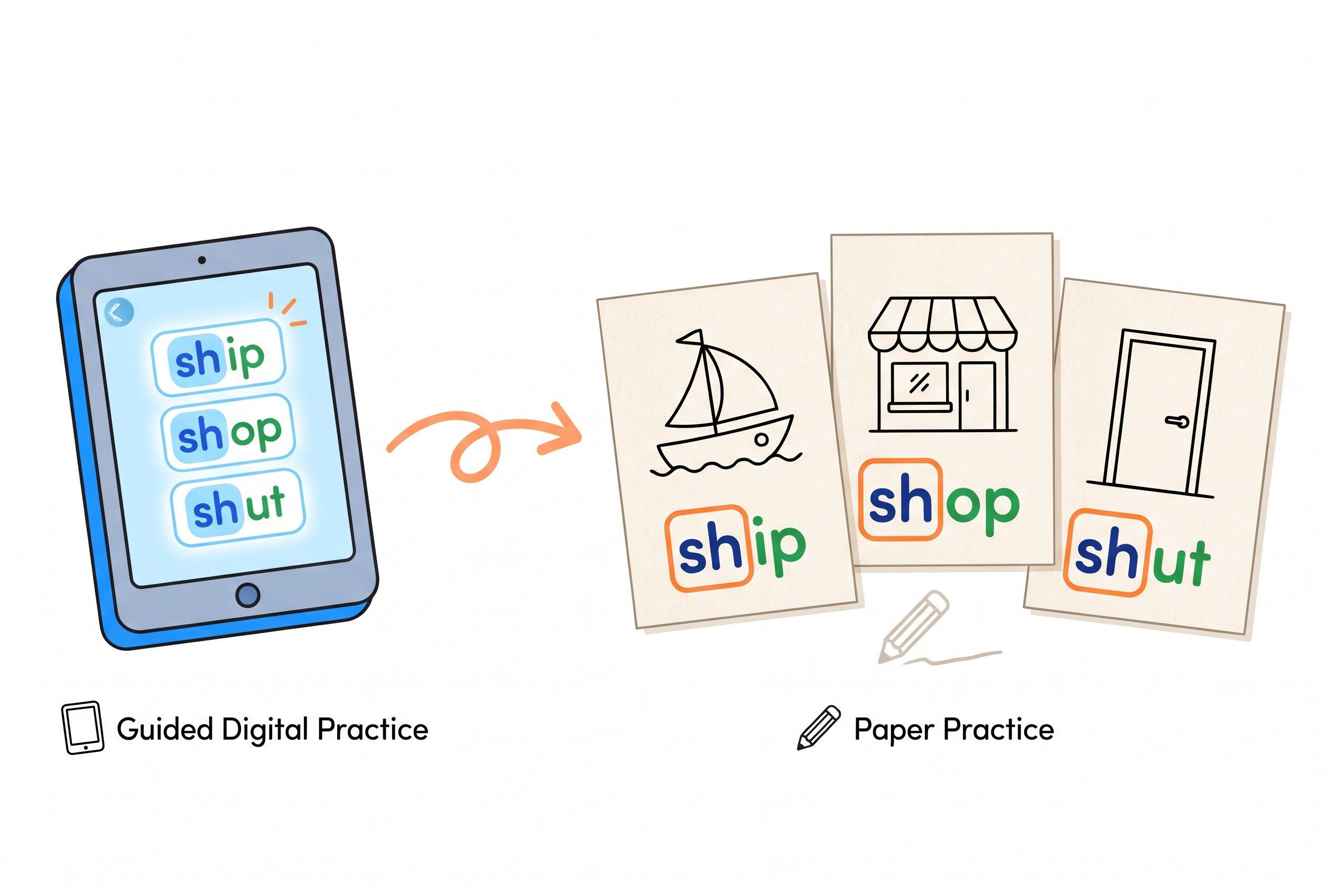
Keep a tiny notebook: date, target pattern, what happened. “Read shop independently; needed help with shut” tells you more than “earned five stars.” Don't mistake one successful answer for secure learning, either. Look for the skill across several words and sessions.
For a wider support plan, read My 8 Year Old Can't Read: Best Apps + Rescue Plan. Contact your child's school or a qualified reading specialist alongside home practice, especially if reading remains effortful or your child starts avoiding it.
My Final Pick
The best reading apps for 8 year old with dyslexia and adhd should make the next teaching step clearer. For adult-supported decoding, my pick is Teach Your Kid to Read. For a dyslexia-focused alternative, investigate Nessy; for broader practice, examine the other options against one identified need.
Don't buy the promise of effortless reading. Choose instruction you can observe, corrections your child can understand and a routine you can maintain.
Ready to sit beside your child and hear those first sounds? Lesson one is free.
FAQ
Can a reading app treat dyslexia and ADHD?
No app here replaces diagnosis, individualized reading instruction or ADHD care. Use an app as practice within a wider support plan. Persistent decoding difficulty deserves a qualified reading evaluation, not another subscription experiment.
Which app should I choose if my child can't work independently?
Teach Your Kid to Read assumes an adult sits alongside throughout the lesson. Reading.com also describes parent-child lessons. If independence is essential, investigate alternatives carefully rather than choosing a program that requires your continuous participation.
Should an 8-year-old start with beginner phonics?
Yes, if those are the missing skills. Start with a skill check rather than repeating every beginner lesson automatically. Keep your language age-respectful: “This pattern needs practice” works better than calling the work baby reading.
How quickly should I expect improvement?
There's no honest universal timeline. Watch for more accurate reading of taught patterns, less prompting and use of those patterns in new words. If practice repeatedly produces confusion or distress, change the teaching plan and seek specialist guidance rather than simply increasing screen time.
From teachyourkidtoread.org/blog/top-5-reading-apps-for-an-8-year-old-with-dyslexia-and-adhd
Part of these guides

Xia Brody
Co-Founder, Teach Your Kid to Read
Mom of 4 who has successfully taught her kids to read. Currently in the trenches with her 4-year-old while her two oldest (10 and 7) devour books on their own. Passionate about phonics-based methods and building a lifelong love of reading.
Related Articles
6 Best Reading Apps for 6-Year-Olds with Dyslexia and ADHD, Ranked
My first pick is parent-led phonics, not an app that keeps a child busy. Compare six options by teaching approach, adult involvement and price—and see when your child needs more than an app.
Read More →
Best Orton-Gillingham Reading Apps: 6 Ranked for 2026
An OG label doesn't guarantee good reading instruction. Here's how six reading apps compare for a 7-year-old who needs stronger decoding skills—and where an app needs backup from a real person.
Read More →
My 8 Year Old Can't Read: Best Apps + Rescue Plan
If your 8-year-old is still guessing at words, this is not a wait-and-see moment. Here’s my no-nonsense app comparison and rescue plan for getting real phonics intervention started now.
Read More →