6 Best Reading Apps for 6-Year-Olds with Dyslexia and ADHD, Ranked
What You'll Learn
- My #1 pick among the best reading apps for 6-year-olds with dyslexia and ADHD.
- Why phonics comes before rewards.
- What adult involvement costs in time.
- When to seek assessment.
Reality Check
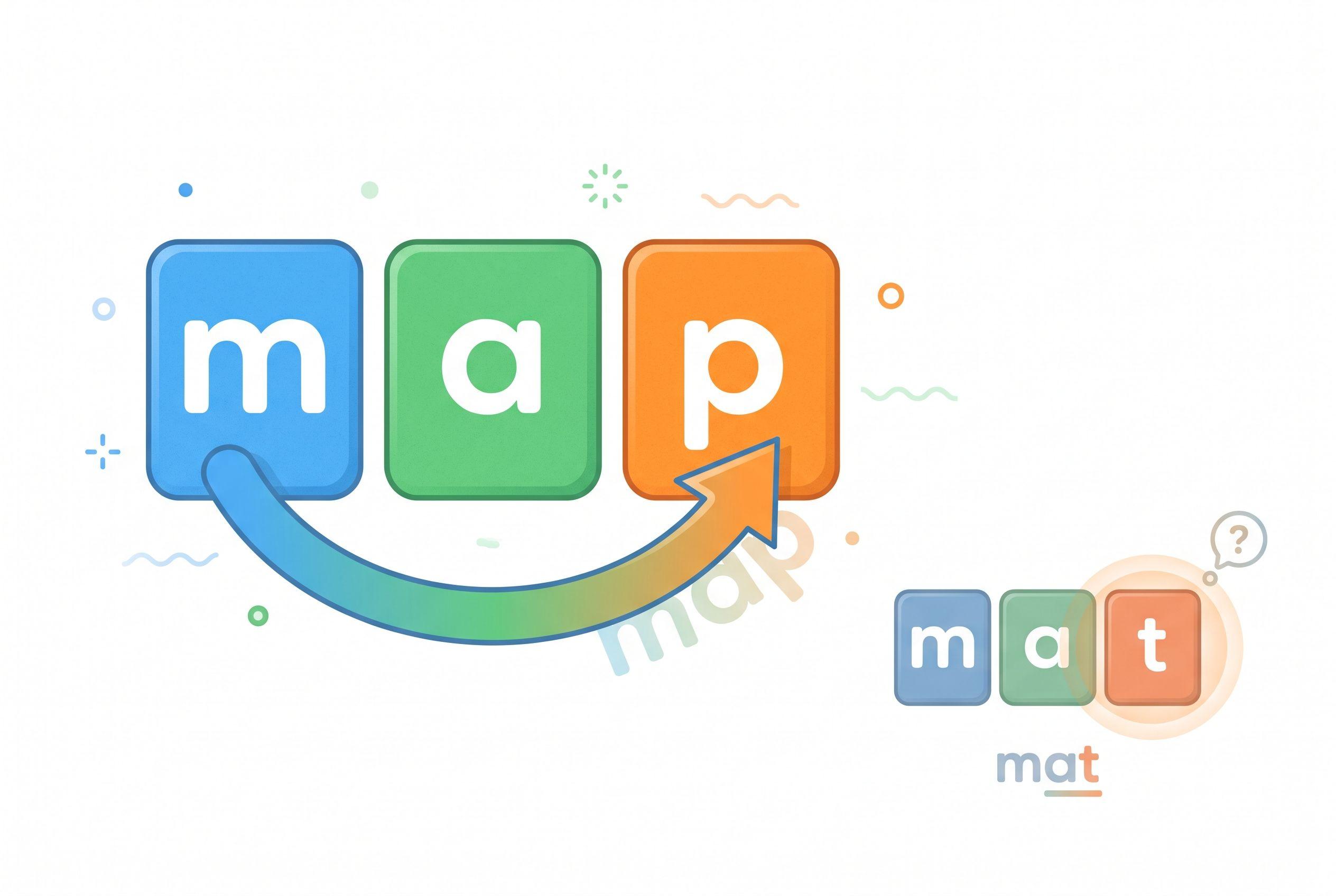
Confetti can't tell you whether a six-year-old actually read map or guessed it.
I'm homeschooling four kids, ages 10, 7, 4 and 1, and I've taught my oldest two to read. With my four-year-old, I'm still listening to sounds and catching guesses. I favor adult involvement, not independent screen time.
The Verdict
How we ranked
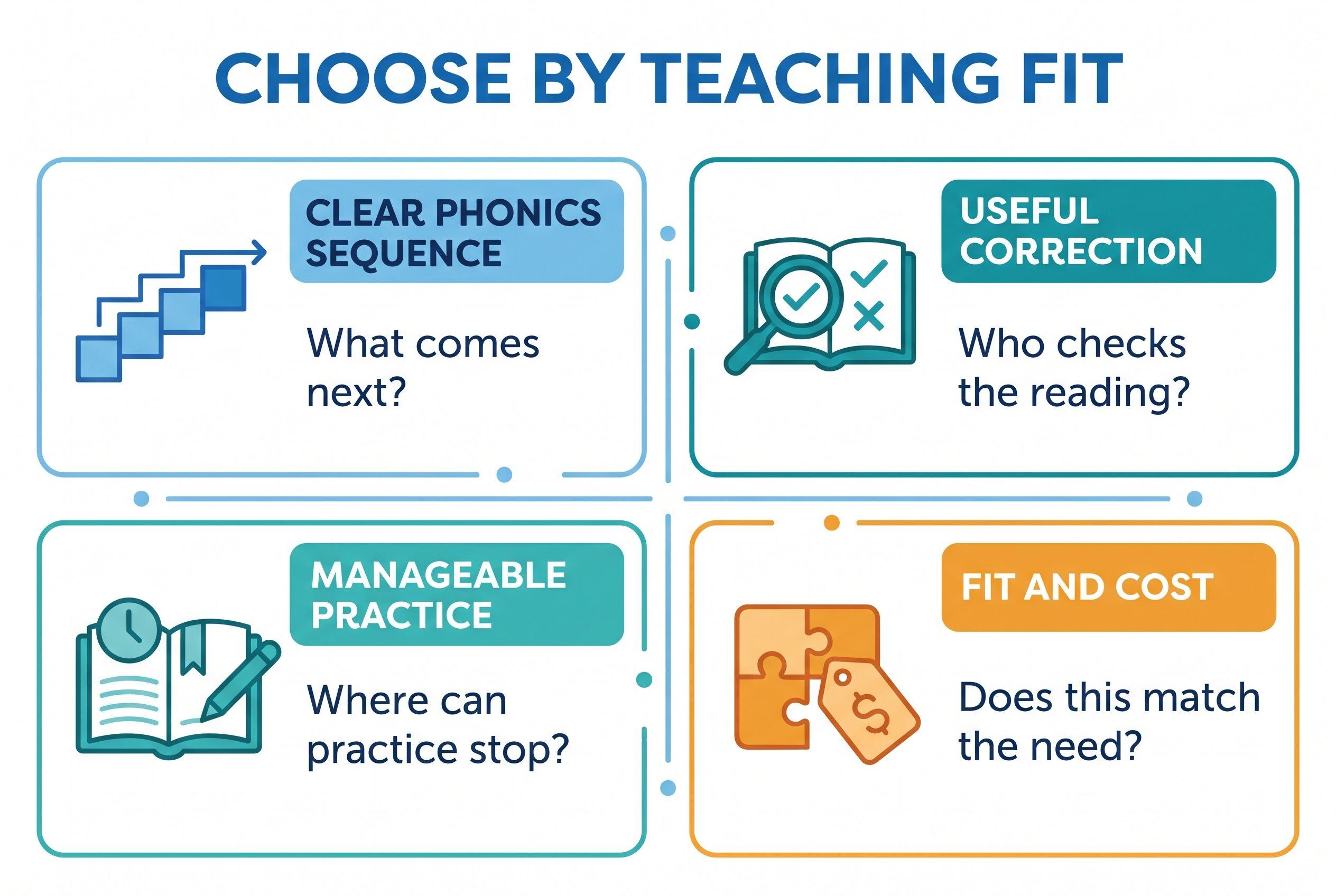
- Clear phonics sequence: Children need a next step that follows what they've learned.
- Useful correction: Someone must notice whether the child actually reads accurately.
- Manageable practice: A predictable task helps parents respond when attention fades.
- Fit and cost: A narrow decoding tool and a broad learning app serve different needs.
| Rank and app | What it teaches or how it describes itself | Price / pricing model | Best-for age |
|---|---|---|---|
| 1. Teach Your Kid to Read | Step-by-step, adult-supported phonics and decoding | Lesson one free, then 7-day trial, US$9.95/mo | My pick for a 6-year-old learning to blend with an adult |
| 2. Nessy | Describes its reading and spelling offering as dyslexia-focused | From US$15.50/month (checked October 2026), home subscription | Stated ages 6–11 |
| 3. Reading.com | Describes itself as a parent-and-child reading program | US$12.49/month (checked October 2026); yearly US$74.94 (checked October 2026) | Stated ages 3–8 |
| 4. Reading Eggs | Describes a reading suite that includes Fast Phonics | US$13.99/month (checked October 2026) or US$99.99/year (checked October 2026), Reading & Math, up to 4 children | Reading Eggs: 3–7; Fast Phonics: 5–10 |
| 5. Teach Your Monster to Read | Describes a game-based progression through early reading skills | Free on computers; app US$8.99 (checked October 2026), one-time purchase | Stated ages 3–6 |
| 6. Khan Academy Kids | Describes broad early learning that includes literacy | Free; no ads or subscriptions | Stated ages 2–8 |
Full disclosure: I co-founded Teach Your Kid to Read, so weigh my #1 pick accordingly; the rest of the ranking is based on the criteria above.
I recommend Teach Your Kid to Read for side-by-side phonics practice: start lesson one free. Lesson one is free, with no card and nothing to cancel. From lesson two, the whole program is a 7-day free trial, then US$9.95 a month.
Prices checked October 2026.
This ranking compares described approaches and family fit, not hands-on competitor testing. None of these positions establishes that one app treats dyslexia or ADHD better than another.
The Tiger Truth: Don't Let Engagement Replace Instruction
The 2000 report from the National Reading Panel, a US federal panel, found benefits from systematic phonics instruction. That supports teaching letter–sound relationships deliberately; it doesn't validate any particular app here.
Linnea Ehri's 2005 review, Learning to Read Words: Theory, Findings, and Issues, explains how readers connect spellings with pronunciations in memory. That's part of orthographic mapping—not memorizing a word's outline or guessing from an illustration.
Only 31% of US 4th graders (ages 9–10) scored at or above Proficient in reading on the 2024 NAEP. That doesn't mean everyone else can't read. It does underline why I won't treat continuing difficulty as something a child must simply outgrow.
As school reading demands grow, weak decoding can turn every subject into extra work. Act early, without panic: start explicit practice and seek assessment when difficulties persist.
Ranked: The 6 Best Reading Apps for 6-Year-Olds with Dyslexia and ADHD
1. Teach Your Kid to Read: Best for Side-by-Side Phonics
My pick when you can sit beside your child and listen. Teach Your Kid to Read gives the adult a teaching role rather than treating the screen as the teacher's replacement.
The program contains 50 lessons in a fixed order. It moves from single letter sounds through digraphs such as sh, ch and th, then blends, vowel teams, silent e, prefixes and suffixes. Along the way, it teaches a small set of common irregular words by sight, calling them “leap words.”
Lesson one teaches m, s, p and short a. Your child hears each sound, taps its matching letter, then blends and builds am, map and sap. There's no story yet. From lesson two, each lesson includes a short story built from sounds taught so far.
That sequence earns its place against my first criterion: a child practices something the lesson has actually taught. The app also teaches you what to listen for and how to correct mistakes. For a six-year-old who rushes, that adult feedback matters more to me than a cheerful completion screen.
Plan on about 15 minutes a day together. If attention fades, I recommend pausing for movement rather than demanding faster answers; that's my teaching advice, not a special app setting.
A dyslexia-friendly font and high-contrast mode offer display choices. A font isn't dyslexia treatment, so judge those settings by your child's comfort, not promises about fixing reading. The program works on iPhone/iPad, Android and the web.
Honest limitation: The app doesn't listen to your child or check pronunciation—you do. Families who need independent use or automatic pronunciation correction should choose something else.
2. Nessy: Best for Exploring a Dyslexia-Focused Offering
Nessy puts dyslexia closer to the center of its public offering than a general early-learning app does. Its stated ages of 6–11 also make it worth considering for a six-year-old who may need ongoing foundational work.
Against my criteria, its reading-and-spelling focus gives it a stronger fit than a broad activities collection. But a dyslexia-focused description doesn't establish that every child will receive the right lesson sequence, practice intensity or correction.
Before subscribing, ask which home product covers your child's current need. Letter sounds, blending and spelling aren't interchangeable starting points. Ask how you can identify errors and return to a difficult pattern.
Pick it if: You want to explore a dyslexia-focused reading and spelling option. Don't assume that branding replaces a specialist's assessment or that a child with ADHD will automatically find every activity manageable.
3. Reading.com: Best Alternative for Parent-and-Child Lessons
Reading.com's parent-and-child positioning makes it a relevant alternative for families who want to participate rather than hand over a device. Its stated age range includes six-year-olds.
That adult role aligns with my correction criterion: you can hear an answer instead of relying only on tapping accuracy. Still, adult presence and effective instruction aren't the same thing. Look for clear guidance about what to say after a wrong sound or an unsuccessful blend.
For short reading lessons for ADHD, check whether the lesson's demands suit your child rather than assuming that an advertised age range guarantees a fit. Can you revisit a shaky skill? Does the next task require sounds your child knows?
Pick it if: You're comparing parent-supported reading programs and want another focused option. I wouldn't infer dyslexia-specific suitability from its general reading description alone.
4. Reading Eggs: Best for Families Comparing Several Reading Stages
Reading Eggs describes a wider reading suite, including Fast Phonics. Its stated ranges distinguish the Reading Eggs component, ages 3–7, from Fast Phonics, ages 5–10.
That distinction matters. A six-year-old who needs explicit blending practice needs a different starting point from a child who decodes comfortably but struggles to explain a passage.
Against my sequence criterion, I'd investigate the phonics pathway first. Against my attention criterion, I'd watch whether moving between activities helps your child practice or becomes the main attraction. More choice isn't automatically more accessible reading practice.
Pick it if: Your family wants a wider reading offering and you can keep the child's current phonics target central. Don't buy the breadth and then forget to check whether word reading improves away from the screen.
5. Teach Your Monster to Read: Best Low-Cost Game-Based Supplement
Teach Your Monster to Read describes a game-based route through early reading. Computer access costs nothing, while the mobile app uses a one-time purchase rather than a subscription.
That makes it an accessible option to investigate without committing to a recurring bill. Its stated ages of 3–6 include this article's reader, but skill fit still matters more than the birthday on the account.
My question isn't “Did the child enjoy the game?” It's “Can the child read the practiced pattern afterward?” Sit nearby for some practice and ask for a spoken response. Tapping the right answer and producing a word independently place different demands on a learner.
Pick it if: You want a game-based supplement with a low-cost access route. I'd keep direct adult-led teaching in place for persistent decoding difficulties rather than making the game the entire intervention.
6. Khan Academy Kids: Best Free Broad-Learning Supplement
Khan Academy Kids offers free early learning without ads or subscriptions. Its stated ages of 2–8 include six-year-olds, and literacy forms part of its broader offering.
The cost earns it a place here. Families shouldn't have to buy several subscriptions just to discover what their child needs.
It ranks sixth because this particular search concerns dyslexia and ADHD, not general enrichment. A broad learning app doesn't necessarily supply the focused sequence and individualized correction a struggling reader needs.
Pick it if: You want free supplementary learning alongside explicit reading instruction. Choose a relevant literacy activity before the session, then check a related skill off-screen. I wouldn't present it as a substitute for dyslexia intervention.
Make Short Practice Useful, Not Just Short
Imagine your child sees map, says mat and reaches for the next activity. Don't congratulate the speed. Point to the final letter: “This is /p/. Let's blend it again.”
That's my No Guessing rule. Pictures can support discussion and meaning; they shouldn't supply an unfamiliar printed word.
Phonics apps for dyslexia and ADHD need adult judgment around attention. Some children settle with a predictable routine; others need movement before they can concentrate. ADHD doesn't create one universal screen preference.
My “We Never Skip” rule means protecting the routine, not forcing a distressed child through a full lesson. A brief review can preserve the habit. Illness, exhaustion and escalating frustration call for flexibility—not a showdown over sap.
Structured literacy also means more than installing a phonics app. Depending on the child, instruction may need explicit work on speech sounds, spelling, word parts and language comprehension. Ask the child's teacher or specialist how home practice connects with that larger plan.
Your Action Step: Choose by the Error, Not the Animation
- Find the starting skill. Try our free phonics skill check. Your child reads real and made-up items; you record right or wrong answers and identify the first pattern to practice. Treat the result as a practice guide, not a diagnosis.
- Describe what you hear. Write “confuses short a and short e” or “says sounds separately but doesn't blend.” That's more useful than “bad at reading.” A trained educator can use an assessment such as Kilpatrick's PAST to investigate phonological awareness; it doesn't diagnose dyslexia by itself.
- Choose one teaching route. Pick the app whose adult demands and scope match your household. Start at demonstrated skill, not the most impressive-looking lesson.
- Make the routine predictable. Put materials in one place, state the task and agree on a stopping point. For my first pick, plan about 15 minutes together, with a pause if needed.
- Check transfer and get help. Revisit the taught pattern away from the screen. If difficulty persists, contact the school or a qualified reading specialist while continuing supportive practice. Use what to expect at age 6 for age context, not as a pass-or-fail diagnosis.
Start with one supported phonics lesson rather than opening six subscriptions.
For recurring warning signs, read Signs of Dyslexia in 6-Year-Olds: What to Watch For. Don't wait for app completion before asking for support.
The best reading apps for 6-year-olds with dyslexia and ADHD help you practice a specific skill and notice what still needs teaching. My first choice puts an adult beside the child because correct, attentive practice matters more than an impressive streak.
If that arrangement fits your household, lesson one is free.
FAQ
Which app ranks first for dyslexia and ADHD at age six?
Teach Your Kid to Read ranks first here for parent-led phonics and decoding. Nessy ranks second for families exploring a dyslexia-focused offering. These are fit judgments, not evidence that either app treats both conditions or outperforms specialist instruction.
Can a reading app replace dyslexia intervention?
No. An app can support practice, but a struggling reader may need assessment and explicit, individualized teaching. Ask the school or reading specialist to connect home practice with the child's instruction and monitor progress beyond completed activities.
How long should a six-year-old with ADHD practice?
There's no universal attention limit. Teach Your Kid to Read suggests about 15 minutes daily with an adult. Pause or shorten practice when accuracy and attention deteriorate, and discuss persistent difficulties with the child's support team.
Do dyslexia-friendly fonts teach children to read?
No. A child may prefer a particular display, but a font doesn't teach decoding. Prioritize explicit instruction, useful correction and enough successful practice. Let comfort guide display choices without treating a visual setting as treatment.
From teachyourkidtoread.org/blog/6-best-reading-apps-for-6-year-olds-with-dyslexia-and-adhd-ranked
Part of these guides

Xia Brody
Co-Founder, Teach Your Kid to Read
Mom of 4 who has successfully taught her kids to read. Currently in the trenches with her 4-year-old while her two oldest (10 and 7) devour books on their own. Passionate about phonics-based methods and building a lifelong love of reading.
Related Articles
Top 5 Reading Apps for an 8-Year-Old with Dyslexia and ADHD
An app needs to teach reading, not just keep an 8-year-old tapping. Here are five ranked options, their limits and a practical plan for matching phonics practice to your child's needs.
Read More →
6 Best Reading Apps for 7-Year-Olds with Speech Delay, Ranked
A pronunciation error doesn't automatically mean a reading error. Here are six reading apps ranked for phonics practice with a speech-delayed seven-year-old, with clear limits on what each can offer.
Read More →
Reading Eggs vs ABCya: 5 Picks for Your 5-Year-Old
Reading Eggs offers a reading lesson sequence; ABCya mainly offers games for practising skills. Here's how I'd choose between them, where three alternatives fit and how to check whether your child can actually read without the screen.
Read More →