Best Phonics Apps for 1st Graders: 6 Picks Ranked (2026)
What You'll Learn
- The best phonics apps for 1st graders help you hear whether your child can blend sounds into words. Teach Your Kid to Read ranks first for parent-led phonics: about 15 minutes together, with an adult listening and correcting mistakes.
- Reading.com ranks second; Reading Eggs ranks third. Teach Your Monster to Read, Khan Academy Kids and Nessy fill different budget and practice needs.
- Choose by missing skill, not birthday. For US 1st grade (ages 6–7), check letter sounds and blending before buying harder lessons.
- An app completion screen isn't a reading assessment. Ask your child to read unfamiliar words away from the screen.
Reality Check: Listen Before You Subscribe
“Which sound does that letter represent?” tells me more than “How many levels did you finish?” If a child taps through activities but can't blend /m/ /a/ /p/ into map, the next purchase needs to address blending—not supply more tapping.
I'm homeschooling four kids, ages 10, 7, 4 and 1. I've taught my oldest two to read, and I'm teaching my 4-year-old now. Honestly, the best phonics apps for 1st graders need to help the adult hear what's going wrong, not just keep the child pleasantly occupied while the laundry reproduces.
The Verdict
Teach Your Kid to Read's offer: Lesson one is free, with no card and nothing to cancel. From lesson two, the whole program is a 7-day free trial, then US$9.95 a month.
How we ranked
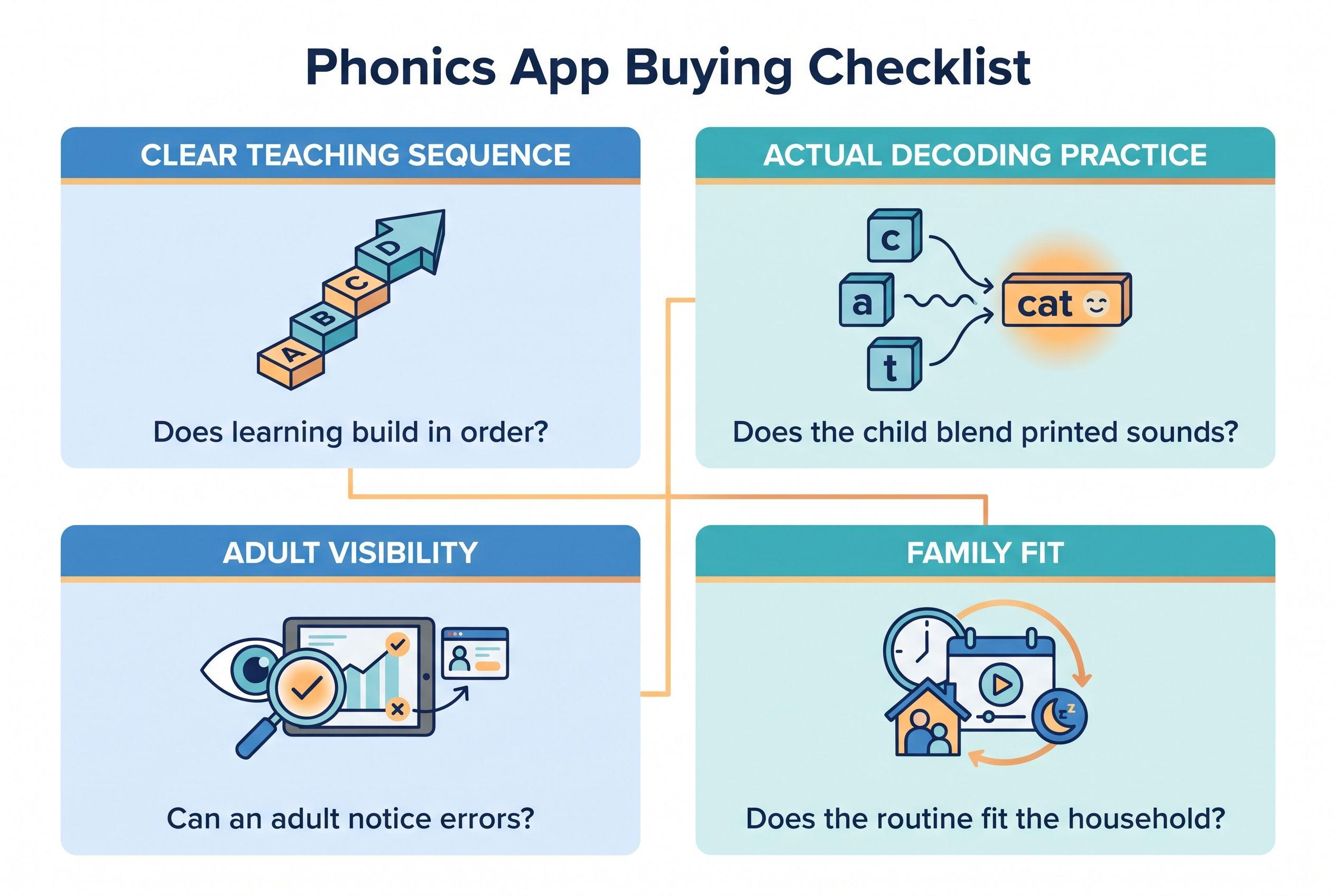
- Clear teaching sequence: new sounds should build on earlier learning, rather than arrive randomly.
- Actual decoding practice: children need to blend print into spoken words, not guess from pictures.
- Adult visibility: parents need a practical way to notice errors and respond.
- Family fit: cost, breadth and required adult involvement affect whether practice happens.
We're a team of teachers, and this ranking is our teaching team's pick.
| Rank and app | What it teaches | Price / pricing model | Best-for age |
|---|---|---|---|
| 1. Teach Your Kid to Read | Step-by-step phonics and decoding; parent and child work together | Lesson one free, then 7-day trial, US$9.95/month | My recommendation: ages 6–7 needing foundational decoding |
| 2. Reading.com | Describes a parent-and-child reading program centered on phonics | US$12.49/month (checked October 2026); US$74.94/year (checked October 2026) | Stated ages 3–8; my pick for parent-supported beginners |
| 3. Reading Eggs | Describes reading lessons and games, including its Fast Phonics program | US$13.99/month (checked October 2026) or US$99.99/year (checked October 2026), Reading & Math for up to 4 children; 30-day free trial | Reading Eggs: 3–7; Fast Phonics: 5–10 |
| 4. Teach Your Monster to Read | Describes a reading game covering letter sounds through early reading | Free on computers; one-time app purchase US$8.99 (checked October 2026) | Stated ages 3–6; my pick for six-year-old beginners |
| 5. Khan Academy Kids | Describes broad early learning, including literacy and phonics | Free; no ads or subscriptions | Stated ages 2–8 |
| 6. Nessy | Describes structured reading and spelling practice, including support for learners with dyslexia | Home subscription from US$15.50/month (checked October 2026) | Stated ages 6–11 |
Full disclosure: I co-founded Teach Your Kid to Read, so weigh my #1 pick accordingly; the rest of the ranking is based on the criteria above.
Prices checked October 2026.
I recommend Teach Your Kid to Read first if you can sit beside your child and want a clear phonics sequence; start lesson one free lets you begin with the first four sounds.
This ranking compares published product descriptions against those criteria—not hands-on competitor testing. My order favors parent-led decoding; a different need can make a lower-ranked option your better purchase.
The Tiger Truth: Waiting Doesn't Teach the Missing Sound
Only 31% of US fourth graders (ages 9–10) scored at or above Proficient in reading on the 2024 NAEP. That doesn't mean everyone below that threshold can't read. It does mean reading achievement deserves attention long before longer textbooks arrive.
The US National Reading Panel, in its 2000 report, found benefits from systematic phonics instruction. That supports explicit teaching—not a claim that any app here has proved its effectiveness through that research.
If blending stays shaky, harder reading adds more opportunities for frustration. Start teaching the missing skill now; if difficulty persists, seek assessment rather than cycling through subscriptions.
Ranked: The 6 Best Phonics Apps for 1st Graders
1. Teach Your Kid to Read — Best for Parent-Led Decoding
This is my first pick for a family that wants the adult to learn how to teach while the child learns how to read. The app guides the parent on what to listen for and how to correct a mistake. You sit together. That's the arrangement, not an optional extra.
Lesson one introduces m, s, p and short a. Your child hears each sound, taps the matching letter, then blends and builds am, map and sap. There's no story in that lesson. From lesson two, the child reads a short story built from sounds taught so far.
The 50 lessons follow a fixed order, moving from single-letter sounds through digraphs such as sh, ch and th, blends, vowel teams and silent e to prefixes and suffixes. A small set of common irregular words—called “leap words”—appears along the way. That sequence gives this option its strongest score on my first criterion: clear teaching order.
For adult visibility, you hear the reading yourself. Imagine your child says map when the screen shows sap. You can point to the first letter and revisit /s/, rather than letting a correct final tap hide the mistake. The app records completed lessons and activities, not reading scores or time spent.
Sessions take about 15 minutes a day. Several children can share one account, and parents can view every lesson and jump to any lesson. It works on iPhone, iPad, Android and the web.
The limitation: there's no child-alone mode. Pick something else if you need an independent activity while you work; every lesson assumes an adult alongside.
My verdict: the best phonics app for 1st grade when parent coaching and foundational decoding are the priorities. It's not my recommendation for a child who already decodes confidently and mainly needs comprehension work.
2. Reading.com — Best Alternative for Learning Together
Reading.com describes a phonics-centered program that parents and children complete together. Its stated ages, 3–8, include the age group here, though skill fit still matters more than the label.
It ranks second because the parent-participation model lines up with my adult-visibility criterion. Sitting nearby lets you hear whether a child blends the whole word or launches a guess after the first sound. That matters more to me than whether the screen looks impressive.
Before subscribing, inspect its sample teaching sequence and how lessons handle errors. Does the guidance help you respond when your child confuses short vowels? That's a useful buying question, not a nitpick.
Pick it if: you want another parent-supported phonics option to compare closely. Don't choose it on the assumption that a reading subscription replaces your listening time.
For a narrower comparison, read Reading.com vs Hooked on Phonics.
3. Reading Eggs — Best for Families Wanting Broader Activities
Reading Eggs describes a wider reading environment, with Fast Phonics as a phonics-focused component. The distinction matters: its overall product family spans ages 2–13, but that doesn't make every section appropriate for a six-year-old struggling to blend.
For first grade decoding, I'd inspect Fast Phonics first. Its stated ages are 5–10, while Reading Eggs itself lists ages 3–7. Choose the relevant teaching path rather than assuming the account's full menu equals a coherent phonics lesson.
It scores well on family breadth, especially if you want reading and math within the listed subscription. My caution concerns focus: more activities give you more choices to supervise. Ask your child to read a fresh word afterward so you can check transfer beyond the activity.
Pick it if: you want a broader subscription and can keep phonics practice purposeful. If decisions about what to open consume the whole session, a narrower program may suit you better.
4. Teach Your Monster to Read — Best Low-Cost Game Supplement
Teach Your Monster to Read describes a game that moves from letter sounds toward early reading. Its free computer version makes it a practical option for families who don't want another recurring bill.
The stated app ages are 3–6. I'd consider it for a six-year-old beginner, not automatically for every seven-year-old because this article says “first grade.” Older children may need different content or presentation.
On my decoding criterion, the key question remains what your child can read outside the game. Sit close enough to hear the response occasionally. If your child races through choices, slow things down and ask for the sound before the click.
Pick it if: budget matters and a game helps your child willingly revisit early skills. Treat game progress as activity information, not proof of independent reading mastery.
5. Khan Academy Kids — Best Free Broad-Learning Option
Khan Academy Kids describes early learning across several areas, including literacy and phonics. It's free, without ads or subscriptions, and lists ages 2–8.
That earns it a strong family-fit score. A parent who can't add a monthly bill still deserves useful educational options. But breadth and targeted instruction aren't the same thing: a general learning session may not concentrate on the exact sound pattern causing trouble.
I'd use it as a supplement while an adult keeps the reading target specific. If short-vowel blending needs work, check that practice rather than counting time spent anywhere inside the app as phonics instruction.
Pick it if: you want free early-learning activities alongside adult-led reading practice. For persistent decoding difficulty, don't let the attractive price postpone more focused help.
6. Nessy — Best to Investigate for Reading and Spelling Difficulties
Nessy describes structured reading and spelling support, including resources for learners with dyslexia. Its stated ages are 6–11, making it relevant to this age group without treating reading difficulty as something a child should have outgrown.
It ranks sixth for this particular parent-led beginner brief, not because struggling readers deserve the last option. A family prioritizing reading-and-spelling support may reasonably investigate it before the broader apps above.
Check the specific home product's teaching sequence and how its activities match the difficulty you've observed. Trouble separating spoken sounds needs attention; so does repeatedly losing a vowel sound during blending. “Needs reading help” isn't specific enough to choose well.
Pick it if: you want to investigate a reading-and-spelling-focused option. An app can't diagnose dyslexia or replace individualized instruction when a child needs it.
What Makes Phonics Practice Count?
Linnea Ehri's 2005 review, Learning to Read Words: Theory, Findings, and Issues, explains how readers form connections between spellings and pronunciations. Orthographic mapping isn't memorizing a word's outline. It depends on connecting the sounds in spoken words with their written representations.
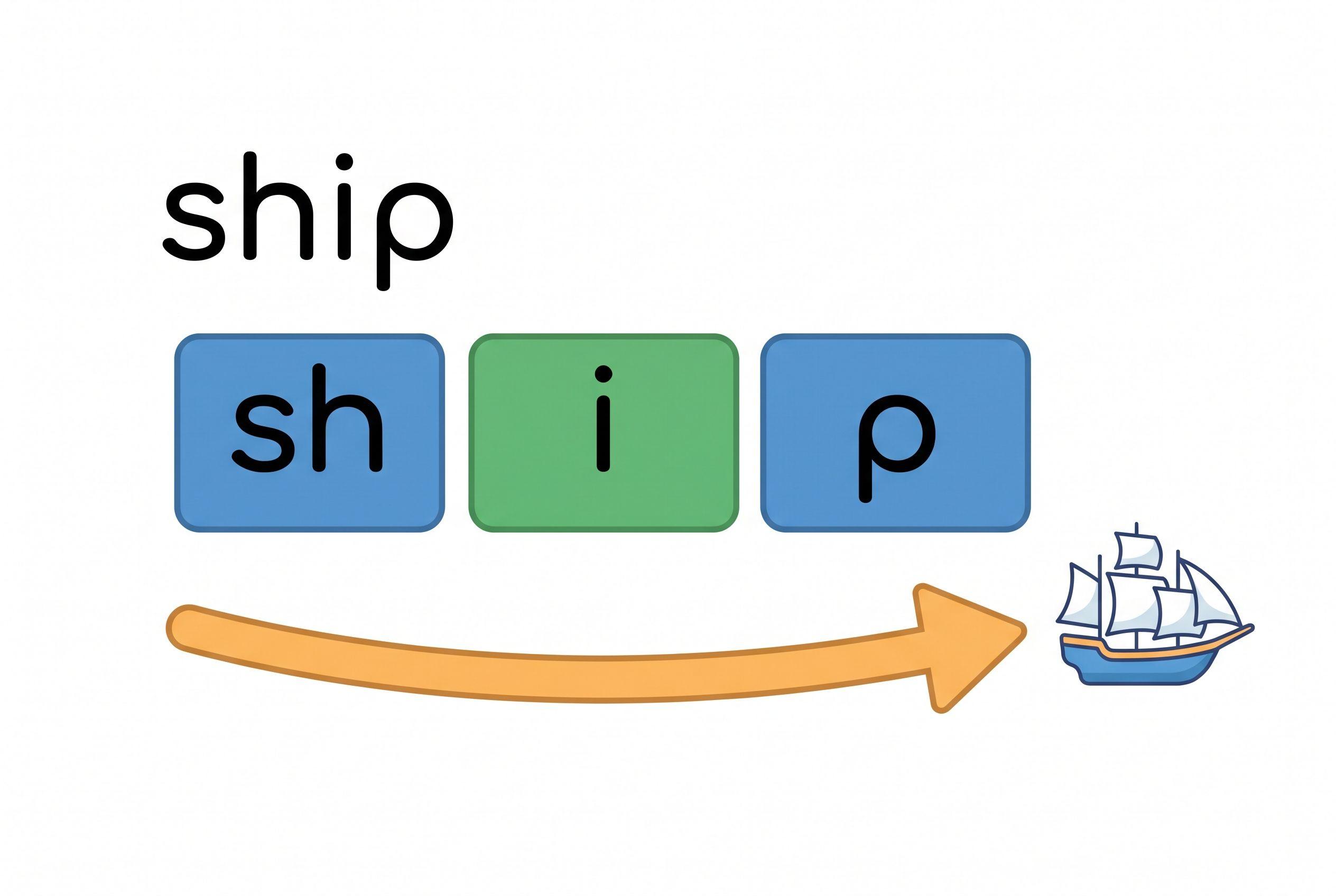
That's why I don't accept picture guessing as decoding. Imagine a child sees ship, notices a boat illustration and says “boat.” The meaning fits the picture. The letters don't fit the answer. Point back to sh–i–p and work through those sounds.
This is also why the best phonics apps for 6 year olds won't all suit the same child. One child needs letter-sound practice; another needs help blending; another can decode but doesn't understand the vocabulary. Buy for the problem you can name.
For off-screen reading practice, Decodable Readers Australia: Best Sets by Phonics Stage explains how to match books to taught patterns.
Action Step: Choose One Skill Before One Subscription
Follow this sequence before committing to months of phonics practice apps for first graders:
- Check what your child can read. Use our free phonics skill check to sample real and made-up words and identify the first pattern to practice. Don't coach during the check.
- Write down the actual error. “Said mat for map” helps you plan. “Bad at reading” doesn't.
- Match the app to the adult time available. Choose parent-led teaching only if someone can sit alongside. Don't purchase a routine your household can't carry out.
- Practice the target, then check away from the screen. Use another word containing taught patterns. Listen for accurate blending before asking for speed.
- Keep one brief note after practice. Record the pattern, an example error and whether your child corrected it with help. You don't need a spreadsheet worthy of a tax audit.
- Get help when difficulty persists. Ask the teacher or a reading specialist about letter-sound knowledge, decoding and phonemic awareness. Kilpatrick's PAST can help a knowledgeable assessor examine awareness of spoken sounds; it isn't a complete reading or dyslexia assessment.
Start with a lesson you can complete together, then listen for what your child carries into the next word.
Use the first grade reading benchmarks for sourced expectations, and what to expect at age 6 for age-specific context. Those pages can help frame a conversation with a teacher; neither replaces an individual assessment.
My tiger rule is No Guessing. My daily-practice rule—“We Never Skip”—means protecting a manageable routine, not forcing drills through illness or distress. Steady teaching beats a marathon followed by a week of avoidance.
Among these first grade phonics apps, choose the one that supports the instruction you can actually deliver. If that's 15 minutes side by side, begin with lesson one.
FAQ
What is the best phonics app for 1st grade?
My first pick is Teach Your Kid to Read for parent-led phonics and decoding. Reading.com offers another parent-supported option; Reading Eggs suits families seeking broader activities. The best fit depends on the missing skill and how much adult involvement your family can provide.
Are any good phonics apps free?
Khan Academy Kids is free, with no ads or subscriptions. Teach Your Monster to Read is free on computers, while its mobile app requires a one-time purchase. Teach Your Kid to Read offers lesson one free; later lessons require its trial and subscription.
Can a phonics app replace reading with an adult?
No. Children still need someone to hear errors, explain unfamiliar language and discuss books. An app can organize practice, but completed activities don't tell you everything about decoding or comprehension.
What if my child knows letter sounds but can't blend?
Model how the sounds join, then help your child blend a short word containing familiar sounds. Keep the target small and avoid picture guessing. If blending remains difficult despite explicit instruction, ask a teacher or reading specialist to assess decoding and phonemic awareness.
From teachyourkidtoread.org/blog/best-phonics-apps-for-1st-graders-6-picks-ranked-2026
Part of these guides

Xia Brody
Co-Founder, Teach Your Kid to Read
Mom of 4 who has successfully taught her kids to read. Currently in the trenches with her 4-year-old while her two oldest (10 and 7) devour books on their own. Passionate about phonics-based methods and building a lifelong love of reading.
Related Articles
Best Phonics Apps for 2nd Graders: 6 Picks Ranked
My first pick favors parent-led decoding practice, but it won't suit families who need independent screen time. Compare six apps by teaching approach, price and the reading gaps they can help you address.
Read More →
6 Best Learn-to-Read Apps for 1st Graders, Ranked (2026)
My first pick puts a parent beside the child for short, ordered phonics lessons. Compare all six apps by decoding focus, adult involvement and cost before you commit.
Read More →
6 Orton-Gillingham Apps for 1st Graders at Home, Ranked
An OG label doesn't tell you whether an app teaches your child to decode. Here are six options for home practice, their limits and the parent-led routine that matters more than screen-time streaks.
Read More →