6 Best Learn-to-Read Apps for 1st Graders, Ranked (2026)
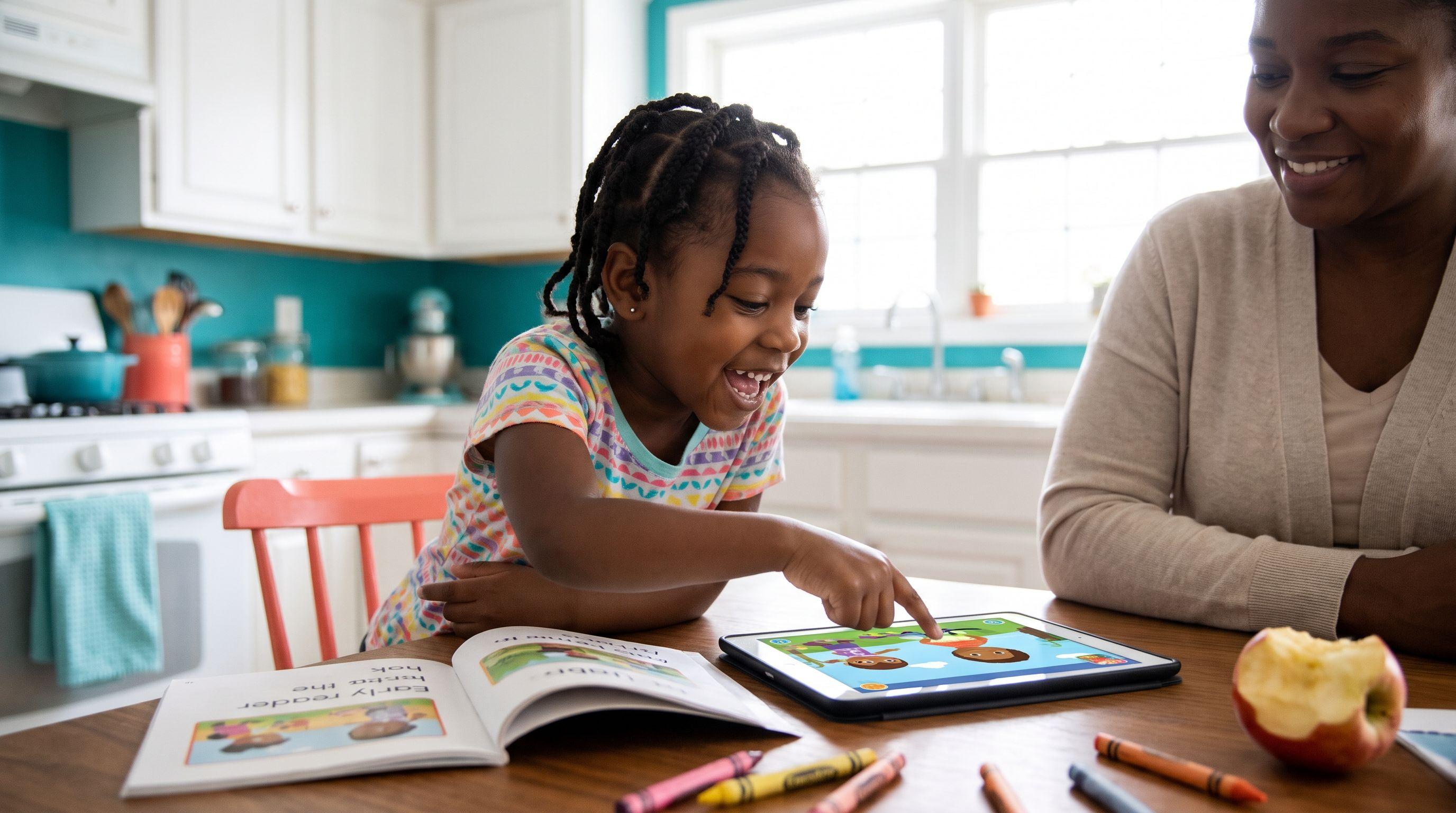
A tablet can keep a child busy without teaching that child to read the next unfamiliar word. That's the difference I'm looking for in the best learn to read apps for 1st graders (ages 6–7).
What You'll Learn
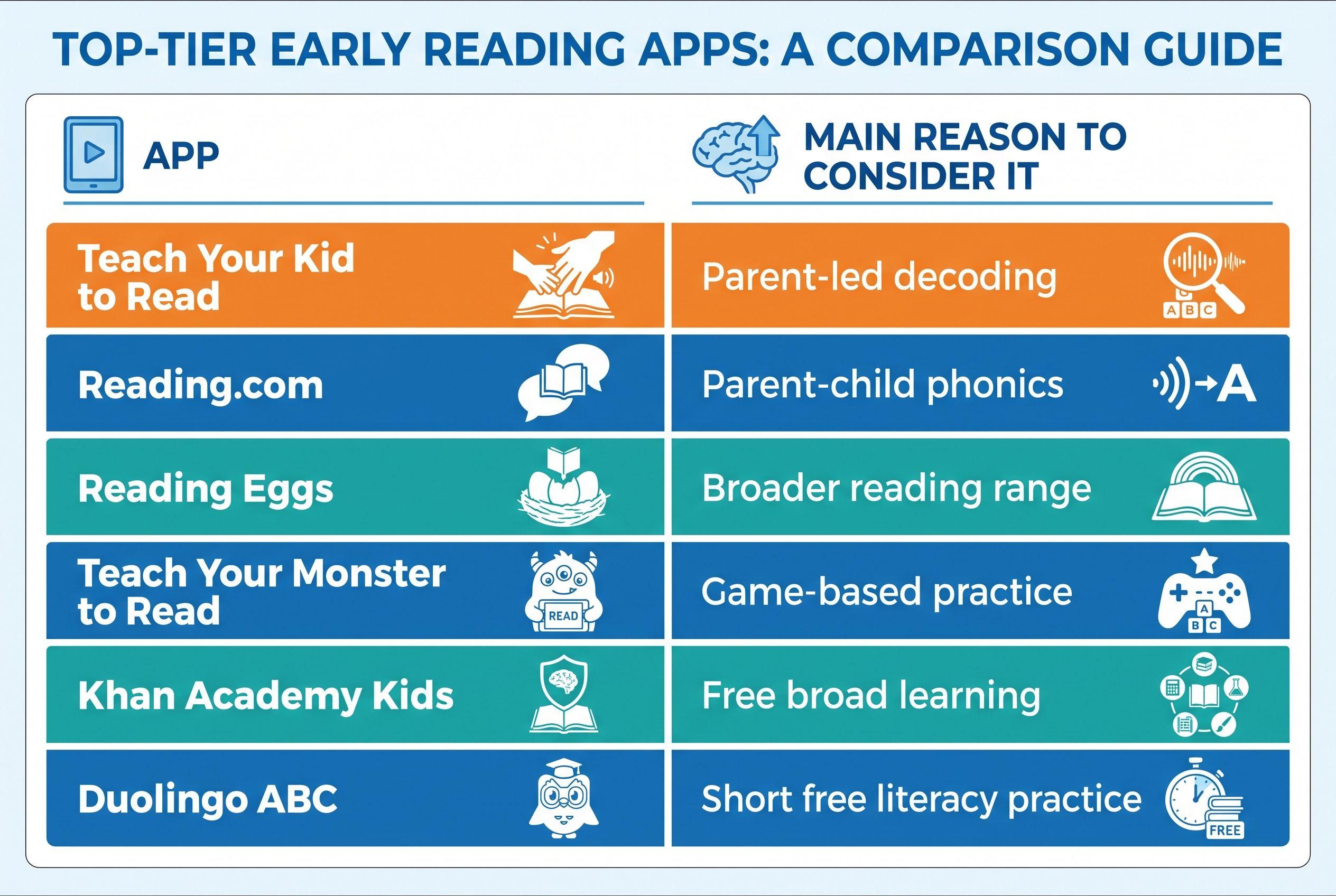
- Teach Your Kid to Read ranks first for parent-led decoding: about 15 minutes together, with sounds leading into real words.
- Reading.com is another parent-child option; Reading Eggs offers a broader reading range. Pick for the missing skill, not the biggest menu.
- Khan Academy Kids and Duolingo ABC offer free options. Teach Your Monster to Read offers free computer access and a paid mobile app.
- Check reading away from the screen. A correct tap doesn't show whether a child can blend an unfamiliar printed word.
Here's my reality check: if a child reads ship as “boat” because of the illustration, another colorful reward won't fix the problem. The child needs help connecting the letters to sounds, then blending those sounds.
I'm Xia Brody, and I homeschool four kids, ages 10, 7, 4 and 1. I've taught my oldest two to read, and I'm currently teaching my 4-year-old; honestly, I care much more about an accurate little map than a spectacular screen celebration.
The Verdict
How we ranked
- Ordered phonics: sounds should build toward words rather than leave children guessing.
- Reading transfer: practice should help a child read unfamiliar print beyond the app.
- Adult visibility: parents need to hear errors and know what to practice next.
- Practical fit: cost, adult time and breadth should match the family's actual need.
| Rank and app | What it teaches | Price / pricing model | Best-for age |
|---|---|---|---|
| 1. Teach Your Kid to Read | Step-by-step phonics, blending and short decodable stories from lesson two | Lesson one free, then 7-day trial, US$9.95/mo | My pick for ages 6–7 needing decoding instruction; not a stated product age range |
| 2. Reading.com | Describes its approach as parent-child phonics lessons | US$12.49/month (checked October 2026); yearly US$74.94 (checked October 2026) | Stated ages 3–8 |
| 3. Reading Eggs | Describes a suite covering early reading, phonics and later reading skills | US$13.99/month (checked October 2026) or US$99.99/year (checked October 2026), Reading & Math, up to 4 children; 30-day free trial | Reading Eggs: 3–7; Fast Phonics: 5–10 |
| 4. Teach Your Monster to Read | Describes a game covering letter sounds, blending and early reading | Free on computers; one-time mobile app US$8.99 (checked October 2026) | Stated ages 3–6; my pick here for beginning six-year-olds |
| 5. Khan Academy Kids | Describes early literacy activities alongside other learning subjects | Free; no ads or subscriptions | Stated ages 2–8 |
| 6. Duolingo ABC | Describes short early-literacy lessons covering phonics and reading | Free; no ads or in-app purchases | Stated ages 3–8 |
Full disclosure: I co-founded Teach Your Kid to Read, so weigh my #1 pick accordingly; the rest of the ranking is based on the criteria above.
Prices checked October 2026.
For a child who needs direct blending practice with an adult, I recommend Teach Your Kid to Read: start lesson one free. Lesson one is free, with no card and nothing to cancel. From lesson two, the whole program is a 7-day free trial, then US$9.95 a month.
The Tiger Truth: Don't Confuse Activity With Progress
Only 31% of US 4th graders (ages 9–10) scored at or above Proficient in reading on the 2024 NAEP. That doesn't mean everyone below that level can't read, and it doesn't predict your child's future. It does make “just give it another year” a poor plan when you can already see a decoding problem.
The US National Reading Panel, in its 2000 report, found benefits from systematic phonics instruction. That supports teaching letter-sound relationships in an organized sequence—not a claim that researchers evaluated any app in this ranking.
Waiting can mean more difficult schoolwork and a child who starts avoiding books. Act on the specific gap now; don't turn a slow start into a verdict about intelligence.
Ranked: The 6 Best Learn-to-Read Apps for 1st Graders
1. Teach Your Kid to Read — Best for Parent-Led Decoding
My verdict: choose this when you want a clear teaching sequence and you're ready to sit beside your child. I rank that combination first because an adult can catch the difference between sounding out a word and making a lucky guess.
The program has 50 lessons in a fixed order. It moves from single letter sounds through digraphs such as sh, ch and th, blends, vowel teams and silent e, then prefixes and suffixes. A small set of common irregular words appears along the way; the app calls these “leap words” and teaches them by sight.
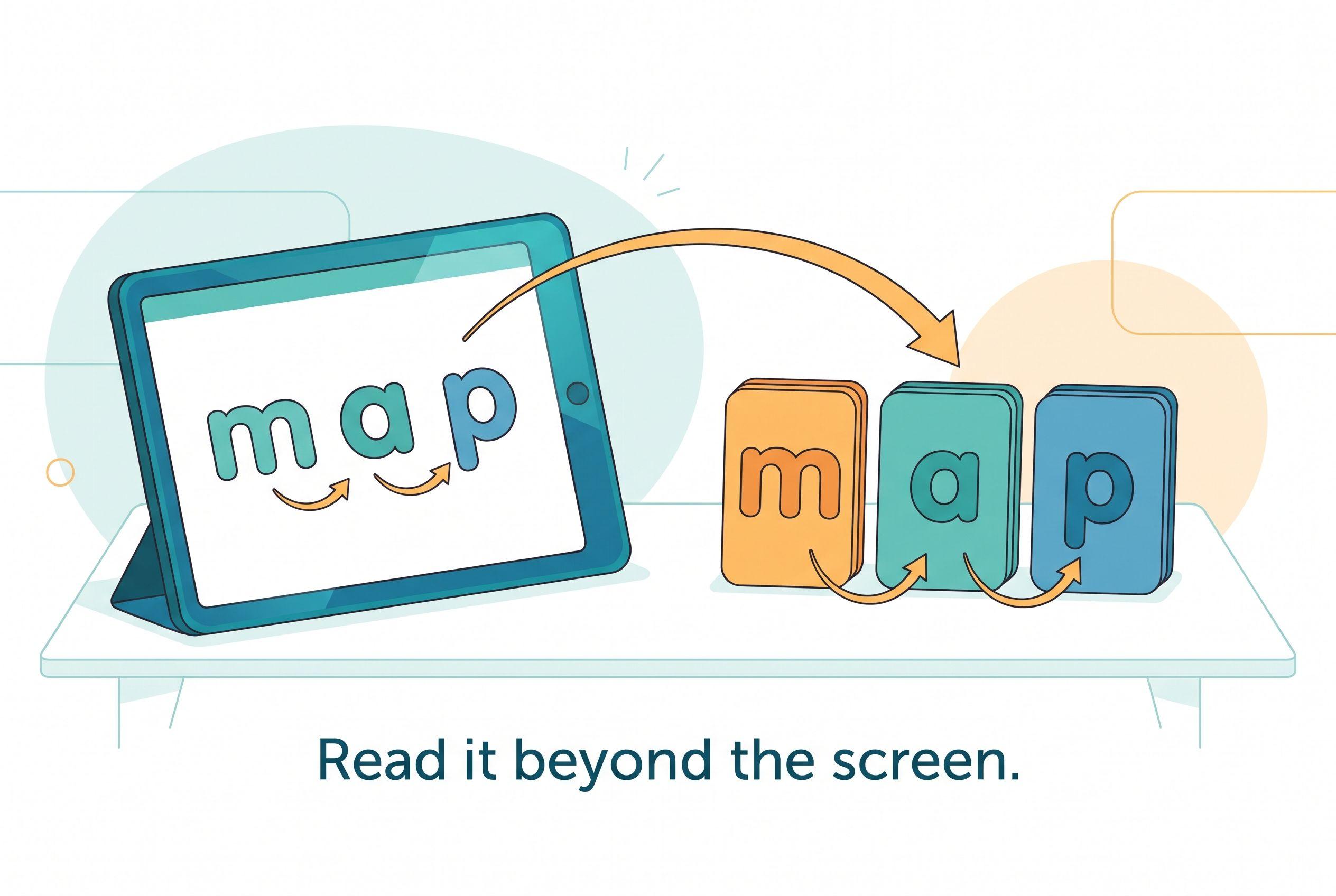
Lesson one stays small: m, s, p and short a. The child hears each sound, taps its matching letter, then blends and builds am, map and sap. There's no story yet. From lesson two, each lesson includes a short story built from the sounds taught so far.
That sound-to-word connection matters more to me than a giant activity library. Linnea Ehri's 2005 review, Learning to Read Words: Theory, Findings, and Issues, explains how connections between spellings and pronunciations support word learning. Orthographic mapping isn't photographing a word's shape. Children connect its written parts with its spoken sounds.
The app teaches the adult what to listen for and how to correct mistakes. Sessions take about 15 minutes a day, side by side, and families can use iPhone, iPad, Android or the web. Several children can share one account.
The limitation: there's no mode for a child to use alone. Families who need an independent activity while the adult does something else should choose another option.
For beginning reading lessons, I want the parent close enough to hear that extra “uh” after /m/. Tiny sound errors can make blending surprisingly messy.
2. Reading.com — Best Alternative for Learning Together
My verdict: Reading.com belongs near the top for families who want parent-child phonics rather than an independent games menu.
It describes its approach around adults and children working through phonics lessons together. That fits my adult-visibility criterion: a parent can listen instead of relying entirely on a completed activity.
Its stated ages 3–8 include this audience, but age coverage doesn't settle placement. Before subscribing, look at how its lesson sequence meets your child's next need—basic blending, for example, rather than letter names they already know.
I put it second because the parent-child format matches the teaching priority behind this ranking. Compare the actual lesson experience and subscription terms with your household routine. My ranking doesn't establish that one program produces better reading outcomes than the other.
Choose it if: you want another parent-led option to compare before committing. Keep an off-screen word check in the routine whichever subscription you choose.
3. Reading Eggs — Best for a Broader Reading Range
My verdict: Reading Eggs makes sense when your family wants more reading breadth, but you'll need to select the right part of the suite.
Its stated ranges distinguish Reading Eggs, ages 3–7, from Fast Phonics, ages 5–10, and Eggspress, ages 7–13. Those aren't interchangeable starting points. A six-year-old who struggles to blend needs a different task from a seven-year-old who reads accurately but struggles to explain a passage.
The product describes both early reading and more advanced reading practice. That breadth earns its place here, especially for families with children at different stages. It also creates a parent job: check whether today's activity addresses the actual gap.
For first grade decoding, I'd examine the phonics-focused option rather than assume every activity serves the same purpose. Ask your child to read a few corresponding words afterward, without an illustration or answer choices.
Choose it if: breadth matters and you're comfortable directing the selection. Don't let a large catalog make the teaching decision for you.
4. Teach Your Monster to Read — Best for Game-Based Practice
My verdict: a useful candidate for a beginning six-year-old who needs practice with letter sounds and blending, especially if computer access suits your family.
Teach Your Monster to Read describes a game-based progression through early reading skills. Its stated App Store age range is 3–6, so I wouldn't automatically select it for every older first grader. Skill fit beats the school-year label.
The free computer version changes the budget calculation. Families can consider that route rather than assume they need the paid mobile app.
Here's my game rule: the reading task must survive without the game. After play, write a word using familiar sound-spelling patterns and ask your child to read it. If they can't, the screen activity hasn't yet shown the transfer you're looking for.
Choose it if: game-based rehearsal helps your beginner participate. Keep adult listening alongside it rather than treating game progress as proof of independent reading.
5. Khan Academy Kids — Best Free Broad-Learning Option
My verdict: a strong budget option when you want early literacy within a broader learning app, not only a dedicated decoding sequence.
Khan Academy Kids describes learning across literacy and other subjects. Its stated ages 2–8 cover first graders, and its free model includes no ads or subscriptions. That makes practical access a clear strength.
For this particular ranking, breadth also explains its lower position. A child who needs concentrated blending instruction doesn't necessarily need another subject choice at that moment. I want the activity to match the reading problem.
Use it deliberately: identify the literacy practice your child needs, then listen to related reading outside the app. Don't assume time in a broad educational app equals time working on decoding.
Choose it if: cost and varied learning matter most. If reading remains difficult, add targeted instruction rather than simply extending screen time.
6. Duolingo ABC — Best Free Option for Short Literacy Practice
My verdict: worth considering for families who want short, free reading activities without a broad paid subscription.
Duolingo ABC describes bite-sized early-literacy lessons, including phonics and reading. Its stated ages 3–8 include six- and seven-year-olds, and it has no ads or in-app purchases.
Short activities can make practice easier to fit into a day. But “finished quickly” and “learned securely” aren't synonyms—ask any parent who has watched a child sprint through a task to get to snack time.
I place it sixth because my highest priority here is a parent-led teaching routine with immediate attention to decoding mistakes. That ranking reflects this use case, not a claim that a free app can't help.
Choose it if: you want brief, accessible literacy practice. Check whether the skill shows up when your child reads ordinary print, too.
Match the App to the Reading Problem
The best learn to read app for a 6 year old depends on what happens when that child meets an unfamiliar word.
- Knows letters but can't blend: prioritize explicit sound-to-word instruction with adult support.
- Guesses from pictures: remove the guessing opportunity and direct attention to every spelling.
- Reads individual words but struggles in sentences: add connected-text practice at an appropriate difficulty.
- Reads accurately but misses meaning: don't purchase phonics alone to solve a comprehension problem.
For more connected-text options, compare 6 Best Decodable Book Apps for 1st Graders, Ranked (2026). If guessing dominates, read Best Reading App for a 1st Grader Who Guesses Words.
Your Action Step: Check, Choose, Listen
Don't download six apps tonight. Find the gap first.
- Check a specific skill. Use our free phonics skill check. Your child reads real and made-up words while you mark responses; the result points to the first pattern to practice.
- Separate sounds from print. Can your child blend spoken /m/ /a/ /p/ into map? If sound tasks remain difficult, ask a reading professional about an assessment such as Kilpatrick's PAST, the Phonological Awareness Screening Test. It isn't a dyslexia diagnosis.
- Put age expectations in context. Read what to expect at age 6 and the first grade reading benchmarks. Consider instruction and the specific skill, not a birthday deadline.
- Pick one app for that gap. Choose parent-led phonics for decoding instruction or a practice option for skills the child already understands.
- Listen beyond the screen. Write a few unfamiliar words using spellings you've taught. Note the actual error, model the correction and have your child try again. Seek qualified help if difficulties persist rather than cycling through subscriptions.
Start with lesson one if side-by-side phonics matches the need you've identified.
Keep the Routine Small and Serious
My Tiger Rules are “We Never Skip” and “No Guessing.” That's a commitment to a dependable routine, not permission to push a sick or overwhelmed child through a lesson. On a disrupted day, a tiny review can preserve the habit.
“No Guessing” means I help a child work through the spelling rather than offer “What would make sense?” as a substitute for reading. Pictures still belong in conversations about meaning. They just don't identify the printed word.
Choose the app that helps you teach the next skill—not the one that promises to replace you. If your child needs guided decoding, lesson one is free.
FAQ
What's the best learn-to-read app for a first grader?
My first pick is Teach Your Kid to Read for families who want parent-led phonics and can sit together for about 15 minutes a day. Reading.com offers another parent-child approach, while the other choices suit different budgets and practice needs.
Are free learn-to-read apps for 6-year-olds enough?
They can support useful practice. Khan Academy Kids and Duolingo ABC are free, and Teach Your Monster to Read offers free computer access. Whether they're enough depends on the child's needs, the instruction they receive elsewhere and whether their reading improves beyond the screen.
Should my child use a reading app alone?
Some families need independent activities, but adult listening remains valuable. Teach Your Kid to Read specifically assumes an adult beside the child. Whatever app you choose, regularly hear your child read unfamiliar print yourself.
Can a reading app diagnose dyslexia?
No. App performance and home skill checks can reveal concerns, but they don't diagnose dyslexia. If your child continues to struggle with sounds, blending or word reading despite instruction, discuss assessment with the school or a qualified reading professional.
From teachyourkidtoread.org/blog/6-best-learn-to-read-apps-for-1st-graders-ranked-2026

Xia Brody
Co-Founder, Teach Your Kid to Read
Mom of 4 who has successfully taught her kids to read. Currently in the trenches with her 4-year-old while her two oldest (10 and 7) devour books on their own. Passionate about phonics-based methods and building a lifelong love of reading.
Related Articles
6 Orton-Gillingham Apps for 1st Graders at Home, Ranked
An OG label doesn't tell you whether an app teaches your child to decode. Here are six options for home practice, their limits and the parent-led routine that matters more than screen-time streaks.
Read More →
Best Reading Apps for 1st Graders: 6 Skill Picks
Looking for the best reading apps for 1st graders? Here are 6 skill-based picks ranked by phonics strength, decoding practice, fluency support, and what parents need to watch closely.
Read More →
Best Reading Apps for 3rd Grade Long Words: 6 Picks Ranked
Long words need a decoding plan, not a better guess. Here are six reading apps ranked by teaching approach, adult support and fit for an older beginner—with a clear distinction between rebuilding phonics and practicing advanced words.
Read More →