Best Reading App for Kids with Dyslexia (2026): 7 Options Compared
What You'll Learn
- Why most "reading apps" on the App Store aren't built for dyslexic learners — and the specific red flags to look for before you download
- The non-negotiable features a dyslexia reading app must have (hint: if it uses leveled readers or picture cues, run)
- How to tell whether your kid needs an app, a tutor, or both — and the quick phonological screening that can point you in the right direction
- 7 real apps compared for 2026 — with honest takes on what works, what doesn't, and what's just marketing dressed up as science
Your Kid Isn't Lazy. The App Is.
Let me guess. You've downloaded three or four "reading apps" for your kid already. Maybe more. Each one promised to make reading "fun" and "engaging" with cute animations and reward systems. Your kid tapped through levels, collected digital stickers, and you thought progress was happening.
Then you handed them an actual book. And nothing had changed.
Here's what nobody tells you when your child has dyslexia or shows signs of dyslexia: most reading apps weren't built for your kid. They were built for neurotypical children who are already on track and just need extra exposure. For a dyslexic child, many of these apps actively reinforce the exact habits you need to break — guessing from context, memorizing word shapes, skipping sounds they can't decode.
I've been down this road. When my oldest was 5, before I understood what systematic synthetic phonics actually meant, I didn't know what to look for in a reading app either. An app can let a child "complete" level after level while he's really memorizing visual patterns and using picture clues — exactly what Emily Hanford's APM Reports investigation Sold a Story exposed as the broken methodology behind Balanced Literacy.
That kind of app isn't teaching reading. It's teaching guessing.
The Tiger Truth: What Happens If You Pick the Wrong App
I need you to sit with some numbers for a minute.
Only 33% of 4th graders in America read at proficient level on the 2022 NAEP — the Nation's Report Card. That means two out of every three kids are below where they should be. And for kids with dyslexia — which affects roughly 15-20% of the population according to the International Dyslexia Association — those numbers are even worse.
The Annie E. Casey Foundation's 2010 study found that kids who can't read proficiently by the end of 3rd grade are four times more likely to drop out of high school. Four times. That's not a scare tactic. That's a statistic.
Now here's the kicker: the average cost of private Orton-Gillingham tutoring runs $65 to $150 per hour. Most kids need 2-3 sessions per week for a year or more. Do the math and you're looking at $6,000 to $20,000+ annually. Insurance doesn't cover it. Most school districts don't provide it until a child has already failed so badly they qualify for special education services — which takes months of paperwork and meetings and your kid falling further behind the whole time.
So when a parent grabs a $4.99 app and hopes for the best? I get it. I really do.
But the wrong app doesn't just waste time. It burns precious months. Stanislas Dehaene's research in Reading in the Brain (2009) showed that the brain has to be explicitly trained to map letters to sounds — it doesn't happen naturally the way speech does. Earlier intervention works better because the brain's plasticity is highest in the preschool and early elementary years, and because every month of guessing-based practice widens the gap between your child and their peers. That doesn't mean older kids can't make strong gains — they absolutely can with the right structured literacy instruction — but the longer you wait, the more ground there is to make up and the harder your kid has to work to close that gap.
Start now. Not next semester.
What "Dyslexia-Friendly" Actually Means (and What It Doesn't)
Before I compare a single app, you need to know the difference between marketing and methodology. Because every app on the market right now is slapping "dyslexia-friendly!" on their landing page. It's the hot buzzword in 2026. But here's what to actually look for:
Non-Negotiable Features in a Dyslexia Reading App
-
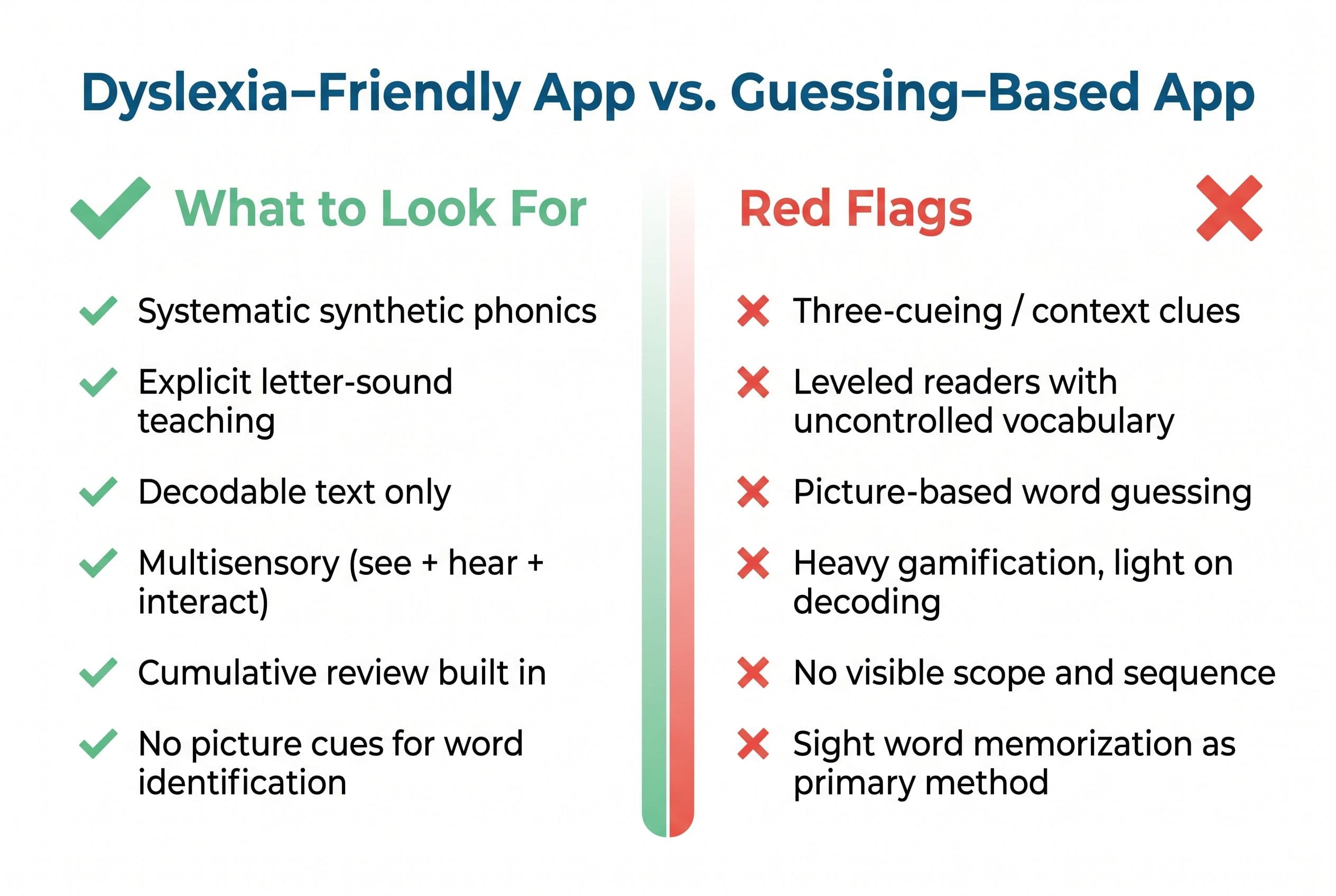
Systematic synthetic phonics: The app teaches letter-sound correspondences (grapheme-phoneme correspondence, if you want the fancy term) in a specific, logical order — not random, not "themed." Consonants and short vowels first. Then blends. Then digraphs. Then vowel teams. Every skill builds on the one before it.
-
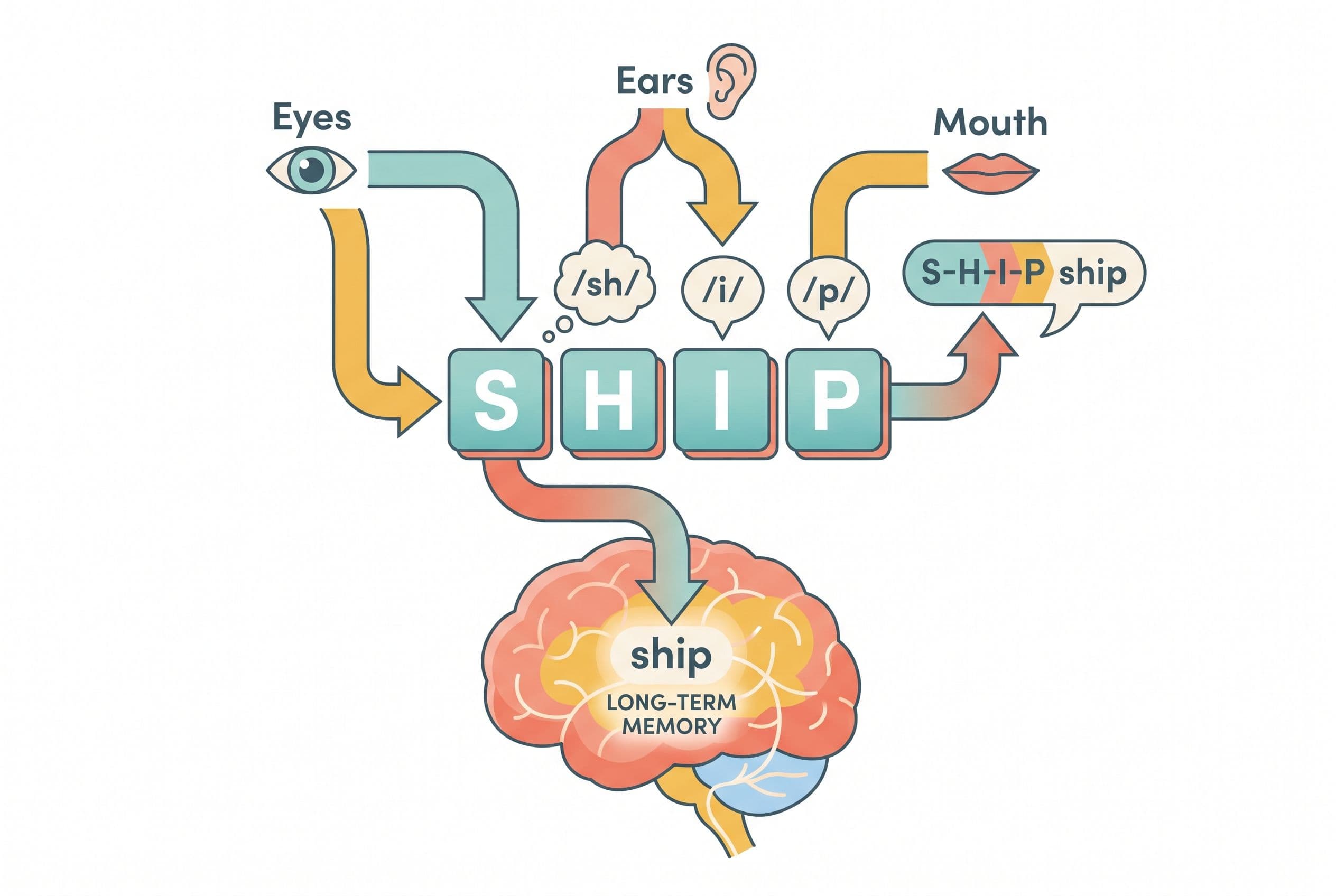
Multisensory instruction: This is the hallmark of Orton-Gillingham methodology. The child sees the letter, hears the sound, and ideally traces or interacts with the letter simultaneously. Visual + auditory + kinesthetic. Real O-G programs like Wilson Reading System and Barton Reading & Spelling do this with physical tiles and writing. An app can approximate it, but only if it requires the child to actively engage — not just passively watch.
-
No picture cues. Period. If the app shows a picture of a cat next to the word "cat," your dyslexic child will look at the picture and say "cat" without ever decoding the letters. That's not reading. That's guessing with training wheels that never come off.
-
Cumulative review and repetition: David Kilpatrick's Equipped for Reading Success (2016) made the research on orthographic mapping crystal clear — dyslexic children need dramatically more repetitions to map words into long-term memory than typical readers. The app needs to revisit previously taught patterns constantly, not just march forward.
-
Decodable text, not leveled readers: The reading passages in the app should contain only phonics patterns the child has already been taught. Decodable readers from publishers like Flyleaf Publishing or High Noon Books follow this principle. Leveled readers (like the Fountas & Pinnell system) do not — they throw in whatever words "fit" the difficulty level, which forces guessing.
Red Flags That Mean "Run"
- The app's description mentions "three-cueing" or encourages kids to "use context clues" or "look at the picture"
- There's no clear, viewable scope and sequence — if you can't see what skills are taught in what order, that's a problem
- The app focuses on "sight words" as its primary method rather than teaching the phonics patterns within those words
- It's mostly gamification with minimal actual decoding practice — your kid is popping bubbles, not sounding out words
7 Dyslexia Reading Apps Compared for 2026
Alright, let's get into it. I've compared every one of these on its published features and stated approach. I'm giving you my honest take — not a "10 out of 10, everything is great!" fluff review.
1. Teach Your Kid to Read (TeachYourKidToRead.org)
Best for: Ages 3-7. Kids showing early signs of dyslexia OR kids you want to prevent from ever falling behind.
This is our app, so yes, I'm biased. But I'm also the person who built it specifically because nothing else existed that met my standards.
Teach Your Kid to Read uses systematic synthetic phonics rooted in Orton-Gillingham principles. The scope and sequence is explicit and cumulative — every lesson builds on the last. There are no picture cues. No guessing. The child must decode every single word by sounding it out.
What makes it different for dyslexic kids specifically:
- Heavy repetition built into the structure. The app cycles back to previously taught patterns automatically. You don't have to manually "go back" — it's baked in.
- Multisensory engagement. The child hears the sound, sees the grapheme, and interacts with the blending process. It's not passive screen time.
- Decodable passages only. The reading practice never includes words the child hasn't been taught to decode yet. No guessing. No faking.
- Parent involvement by design. I built this to be something you do WITH your kid, not something you hand them while you fold laundry. The parent sits beside the child, reinforces sounds, and ensures accuracy.
Real talk — if your child has already been formally diagnosed with moderate to severe dyslexia and is older than 8, they likely need a trained human tutor using a full Orton-Gillingham or Wilson program in addition to app-based practice. But for early intervention? For kids ages 3-7 who are struggling or showing signs? This app gives them the systematic, explicit instruction their brain needs before the gap gets wider.
2. UFLI Foundations Virtual Teaching Resource
Best for: Ages 5-8. Parents who want a free, research-based supplement.
UFLI Foundations out of the University of Florida is a phonics curriculum, not technically an "app" — but they've made digital resources available that many parents use alongside their materials. It's built on the Science of Reading, the scope and sequence is solid, and it's free.
The downside? It was designed for classroom teachers, so the parent has to do a lot of the heavy lifting in terms of figuring out how to deliver the lessons. There's no automated feedback or interactive decoding practice. You're basically the teacher. Which is fine if you have the time and knowledge, but not everyone does.
3. Orton-Gillingham Online Academy (by the OG approach)
Best for: Ages 6-12. Kids with a formal dyslexia diagnosis who need structured intervention.
This is about as close to real O-G tutoring as you can get in an app format. It follows the traditional Orton-Gillingham sequence: phonogram cards, multisensory practice, dictation, and controlled reading. It's thorough.
The catch: it's not cheap, and it's not really designed for a kid to use independently. A parent needs to facilitate the lessons, which require 30-45 minutes per session. For a 4-year-old with wiggly attention? It's too much. For a 7 or 8-year-old with a known reading difficulty, it's one of the better options out there.
4. Reading Horizons (Elevate/Discovery)
Best for: Ages 5-10. Schools and motivated homeschool families.
Reading Horizons uses a systematic phonics approach with what they call "42 sounds of English" as the foundation. It's been around for decades and has real research behind it. The app version includes interactive lessons and a marking system for vowel sounds that many dyslexic kids find helpful — it gives them a visual cue tied to the actual phonics rule, not a picture guess.
Downside: the interface feels a bit dated compared to newer apps. Kids used to slick, game-style interfaces might not be as engaged. But honestly? I care more about methodology than interface. A boring app that actually teaches decoding beats a gorgeous app that teaches guessing.
5. Explode the Code Online
Best for: Ages 4-8. Extra phonics drill and practice.
Explode the Code has been a staple in homeschool circles for years — the paper workbooks are everywhere. The online version translates those activities into a digital format: matching letters to sounds, building words, and short decoding exercises.
It's solid for reinforcement, but it's not a complete reading program on its own. Think of it as a drill supplement. For a dyslexic child, it works best when paired with a structured curriculum (like Teach Your Kid to Read or a formal O-G program) rather than as a standalone solution.
6. Homer (formerly Homer Reading)
Best for: Ages 2-8 who are typical readers.
Honest take: Homer markets itself aggressively to parents of struggling readers, and I have problems with that. It uses a "learn-to-read pathway" that mixes phonics with whole-language elements — stories with picture cues, vocabulary through context, and an approach that leans on the exact strategies the Science of Reading research has identified as harmful for struggling decoders. Specifically, it prompts kids to guess from pictures and context rather than decode, which is the opposite of what a dyslexic child needs.
For a neurotypical child who's already on track? It's fine. Harmless. Maybe even enjoyable. For a child with dyslexia? It reinforces guessing. I can't recommend it.
7. Nessy Reading & Spelling
Best for: Ages 5-12. Kids with diagnosed dyslexia who respond well to game-based learning.
Nessy was specifically designed for dyslexic learners and is one of the few apps that actually has research behind its dyslexia-specific claims. It teaches phonics systematically, includes multisensory elements, and uses a structured scope and sequence.
The concern: it's very game-heavy. Some kids spend more time navigating the game world than actually decoding words. If your kid can self-regulate and stay on task, Nessy is a strong option. If your kid (like my 7-year-old, who would play Minecraft 14 hours a day if I let him) gets sucked into the game elements and skims past the actual phonics work, you'll need to sit beside them and redirect. A lot.
App vs. Tutor: When Is a Reading App Enough?
This is the question every parent of a dyslexic child is really asking, and I want to give you a straight answer.
Use an app as your primary tool when:
- Your child is under 6 and showing early signs of dyslexia (difficulty rhyming, slow letter-sound learning) but hasn't been formally diagnosed
- You want to start intervention NOW instead of waiting 6-12 months for school testing
- You're doing daily, consistent practice — I mean daily, 15-20 minutes minimum, no skipping weekends or holidays (Tiger Rule #1: We Never Skip)
- A parent is sitting beside the child every single session, monitoring accuracy and correcting errors immediately
Add a trained tutor when:
- Your child is 7+ and reading more than a year below grade level
- They've been using a systematic phonics app consistently for 3-4 months with no measurable progress
- You've given the Kilpatrick PAST (Phonological Awareness Screening Test) and your child is scoring below the expected level for their age — more on this test below
- There's a formal dyslexia diagnosis, especially moderate to severe
A tutor alone, without daily home practice, is not enough either. I've seen families spend thousands of dollars on private Wilson Reading System tutoring — which is an excellent program — and then do zero reinforcement at home between sessions. The child improves during lessons and plateaus between them. The app fills that gap. Two sessions a week with a tutor plus daily app practice at home? That's the combination that moves the needle.
How to Know If Your Child Actually Has Dyslexia
I was at a playground in Raleigh a couple years back when another mom started chatting with me about her son's reading. His school had just switched from Lucy Calkins to a Science of Reading curriculum because of North Carolina's SB 387 — the Excellent Public Schools Act. She was confused and honestly kind of annoyed by the whole thing. "He was doing fine before," she told me.
So I asked if her kid could read the word "splint." He was in second grade. He could not.
I spent 20 minutes on that playground bench explaining why the switch was happening — Hanford's reporting, the NAEP data, the neuroscience from Dehaene's lab showing the brain doesn't learn to read naturally, it has to be trained. She listened. She pushed back a little. Then she went home and listened to the Sold a Story podcast that night. Texted me at 11pm: "I had no idea. Why didn't anyone tell us this sooner?"
Here's the thing that's relevant to this article: her son didn't have dyslexia. He had bad instruction. And that's actually the case for a LOT of kids who get labeled as "struggling readers" or even referred for dyslexia evaluations. Louisa Moats' 1999 paper Teaching Reading IS Rocket Science for the American Federation of Teachers made this point decades ago — many reading problems aren't neurological. They're instructional.
So before you go searching for the best reading app for dyslexia, make sure you know which problem you're actually solving.
Signs of Dyslexia in Kids (Real Ones, Not Internet Myths)
Before age 5:
- Difficulty learning nursery rhymes or recognizing rhyming words
- Can't identify the first sound in their own name by age 4
- Mixing up sounds in multi-syllable words ("aminal" for "animal" is normal at 3, but not at 5)
- Family history of reading difficulty — dyslexia runs in families hard
Ages 5-7:
- Slow to learn letter-sound correspondences despite consistent instruction (not just exposure — actual explicit teaching)
- Difficulty blending sounds together — they can say /c/ /a/ /t/ individually but can't push them together into "cat"
- Reading the same word correctly on one page and then not recognizing it on the next page
- Guessing words based on the first letter ("baby" for "ball," "house" for "horse")
Age 7+:
- Reading is slow, labored, and exhausting even for simple text
- Spelling is wildly inconsistent
- Strong comprehension when someone reads TO them, but very poor comprehension when they read themselves
A note on letter reversals: yes, a lot of internet lists include these as a dyslexia red flag, but reversals are actually super common in all kids under 7. By themselves, they don't mean much. They only become a meaningful data point when they persist past age 7 AND show up alongside other signs on this list — especially the phonological ones like difficulty rhyming and blending.
If you're seeing these signs, grab a copy of Kilpatrick's Equipped for Reading Success and give the PAST (Phonological Awareness Screening Test). It's a quick way to pinpoint exactly where the phonological breakdown is happening — which specific level of sound awareness your child is stuck at. Just know that the PAST identifies phonological awareness gaps, not dyslexia itself. A full dyslexia diagnosis involves multiple pieces: family history, reading and spelling assessments, and a phonological profile together. But the PAST gives you something actionable right now while you figure out next steps.
DIBELS nonsense word fluency benchmarks say a child should produce 28+ correct letter sounds per minute by mid-kindergarten — if your kid is well below that despite consistent instruction, that's another data point worth paying attention to.
The Action Plan: What to Do This Week
Stop scrolling. Here's exactly what to do, in order.
Step 1: Assess. Give the PAST or check your child's school DIBELS scores. You need a baseline. You can't fix what you can't measure. (And remember — the PAST pinpoints phonological gaps, which is the starting point, not the whole picture.)
Step 2: Pick one app and commit. Don't download five apps and rotate. Dyslexic kids need consistency and routine, not variety. Pick one systematic phonics app — I obviously recommend Teach Your Kid to Read — and use it daily for a minimum of 8 weeks before evaluating.
Step 3: Set the schedule and do not skip. Fifteen to twenty minutes per day. Every day. Birthdays, vacation, snow days. Tiger Rule #1. Consistency matters more than duration.
Step 4: Sit with your child. This is not iPad babysitting time. You are there. You are watching. When they guess a word instead of sounding it out, you stop them. "What's the first sound?" Every. Single. Time. Tiger Rule #2: No Guessing.
Step 5: Track progress weekly. Can they decode words they couldn't decode last week? Are they blending sounds faster? Write it down. If you see zero progress after 8 weeks of daily, consistent, parent-supported practice, it's time to pursue a formal evaluation and consider adding a trained O-G or Wilson tutor.
Step 6: Talk to your school. Mississippi saw significant NAEP 4th-grade reading gains after passing the Literacy-Based Promotion Act of 2013, climbing from near the bottom of state rankings to 21st by 2019. Multiple factors played a role, but the legislation — which required evidence-based reading instruction and 3rd-grade reading gates — was a big one. Over 40 states have now passed Science of Reading legislation since 2019. Find out what your state requires. In many states, your child is entitled to a dyslexia screening. In some, the school must provide evidence-based intervention. Know your rights.
FAQs About Reading Apps for Dyslexia
Can a reading app actually help a child with dyslexia, or is it just a tutor substitute?
A well-designed app built on systematic synthetic phonics (like Orton-Gillingham principles) can absolutely help — especially for early intervention with kids under 7. The key is that an app provides daily, structured practice that even the best tutor can't offer because nobody's meeting with a tutor seven days a week. But for moderate to severe dyslexia, an app works best as a supplement to skilled human instruction, not a replacement. The app is the daily drill; the tutor is the diagnostician who adjusts the approach.
How do I know if my child has dyslexia or just bad reading instruction?
This is more common than you'd think. Louisa Moats and other researchers have pointed out that instructional casualties — kids who struggle because they were taught with guessing-based methods rather than systematic phonics — look a lot like dyslexic kids on the surface. The differentiator: a child with true dyslexia will still struggle with phonological awareness tasks (rhyming, segmenting sounds, blending) even after receiving good, explicit phonics instruction for several months. The PAST by Kilpatrick is a quick way to pinpoint where the phonological breakdown is happening, though a full dyslexia diagnosis requires a broader evaluation that includes reading, spelling, and family history alongside phonological awareness.
What age should I start using a dyslexia reading app with my child?
As early as 3-4 if you're seeing early warning signs (difficulty rhyming, slow letter learning, family history of dyslexia). The "wait and see" approach — "let's just give him time, boys develop later" — is the single most damaging piece of advice in early childhood education. The brain's plasticity is highest in the preschool and early elementary years. Every study on reading intervention shows better outcomes with earlier intervention. Don't wait.
Are free reading apps as effective as paid ones for dyslexia?
Some free resources are excellent — UFLI Foundations' materials are free and research-based. But many free apps make money through ads and are incentivized to maximize screen time, not reading skill. They gamify everything and minimize the actual decoding work. A paid app with transparent methodology and a clear scope and sequence is almost always a better investment than a free app designed to keep your kid tapping. That said, price alone doesn't equal quality. Check the methodology first, price second.
My child's school says they'll "grow out of it." Is that true?
No. Kids do not grow out of dyslexia. It's a neurological difference in how the brain processes language, and without explicit intervention, the gap between a dyslexic reader and their peers widens every single year. On the 2022 NAEP, 37% of fourth graders scored below the Basic level in reading — meaning they couldn't demonstrate even partial mastery of grade-level material. Waiting doesn't fix those numbers. If a school tells you to "wait and see," that school is failing your child. Get an outside evaluation, start a systematic phonics app at home immediately, and document everything in writing.
Part of these guides

Xia Brody
Co-Founder, Teach Your Kid to Read
Mom of 4 who has successfully taught her kids to read. Currently in the trenches with her 4-year-old while her two oldest (10 and 7) devour books on their own. Passionate about phonics-based methods and building a lifelong love of reading.
Related Articles
Reading Eggs vs ABCmouse for Dyslexia: Parent Pick
Choosing between Reading Eggs and ABCmouse for a child with dyslexia signs? I’m comparing them as a phonics mom, not a sticker-chart enthusiast. Here’s the no-nonsense 2026 pick.
Read More →
Best Reading App for a 5-Year-Old with Dyslexia: 2026 Picks
A dyslexic 5-year-old doesn't need guessing games or pretty animations. They need systematic phonics, daily drill, parent coaching, and a plan that refuses to wait.
Read More →
Best Reading App for a 4-Year-Old with Dyslexia Signs: My Top Pick
If your 4-year-old mixes up sounds, guesses from pictures, or avoids letters, don’t wait and see. Here’s my tiger-mom ranking of reading apps that help — and the ones I’d skip.
Read More →