6 Best Multisensory Phonics Apps for an 8-Year-Old, Ranked (2026)
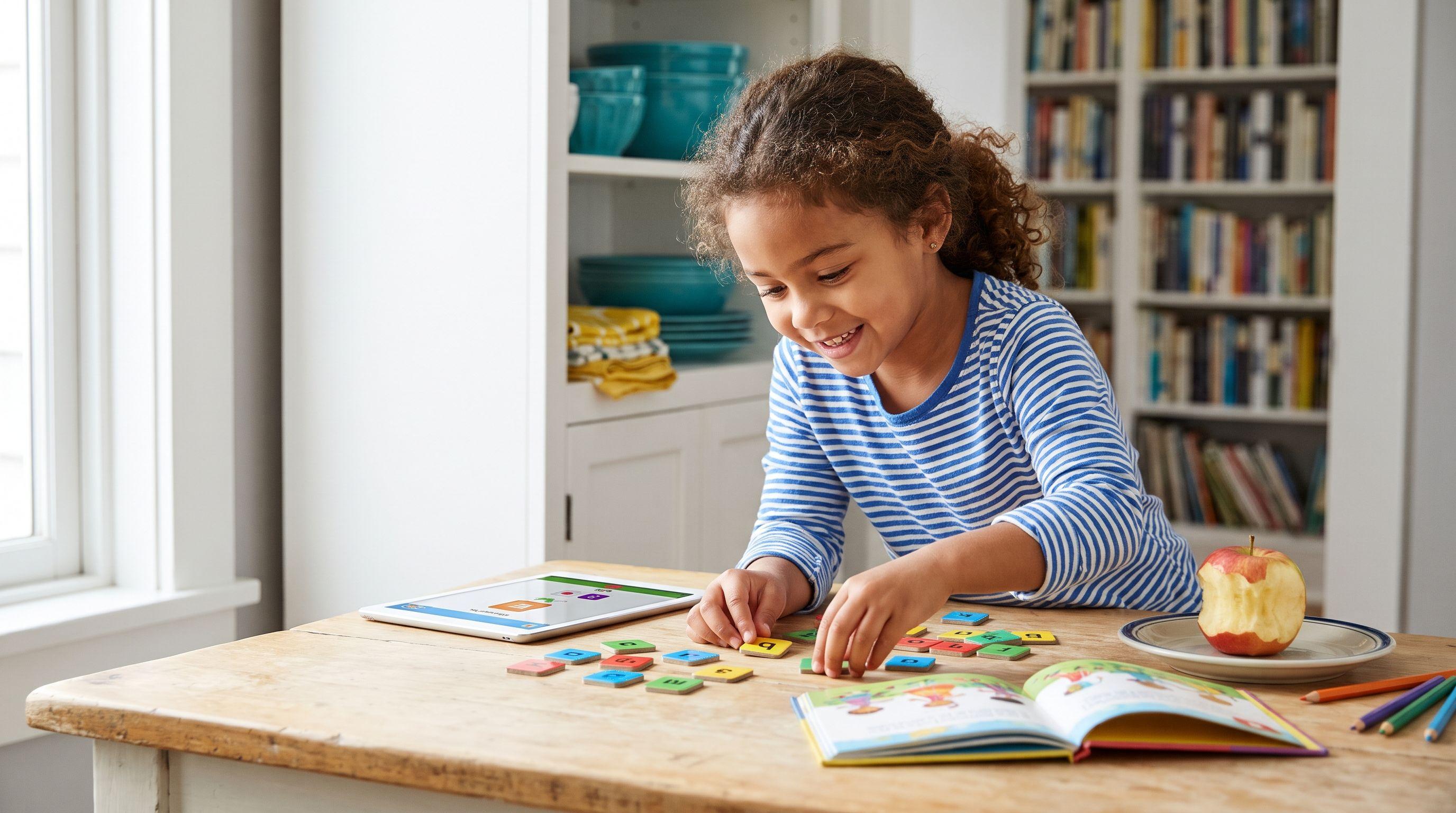
Eight-year-olds deserve reading practice that respects their age without skipping the sounds they still need. That's what I look for in the best multisensory phonics apps.
I'm Xia Brody, a homeschooling mom of four, ages 10, 7, 4 and 1. I've taught my two oldest to read, and I'm back in the letter-sound trenches with my 4-year-old. My shopping rule? Look past the animation and ask what the child actually has to read.
What You'll Learn
- Teach Your Kid to Read ranks first for adult-led decoding practice, with Nessy second for families considering a program aimed at ages 6–11.
- Screens aren't automatically multisensory instruction. Connect seeing letters, hearing sounds, saying them and building or writing words.
- Reading Eggs' Fast Phonics fits this age better than its main beginner strand, based on its stated ages 5–10.
- Start with a skill check, then choose an app that addresses the first shaky spelling pattern—not whichever subscription has the loudest celebration.
An eight-year-old who guesses ship from a picture needs help connecting letters to sounds. More tapping won't necessarily fix that. Neither will a game that rewards finishing without checking what the child said.
The best multisensory phonics apps make useful practice possible, but this isn't a list of six equivalent treatments. I include parent-led programs and phonics games because families need different levels of adult involvement; none earns a place simply by combining music with moving pictures.
The Verdict
How we ranked
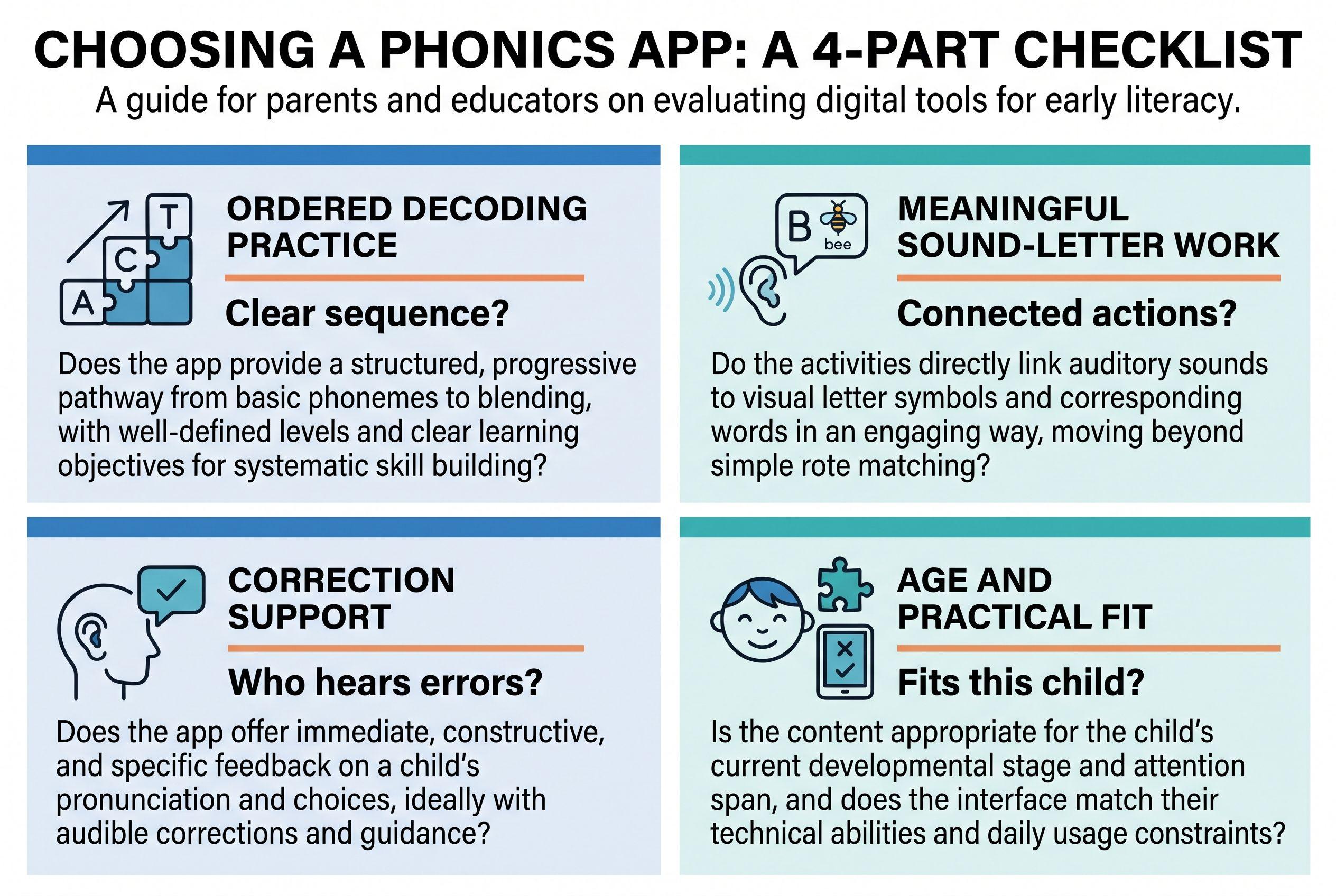
- Ordered decoding practice: a clear sequence helps you address gaps instead of guessing what comes next.
- Meaningful sound-and-letter work: children need to connect what they see, hear and say.
- Correction support: an adult needs a way to notice errors and respond.
- Age and practical fit: presentation, parent time and cost must suit an eight-year-old's household.
| Rank and app | What it teaches or describes itself as teaching | Price / pricing model | Best-for age |
|---|---|---|---|
| 1. Teach Your Kid to Read | Step-by-step, parent-led phonics and decoding | Lesson one free; then 7-day trial, US$9.95/month | My pick for an 8-year-old with foundational decoding gaps |
| 2. Nessy | Describes its Reading & Spelling program as structured reading and spelling support | Home/school subscription; from US$15.50/month (checked October 2026) | Stated ages 6–11 |
| 3. Reading.com | Describes itself as a parent-and-child reading program | Subscription; US$12.49/month (checked October 2026) | Stated ages 3–8 |
| 4. Reading Eggs | Describes a suite covering early reading, phonics and later reading skills | Subscription; US$13.99/month (checked October 2026), Reading & Math, up to 4 children | Fast Phonics: stated ages 5–10 |
| 5. Hooked on Phonics | Describes its approach around phonics lessons and reading practice | Subscription; plans US$23.96–US$31.99/month (checked October 2026) | Stated app ages 3–8 |
| 6. Teach Your Monster to Read | Describes a game covering letter sounds through early reading | Free on computers; one-time app purchase US$8.99 (checked October 2026) | Stated app ages 3–6; my conditional catch-up pick at 8 |
Full disclosure: I co-founded Teach Your Kid to Read, so weigh my #1 pick accordingly; the rest of the ranking is based on the criteria above.
Prices checked October 2026.
I recommend Teach Your Kid to Read for side-by-side decoding practice; start lesson one free. Lesson one is free, with no card and nothing to cancel. From lesson two, the whole program is a 7-day free trial, then US$9.95 a month.
The Tiger Truth: Don't Let Guessing Become the Routine
Only 31% of US fourth graders (ages 9–10) scored at or above Proficient in reading on the 2024 NAEP. That doesn't mean everyone below that threshold can't read. It does mean reading difficulties deserve attention, not a soothing subscription receipt.
The US National Reading Panel, in its 2000 report, found benefits from systematic phonics instruction. That supports teaching sound-spelling relationships explicitly; it doesn't establish that any app in this ranking works better than another.
Don't wait for repeated guessing to disappear by itself. A child who struggles to decode has less attention available for understanding the sentence, and increasingly demanding school reading makes that burden heavier. Ask for targeted help while you practice at home.
Ranked: The 6 Best Multisensory Phonics Apps
1. Teach Your Kid to Read — Best for Parent-Led Correction
My verdict: first choice when an eight-year-old needs an adult to hear the mistake, explain the correction and practice the same pattern again.
Teach Your Kid to Read follows 50 lessons in a fixed order. The sequence moves from single letter sounds through digraphs such as sh, ch and th, then blends, vowel teams, silent e, prefixes and suffixes. It also teaches a small set of common irregular words by sight, calling them “leap words.”
Lesson one teaches m, s, p and short a. Children hear the sounds individually, tap the matching letters, then blend and build am, map and sap. There's no story in that first lesson. From lesson two, each lesson includes a short story built from sounds taught so far.
That makes the sound-letter work concrete. For tactile phonics, I'd add physical letter tiles beside the screen and rebuild a lesson word afterward. That's my teaching suggestion, not an included app feature.
The parent sits alongside for about 15 minutes a day. The app teaches the adult what to listen for and how to correct a mistake while the child works. I value that more than a reward animation: an accurate tap doesn't prove an accurate spoken blend.
The limitation: it has no speech recognition; the parent listens and checks pronunciation. Choose something else if you need the app itself to hear and correct reading, or if your child must work alone.
For age fit, use the lessons page to inspect the sequence and jump to a relevant lesson. An eight-year-old doesn't need to repeat every familiar sound just because it's near the beginning. It runs on iPhone/iPad, Android and the web.
2. Nessy — Best Age-Range Match for Reading and Spelling
My verdict: the strongest next option to investigate when you want reading and spelling support within a stated ages 6–11 range.
Nessy describes its Reading & Spelling program around structured instruction and game-based practice. That gives it a clearer age fit for this reader than products aimed chiefly at preschool beginners.
For ordered practice, inspect where your child would begin and what the next lessons cover. For meaningful sound-letter work, ask your child to read practiced words aloud rather than treating successful screen responses as enough evidence.
I'd pair a multisensory reading app like this with brief spelling practice: say a word, separate its sounds and write the matching letters. Don't assume the program's appeal or dyslexia-related positioning guarantees the right support for your child's particular difficulty.
Choose it when: your child needs spelling alongside decoding; its stated ages 6–11 range is what puts it on my shortlist for an eight-year-old. That age fit isn't proof that it corrects spoken decoding errors. If errors persist, bring examples to a reading specialist rather than adding more game time.
3. Reading.com — Best Alternative for Learning Together
My verdict: a relevant comparison for families who want an adult involved rather than a child-only activity.
Reading.com describes itself as a parent-and-child reading program, with stated ages 3–8. I'd verify what the parent actually does in a lesson before subscribing: that description alone doesn't tell me how it teaches sound-spelling relationships or handles guessing.
Your eight-year-old sits at the upper end of its stated range. Before subscribing, examine both the teaching sequence and the presentation. Foundational content can fit an older beginner even when the surrounding style doesn't.
For multisensory practice, connect its screen work to spoken reading and a short writing task. Don't add movement just to keep hands busy; make the movement represent the sounds or spellings.
Choose it when: you want to learn together and its lesson guidance gives you a clear way to hear and correct decoding. That's my deciding condition—not just how polished the screen looks.
4. Reading Eggs — Best for Comparing Different Reading Strands
My verdict: investigate Fast Phonics first for an eight-year-old who needs phonics, rather than choosing the main beginner strand by name alone.
Reading Eggs describes a suite covering early reading, phonics and later reading skills. It lists different age ranges across its suite: Reading Eggs for ages 3–7, Fast Phonics for 5–10 and Eggspress for 7–13. Those distinctions matter. A broader reading activity isn't automatically the right response to weak decoding.
Against the ranking criteria, its main advantage is the choice of strands. The corresponding risk is choosing by chronological age instead of the actual skill gap.
Ask your child to read a few practiced words away from the screen. Can they recognize the spelling pattern without the game's prompts? That checks learning more usefully than asking whether they enjoyed the session.
Choose it when: you want to compare phonics support with broader reading options; Fast Phonics' stated ages 5–10 put it on my shortlist for this age. I'd rule out a strand that doesn't address your child's decoding gap, even if its age label fits. My Reading Eggs vs Hooked on Phonics vs HOMER comparison looks more closely at that buying decision.
5. Hooked on Phonics — Best for Families Considering a Lesson-and-Practice Routine
My verdict: worth comparing if you want a recognizable phonics-focused option and will check the exact subscription contents before paying.
Hooked on Phonics describes its approach through phonics lessons and reading practice. Its stated app ages 3–8 place an eight-year-old at the upper end, so presentation deserves the same scrutiny as teaching content.
For ordered decoding, inspect the starting point and progression. For correction, sit beside your child and listen; don't assume completing an activity means the child read every word accurately.
For tactile phonics, add a small whiteboard and have your child write one practiced word from dictation. Keep that extra task closely tied to the lesson rather than turning it into a separate spelling marathon.
Choose it when: you want a phonics lesson-and-practice routine and can listen alongside your child. I'd rule it out if the presentation puts your eight-year-old off practicing, even if the foundational content fits. Check what your chosen plan includes instead of assuming every subscription contains the same materials.
6. Teach Your Monster to Read — Best Computer-Based Supplement
My verdict: a budget-conscious supplementary option, not my first pick for a complete eight-year-old intervention plan.
Teach Your Monster to Read describes a game moving from letter sounds toward early reading. Computer access costs nothing, while the mobile app uses a one-time purchase model.
Its stated app ages are 3–6. I include it for an older beginner only if the child likes the presentation and needs those foundational skills. Don't insist that an eight-year-old enjoy a younger-looking activity because the price suits you.
For correction support, an adult still needs to check spoken reading outside the game's responses. For multisensory learning, add letter building or writing; moving a character around doesn't itself teach a spelling pattern.
Choose it when: you need extra beginner practice and your child welcomes the format. Keep targeted teaching at the center.
What Makes Practice Multisensory—and What Doesn't?
The best multisensory phonics apps connect actions to language. Seeing sh, hearing /sh/, saying it and writing the two letters connects several routes to the same spelling. Random background music doesn't.
Linnea Ehri's 2005 review, Learning to Read Words: Theory, Findings, and Issues, explains how connections between spellings and pronunciations support word learning. Orthographic mapping isn't memorizing a word's outline. Children need accurate links between sounds and letters.
Nor does “more senses” automatically mean better instruction. Keep the task clear enough that your child can concentrate on the sound-spelling relationship.
Orton-Gillingham is an instructional approach, not a synonym for any multisensory learning app. Don't infer that an app follows it because children tap, trace or hear narration. The best multisensory phonics apps still need a sensible sequence and useful correction.
Your Action Step: Choose the Gap Before the Subscription
For multisensory phonics for an 8 year old, I'd use this short buying-and-teaching routine:
- Find the first weak pattern. Use our free phonics skill check. Listen to the real and made-up words, mark responses honestly and note the first pattern that needs practice. Treat it as a starting point, not a diagnosis.
- Check the bigger picture. Read what to expect at age 8 alongside your child's actual reading. Age expectations give context; they don't explain why a child struggles.
- Choose one app. Match its sequence, adult involvement and presentation to that gap. Six subscriptions won't create six times the learning.
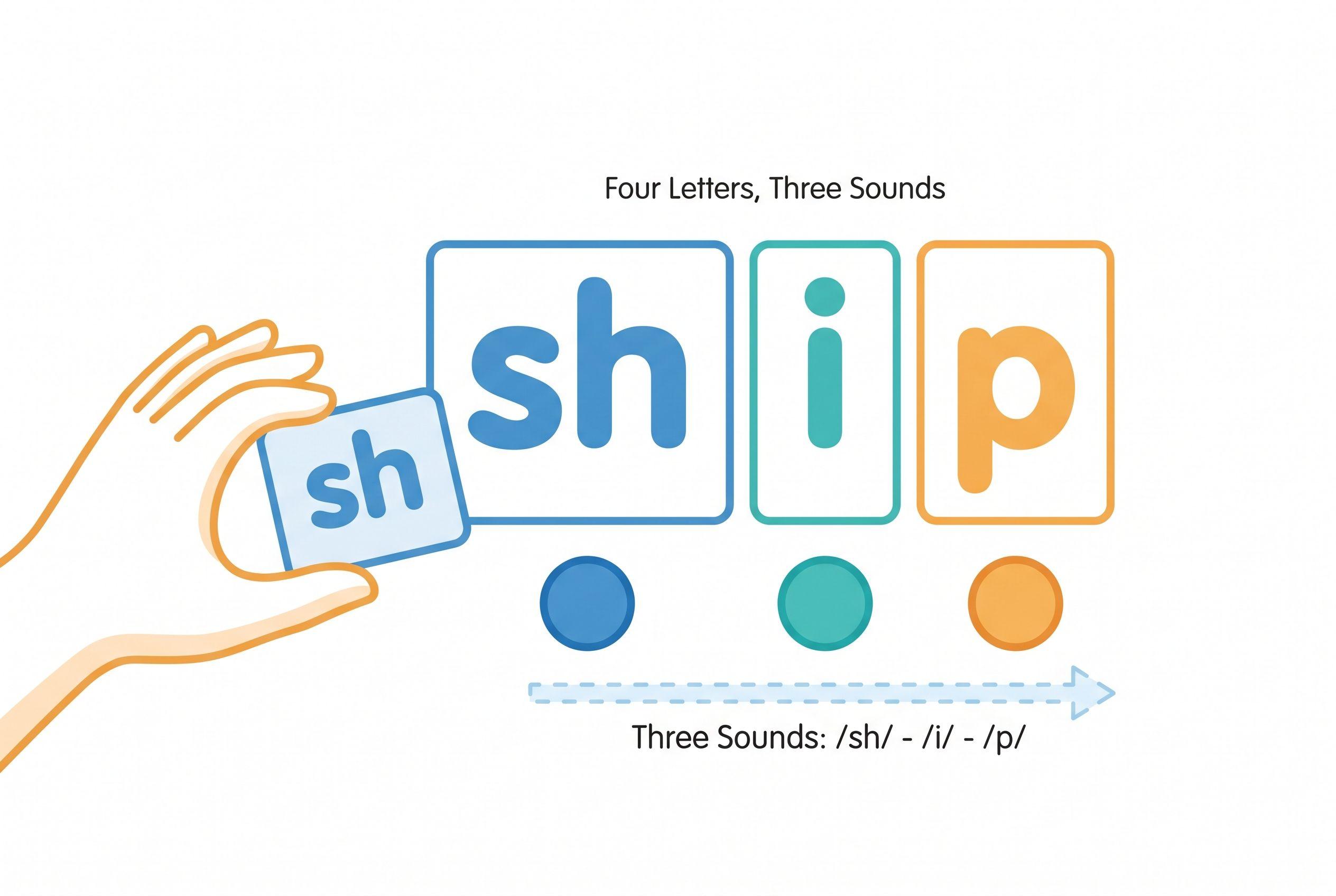
- Connect screen and hands. For ship, say the word, identify /sh/ /i/ /p/, then build it with sh, i and p. Point out that four letters represent three sounds.
- Correct without a guessing prompt. If your child says shop, point to i: “This spells /i/ here. Blend it again.” Don't ask which word matches the picture.
- Recheck away from the screen. Have your child read the practiced pattern on paper. If difficulties persist, contact the school or a qualified reading specialist and share specific examples.
Start with the opening lesson if your child needs those first sound-letter connections.
My Tiger Rule, “No Guessing,” means I teach the missing connection rather than demanding a mystery answer. “We Never Skip” means protecting a manageable routine, not pushing a sick or overwhelmed child through a lesson. Consistency needs judgment (and occasionally a snack).
If your child struggles with most simple words, my eight-year-old reading rescue plan can help you organize the next conversation with a teacher or specialist.
The best multisensory phonics apps support instruction; they don't replace your ears. If adult-led practice fits your household, lesson one is free.
FAQ
Which of the best multisensory phonics apps should I choose first?
I rank Teach Your Kid to Read first for adult-led decoding practice. Nessy deserves a closer look if you want reading and spelling support within a stated ages 6–11 range. Choose by skill gap and supervision needs, not the ranking alone.
Can an app provide tactile phonics?
A touchscreen gives movement and contact, but it doesn't replace every hands-on task. Add letter tiles or handwriting, and connect each action to a sound or spelling. Extra sensory activity without that connection can distract.
Are these apps all Orton-Gillingham programs?
No. This ranking doesn't classify these six apps as Orton-Gillingham programs or equivalent interventions. A multisensory description alone doesn't establish a particular teaching method or evidence of effectiveness.
Should an eight-year-old still practice basic phonics?
Yes, if those skills remain shaky. Teach the missing skill with age-respectful materials, and keep reading richer books aloud together. Persistent difficulty warrants targeted assessment and support—not an indefinite wait for an app to solve it.
From teachyourkidtoread.org/blog/6-best-multisensory-phonics-apps-for-an-8-year-old-ranked-2026
Part of these guides

Xia Brody
Co-Founder, Teach Your Kid to Read
Mom of 4 who has successfully taught her kids to read. Currently in the trenches with her 4-year-old while her two oldest (10 and 7) devour books on their own. Passionate about phonics-based methods and building a lifelong love of reading.
Related Articles
Best Orton-Gillingham Reading Apps: 6 Ranked for 2026
An OG label doesn't guarantee good reading instruction. Here's how six reading apps compare for a 7-year-old who needs stronger decoding skills—and where an app needs backup from a real person.
Read More →
Top 5 Reading Apps for an 8-Year-Old with Dyslexia and ADHD
An app needs to teach reading, not just keep an 8-year-old tapping. Here are five ranked options, their limits and a practical plan for matching phonics practice to your child's needs.
Read More →
Teach Your Monster to Read vs HOMER: 4 Apps Ranked (2026)
Teach Your Monster to Read offers focused phonics practice; HOMER offers a broader early-learning experience. Here's how they compare with two alternatives—and how I judge whether an app helps a child actually read.
Read More →