Best Reading App for Kindergartners in 2026 (6 Compared)
What You'll Learn
- Why most "top reading app" lists are useless — and the one question that separates a real phonics app from a glorified cartoon
- The 6 kindergarten reading apps I compared (spoiler: two of them made me angry)
- What recent research says about whether apps can even teach reading — and the specific conditions that make the difference between gains and wasted screen time
- The exact benchmarks your kindergartner should hit so you know if your app is working or just burning months
The Problem with "Best Reading App" Lists
Let's get something out of the way. Most "best reading app for kindergartners" roundups are glorified ad placements. The writer downloaded five apps, poked around for ten minutes, and ranked them based on how cute the animations were.
That's not what this is.
I'm Xia Brody. I've homeschooled four kids. My two oldest are fluent readers. My 4-year-old, Meilin, is currently in the thick of phonics instruction — she's blending CVC words and starting on consonant digraphs. And my 1-year-old is still eating board books, which is its own kind of literacy, I guess.
I compared these six apps on the question I ask about everything: Does it actually teach a kid to decode? Or does it just keep them quiet while you make dinner?
Because here's the thing — those are two very different outcomes. And only one of them matters.
The Tiger Truth: What Happens When You Pick the Wrong App
Only about one-third of 4th graders in the U.S. read at a proficient level on the NAEP. Let that sink in. Two out of three American fourth graders can't read at grade level.
And the kids who can't read by 3rd grade? They're four times more likely to never graduate from high school. That's from the Annie E. Casey Foundation's 2010 report (Early Warning! Why Reading by the End of Third Grade Matters), and the numbers haven't gotten better.
So when a parent tells me, "Oh, he plays his reading app for 30 minutes a day — he loves it!" I don't get relieved. I get nervous. Because "loves it" and "is learning from it" are often not the same thing.
Research on mobile literacy apps paints a grim picture. When expert panels of speech-language pathologists evaluate apps that claim to support phonics and phonological awareness, they consistently find that a huge chunk — sometimes fewer than one in three — actually meet quality standards for foundational reading instruction. (If you want the details, look for published app appraisal studies from teams like Furlong et al. out of Flinders University, who've done this kind of systematic review.)
That means if you grabbed a random phonics app from the App Store, you'd have a disturbingly low chance of picking something that actually teaches reading. Those odds are terrible.
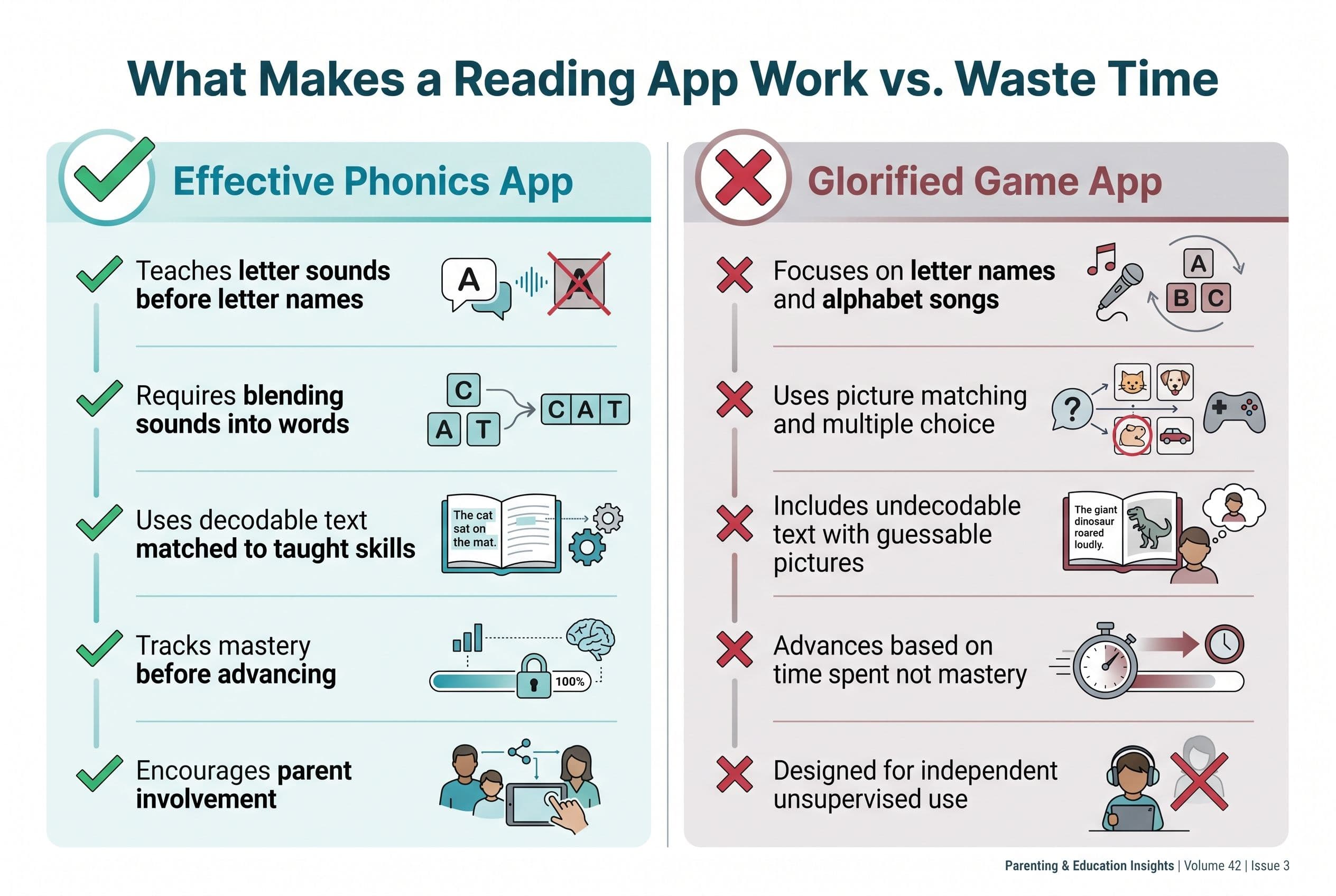
The kicker? A bad app doesn't just waste time. It can actively reinforce guessing habits — the exact opposite of what the Science of Reading teaches. If your kid taps pictures to "read" a story, or gets rewarded for choosing the right answer from three options without ever sounding out a word, they're learning to guess. And guessing is not reading.
Why I Even Believe Apps Can Work (The Research Is Surprisingly Strong)
Look, I'm a tiger mom. My instinct is to sit at the kitchen table with flashcards and demand perfection. And that's still the core of what I do.
But I'm also not going to ignore data.
Multiple meta-analyses — including large-scale reviews from Harvard's Center for Education Policy Research and from researchers like Silverman and colleagues — have found moderate positive effects when young kids use well-designed educational apps for reading. We're talking meaningful gains, especially for constrained skills like letter recognition and phonics decoding. Decoding — the actual skill of turning letters into sounds — tends to show some of the strongest improvements.
But here's the catch nobody talks about. Research consistently shows that children learn dramatically more from educational media when they use it with a parent or caregiver. The co-use effect is massive — some studies on interactive media and young children have found learning gains many times higher when an adult is actively involved.
So no, you can't hand your kid an iPad and call it homeschool. An app is a tool. It's a really good drill sergeant if you sit next to your kid and make sure they're actually sounding out words instead of tapping randomly. Without you? It's Candy Crush with letters.
The 6 Apps I Compared (And How I Compared Them)
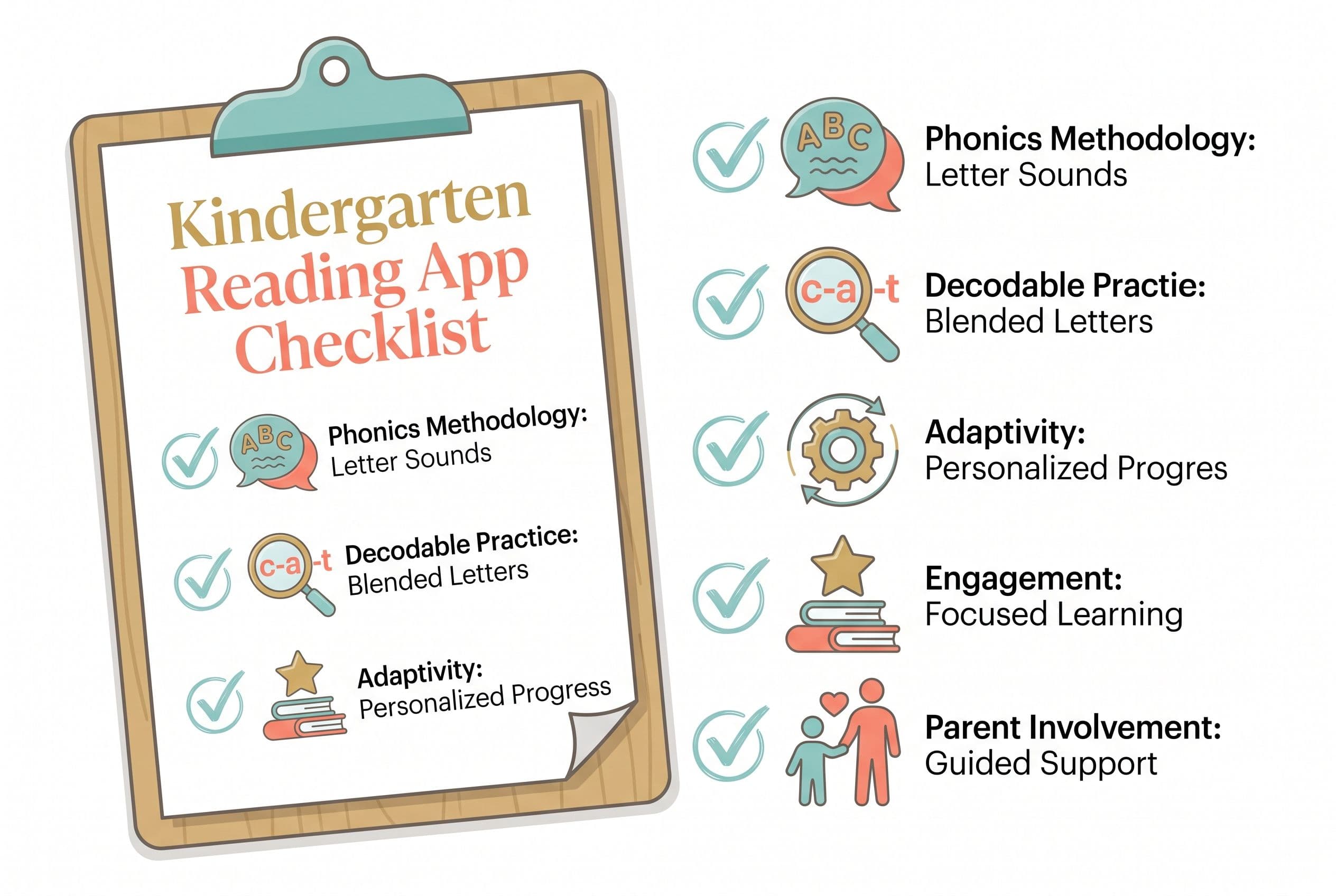
I compared each app's stated approach and features on five things:
- Phonics methodology — Does it teach systematic synthetic phonics? Letter sounds before letter names? Blending before guessing?
- Decodable practice — Does the kid read real decodable text, or just tap on pictures?
- Adaptivity — Does it adjust to the child's actual level, or does every kid get the same sequence?
- Engagement without distraction — Fun is fine. Reward systems that interrupt the reading? Not fine.
- Parent involvement — Does it tell me what my kid is learning and where they're struggling?
Here we go.
1. Teach Your Kid to Read — The One I'm Biased About (And Why)
Full disclosure: this is our app at start lesson one free. I co-founded TeachYourKidToRead.org. So obviously I'm biased.
But here's why I built it in the first place — because nothing else did what I needed.
Teach Your Kid to Read uses systematic synthetic phonics grounded in Orton-Gillingham principles. That means letter-sound correspondences are taught explicitly, in a specific sequence, with decodable reading at every stage. No guessing from pictures. No three-cueing. No "look at the first letter and think about what would make sense."
The app follows the same progression I use when I teach my own kids at the kitchen table:
- Phase 1: Individual letter sounds (grapheme-phoneme correspondences)
- Phase 2: Blending CVC words (cat, sit, mop)
- Phase 3: Consonant digraphs and blends (sh, th, bl, cr)
- Phase 4: Long vowel patterns, r-controlled vowels, diphthongs
- Phase 5: Multisyllabic words and morphological awareness
Every word the child reads is decodable based on what they've already been taught. There's no moment where the app asks them to "read" a word they don't have the phonics tools to decode.
Meilin uses this for 15 minutes a day, six days a week. We never skip. Not on birthdays, not on Christmas, not on vacation. Tiger rules.
Best for: Parents who want a structured, no-nonsense phonics progression they can follow alongside their kid.
2. HOMER
HOMER offers personalized reading journeys for ages 2-8 based on a child's interests and skill level. It covers phonics, spelling, fluency, and vocabulary. The personalization is genuinely good — it asks your kid what they're interested in (dinosaurs, princesses, trucks) and weaves those themes into the lessons.
What I liked: The phonics instruction is sequential. It teaches letter sounds, then blending, then word families. The decodable stories match the skills being taught.
What I didn't like: The reward system is heavy. Stickers, animations, celebrations — every few seconds. That can push a kid to tap faster to get to the rewards instead of actually listening to the sounds, so plan to sit next to them and slow them down. Which, honestly, you should be doing anyway.
HOMER also mixes in "whole word" recognition activities fairly early. I don't hate sight words — Linnea Ehri's phases of word reading development show that consolidated alphabetic readers do store words as wholes — but the timing matters. You can't skip the full alphabetic phase.
Best for: Kids who need high engagement and thematic variety to stay interested.
3. Reading Eggs
Reading Eggs uses colorful animations, songs, and a reward system to engage kids in self-paced phonics lessons. The adaptive technology adjusts difficulty as the child progresses.
Here's my issue: it's too game-like. There's so much going on visually that the actual phonics instruction gets buried.
That's a problem.
The phonics content itself is decent — it follows a logical scope and sequence. But the delivery wraps it in so much entertainment sugar that the medicine doesn't go down. The kid remembers the game, not the lesson.
The app sometimes lets kids tap through activities without demonstrating mastery. If a kid gets a letter sound wrong, it gives the answer and moves on. In a Teach Your Kid to Read session or an Orton-Gillingham lesson, a wrong answer means you go back and drill it again. You don't just show the answer.
Best for: Kids who absolutely refuse to engage with anything that doesn't look like a video game. It's better than nothing. But it's not my first choice.
4. Teach Your Monster to Read
This one gets recommended constantly in Facebook parenting groups, and I understand why. It's a phonics adventure game where kids create a monster avatar and travel through worlds unlocking letter sounds.
The phonics is legitimate. It teaches grapheme-phoneme correspondences in a systematic order. Kids practice blending sounds into words. The decodable word practice is solid.
My complaints: the monster-building and world-navigation eat into actual learning time.
Also, the app is better for phonics introduction than phonics mastery. It exposes kids to letter sounds but doesn't drill them to automaticity the way David Kilpatrick's orthographic mapping research (see Essentials of Assessing, Preventing, and Overcoming Reading Difficulties, 2015) says is necessary. Kilpatrick's work shows that kids need to process phoneme-grapheme connections so many times that word recognition becomes automatic — and a game-based approach rarely provides enough repetitions.
Best for: Kids who are just starting letter sounds and need a gentle, fun introduction before moving to more rigorous practice.
5. Khan Academy Kids
Khan Academy Kids is free. Completely free. No ads, no premium tier, no "upgrade to unlock the next level." That alone makes it remarkable.
The reading section includes interactive phonics games, letter tracing, and read-along stories. The content is solid and covers letter recognition, letter sounds, CVC blending, and sight words.
But it's a jack-of-all-trades app. It also teaches math, social-emotional skills, creative expression, and logic. Reading is one slice of a much bigger pie. So the phonics instruction isn't as deep or systematic as a dedicated reading app.
If your family is on a tight budget — and research from Common Sense Media consistently shows that children in lower-income households spend significantly more time with screen media — Khan Academy Kids is a no-brainer starting point. It's free, it's high-quality, and it teaches real phonics. It's just not enough phonics on its own.
Best for: Families on a budget who want a free, high-quality starting point. Pair it with a dedicated phonics app or curriculum for full coverage.
6. ABC Mouse (ABCmouse)
I included ABC Mouse because it's one of the most heavily advertised learn-to-read apps on the market. Parents see it everywhere.
Real talk — this one made me the most frustrated.
ABC Mouse has thousands of activities. Coloring pages, puzzles, songs, videos, games. It's an entire digital preschool. But the reading instruction is buried under layers of entertainment, and much of the "reading" content relies on whole-word memorization and picture-matching rather than systematic phonics.
A child can "read" a book inside ABC Mouse by tapping on highlighted words that are read aloud to them. That isn't decoding anything. It's listening and repeating. That's not reading. That's audio playback with extra steps.
The phonics lessons that do exist aren't presented in a clear, systematic scope and sequence. Kids can jump between activities, skip phonics entirely, and spend hours on the app without ever practicing blending.
Best for: Honestly? I'd skip this one for reading specifically. It might be fine for general preschool enrichment, but as a kindergarten reading app, it doesn't meet the bar.
My Rankings (Blunt and Final)
| Rank | App | Phonics Quality | Parent Involvement Needed | Cost |
|---|---|---|---|---|
| 1 | Teach Your Kid to Read | Systematic synthetic phonics (OG-based) | High (by design) | Free trial available |
| 2 | HOMER | Strong, with some whole-word elements | Medium-High | Subscription |
| 3 | Teach Your Monster to Read | Good introduction, limited mastery drilling | Medium | Free / Low cost |
| 4 | Khan Academy Kids | Solid but not deep enough alone | Medium | Free |
| 5 | Reading Eggs | Decent, buried under gamification | Medium | Subscription |
| 6 | ABC Mouse | Weak, not systematic | Low (and that's the problem) | Subscription |
The Playground Conversation That Changed a Mom's Mind
I was at a playground in Raleigh last fall when another mom — let's call her Sarah — told me her son's school had just switched from Lucy Calkins' Units of Study to a Science of Reading curriculum. North Carolina passed SB 387, the Excellent Public Schools Act, and schools were scrambling to comply.
Sarah was confused and kind of annoyed. "He was doing fine before," she said. Her son is in second grade.
I asked if he could read the word "splint."
She called him over. He stared at it on my phone screen. He could not read it.
Second grade. Can't decode a one-syllable word with a consonant blend.
I spent 20 minutes on that bench explaining why the switch was happening — Emily Hanford's APM Reports investigation that exposed how Balanced Literacy failed an entire generation of kids, the NAEP data showing reading scores dropped significantly between 2019 and 2022 (the largest decline in 30 years), and the neuroscience from Stanislas Dehaene's lab showing that humans aren't wired to read the way they're wired to speak — reading has to be explicitly taught.
Sarah texted me at 11 PM that night. She'd gone home and listened to the entire "Sold a Story" podcast. Her message: "I had no idea. Why didn't anyone tell us this sooner?"
I think about Sarah every time I see a parent choosing a reading app based on App Store reviews. The reviews tell you if the app is fun. They don't tell you if the app teaches phonics correctly. They don't tell you if your kid is actually learning to decode or just memorizing picture cues.
The app matters. But what the app teaches matters a thousand times more.
How to Know If Your App Is Actually Working
Don't just trust the in-app progress reports. Here's what I do.
Every two weeks, I pull out Kilpatrick's PAST (Phonological Awareness Screening Test). It takes about five minutes and tells me exactly where Meilin's phonological processing stands. If she's stalling, I know immediately.
For decoding benchmarks, I use DIBELS targets as rough guardrails. (Note: exact benchmarks vary by DIBELS edition — 8th Edition vs. Next — and by district, so always check your child's specific report. These are ballpark numbers to give you a sense of what to expect.)
- Mid-kindergarten: ~28+ correct letter sounds per minute on the Nonsense Word Fluency measure (NWF-CLS)
- End of kindergarten: ~40+ correct letter sounds per minute (NWF-CLS)
- End of first grade: Reading ~47+ words correct per minute on connected text (ORF-WCPM)
If your kid has been using a reading app for three months and can't hit roughly mid-kindergarten benchmarks, the app isn't working. Switch. Don't wait.
This is where I get aggressive. The "Wait and See" approach — "Oh, he'll catch up, boys develop later, let's give it another year" — is the most dangerous lie in education. Mississippi proved what happens when you don't wait. Their Literacy-Based Promotion Act of 2013 required evidence-based reading instruction and 3rd grade reading gates. They went from 49th to 21st in national reading scores in six years. Georgia followed suit with recent legislation allocating tens of millions for Science of Reading implementation statewide.
States are done waiting. You should be too.
The Screen Time Question (Because I Know You're Thinking It)
Yes, I limit screen time. Hard.
School districts across the country are tightening tech policies for young learners. Baltimore City Public Schools, for example, recently ended 1:1 device access for K-2 students and capped screen time at 15 minutes for K-1 and 20 minutes for 2nd graders. Several states have bills proposing daily caps on digital instruction for elementary students.
These policies exist because the research shows excessive screen time hurts young kids. I agree with the instinct.
But here's the flip side. Multiple randomized controlled trials have shown that kindergartners and preschoolers who use well-designed literacy apps at home — even for modest amounts of time — show significantly stronger letter knowledge and phonological awareness than control groups. The gains tend to increase with usage, up to a point.
One study found that just 30 minutes per week of structured, game-based literacy app practice produced measurable gains for preschoolers — regardless of family income, gender, or starting ability.
Thirty minutes per week. That's less than five minutes a day.
The answer isn't "no screens." The answer is the right screen, for the right amount of time, with a parent sitting right there.
I give Meilin 15 minutes of app-based phonics practice per day, six days a week. That's 90 minutes a week. She also gets 15-20 minutes of me drilling flashcards, reading decodable books together, and doing phonemic awareness games ("What word do you get if you take the /s/ off 'stop'?"). The app supplements the teaching. It doesn't replace me.
Your Action Plan: Picking and Using the Best Reading App for Your Kindergartner
Step 1: Check the phonics methodology. Open the app. Within the first five activities, does your child learn a letter sound (not just the letter name)? Does the app ask them to blend sounds together to make a word? If the answer to either question is no, delete it.
Step 2: Test for guessing. Watch your kid use the app for 10 minutes. Are they ever asked to look at a picture and guess the word? Are they tapping multiple-choice answers without sounding anything out? If yes, that's a guessing app, not a reading app.
Step 3: Sit with them. Co-use with a parent reliably increases how much kids learn from educational media — by a lot. Don't hand over the iPad and walk away. Sit next to your kid. When the app shows a word, ask them to say the sounds aloud before they tap. Make them do the work.
Step 4: Benchmark every two weeks. Use Kilpatrick's PAST test or informal checks: Can they segment the sounds in "map"? Can they blend /sh/ + /i/ + /p/ into "ship"? Can they read nonsense words like "tig" and "bom"? Nonsense words are a strong check for decoding — they prove your kid is sounding out, not memorizing.
Step 5: Set a timer. Stick to it. 15 minutes. That's it. When the timer goes off, the app goes away. Then pull out a decodable book — something from Flyleaf Publishing or High Noon Books. (Skip many popular leveled-reader systems like Fountas & Pinnell — they tend to encourage guessing from context and pictures rather than actual decoding, and the texts aren't fully decodable for beginning readers.) Read together. Out loud. Every single day.
FAQ
What's the best free reading app for kindergartners?
Khan Academy Kids is completely free — no ads, no premium paywall — and teaches legitimate phonics skills. It's the best free option available. However, it covers a lot of subjects beyond reading, so the phonics instruction isn't as deep as dedicated apps like Teach Your Kid to Read or HOMER. If budget is the main concern, start with Khan Academy Kids and supplement with free decodable readers (check Reading Rockets for printable options).
How much time should my kindergartner spend on a reading app each day?
Fifteen minutes, max. Research has shown meaningful gains from as little as 30 minutes per week of structured app usage — that's roughly 5 minutes a day. I do 15 minutes because Meilin's at the stage where she needs more decoding practice, but I'd never go over 20. Baltimore's new K-2 technology policy caps app time at 15 minutes for kindergartners, and that's a solid guideline. The rest of your reading instruction should be offline — flashcards, decodable books, and phonemic awareness games.
Can a reading app replace a phonics curriculum or tutor?
No. An app is a drill tool, not a teacher. Meta-analyses on educational app effectiveness consistently find that apps work best when they target specific constrained skills like letter recognition and phonics — not when they try to be a full curriculum. Use the app to reinforce what you're teaching. Pair it with a structured program like UFLI Foundations, Fundations, or Logic of English if you want a full curriculum. If your child is showing signs of reading difficulty, get a professional evaluation and consider programs like Barton Reading & Spelling or the Wilson Reading System — an app won't be enough.
My kid loves their reading app but still can't read. What's wrong?
The app is probably teaching recognition (matching, tapping, selecting) instead of decoding (sounding out). Pull your child away from the app and ask them to read a simple nonsense word like "bim" or "tup." If they can't do it, they're not decoding — they've been memorizing or guessing. Switch to an app that requires them to vocalize sounds and blend them together. Teach Your Kid to Read requires this at every step. Also give them Kilpatrick's PAST test to identify exactly where the phonological breakdown is happening.
Are reading apps effective for kids with dyslexia?
Apps alone are not sufficient for a child with dyslexia. The International Dyslexia Association recommends structured literacy instruction delivered by a trained professional — programs like Orton-Gillingham, Wilson Reading System, or Lindamood-Bell. However, apps built on systematic synthetic phonics principles can be a useful supplement for extra practice. Emerging research on AI-assisted reading tools suggests that tech-supported practice can improve oral reading fluency — but as a complement to professional intervention, not a replacement. If you suspect dyslexia, get an evaluation. Don't wait.
Part of these guides

Xia Brody
Co-Founder, Teach Your Kid to Read
Mom of 4 who has successfully taught her kids to read. Currently in the trenches with her 4-year-old while her two oldest (10 and 7) devour books on their own. Passionate about phonics-based methods and building a lifelong love of reading.
Related Articles
Reading Eggs vs ABCmouse for 5-Year-Olds: Best Pick
Choosing between Reading Eggs and ABCmouse? Here’s the no-fluff mom verdict on which app actually teaches a 5-year-old to read — and where both fall short.
Read More →
Reading Apps for 5-Year-Olds: 6 Skill-Level Picks
Most reading apps for 5-year-olds look cute. Too many teach guessing, tapping, and screen-zombie habits instead of real decoding. Here’s how I’d pick a phonics app by skill level if I were sitting at your kitchen table.
Read More →
ABCmouse vs Reading Eggs Cost: Which Is Cheaper in 2026?
ABCmouse and Reading Eggs both look cute. But price means nothing if your child is still guessing at words. Here’s the no-nonsense 2026 cost comparison parents actually need.
Read More →