Best Reading App for 1st Graders Behind: 7 Options Ranked for 2026
What You'll Learn
- Why most "top-rated" reading apps actually make struggling 1st graders worse — and the one design flaw to look for
- The specific phonics sequence a reading intervention app must follow (hint: if it skips blending drills, run)
- How to tell in 5 minutes whether your child's reading gap is a phonics problem or a phonological awareness problem — and why that distinction changes which app you need
- The 7 best reading apps for 1st graders behind in 2026, ranked by alignment with the Science of Reading
Your 1st Grader Can't Read. The App Store Won't Save Them — Unless You Pick the Right One.
Let's skip the part where I pretend this is easy to hear.
Your 1st grader is behind. Maybe the teacher mentioned it at conferences. Maybe you noticed your kid "reading" a book by memorizing the pattern on each page. Maybe they stare at the word jump and say play because there's a picture of a kid on a trampoline.
That's not reading. That's guessing. And guessing is what happens when kids haven't been taught the code.
So you do what every modern parent does — you search for an app. You type "best reading app for 1st grader behind" into Google and get a wall of listicles recommending apps with cartoon animals and five-star ratings. Half of them are glorified games. A third of them use the exact same sight-word-memorization approach that got your kid into this mess. And almost none of them teach systematic synthetic phonics — the method backed by decades of cognitive science.
I know because I've downloaded probably 40 of these apps over the last six years. I've tested them on my own kids. I've deleted most of them within a week.
Here's what actually works.
The Tiger Truth: What Happens If You Pick the Wrong App (or Do Nothing)
I need you to sit with this for a second.
The 2022 NAEP scores — that's the Nation's Report Card — showed only 33% of 4th graders read at a proficient level. Reading scores dropped 3 points since 2019, the largest decline in 30 years. One in three kids. Proficient. Not advanced — just proficient.
And here's the kicker: the Annie E. Casey Foundation's 2010 study found that kids who can't read by 3rd grade are four times more likely to drop out of high school. Four times.
Your 1st grader who's behind right now? They're not "a little slow." They're standing at the edge of what reading researchers call the 3rd Grade Cliff. In first and second grade, kids are learning to read. By third grade, they're reading to learn — science, social studies, math word problems, all of it. A kid who hits third grade without decoding skills doesn't just struggle in reading. They struggle in everything.
The average private reading intervention — a program like Lindamood-Bell or a Wilson Reading System tutor — costs $10,000 to $15,000 per year. Insurance doesn't cover it. Most schools don't have the staff to provide one-on-one Orton-Gillingham-based instruction. The waitlists for private evaluation alone can stretch six months.
So yeah. Picking the right reading app isn't a nice-to-have. For a lot of families, it's the most accessible intervention available right now.
But you have to pick the right one.
Why Most Reading Apps Fail Struggling 1st Graders
Here's what drives me crazy about the app market in 2026: most reading apps are designed for kids who are already learning to read normally. They reinforce. They practice. They quiz. That's fine if your kid is on track.
But if your 1st grader is behind, they don't need reinforcement. They need intervention. And intervention means systematic, explicit phonics instruction that follows the actual research.
Let me break down the three biggest problems I see:
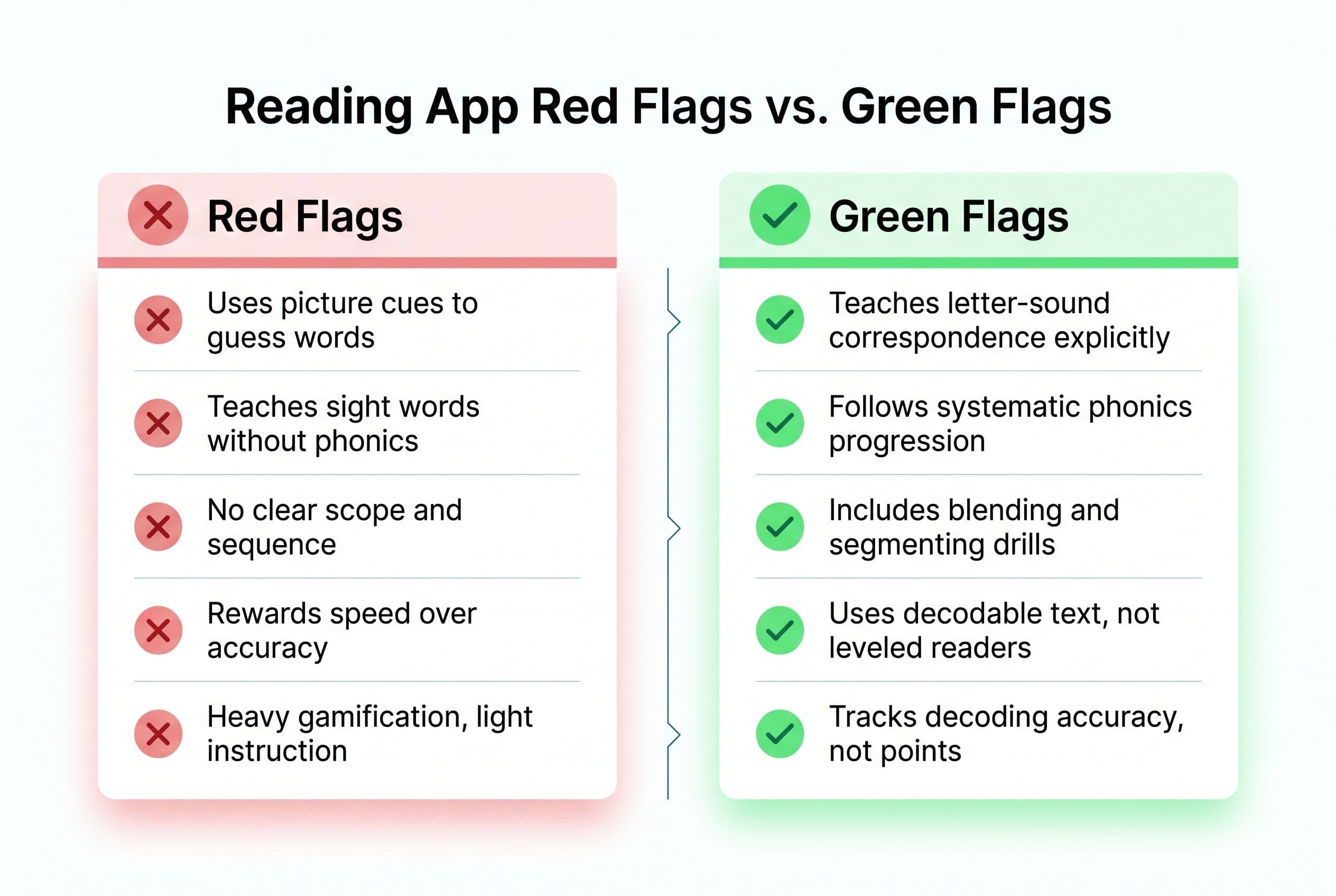
Problem #1: The app teaches sight words without phonics.
Flashing the word "said" on a screen 40 times and asking a kid to tap it isn't teaching reading. It's teaching memorization. David Kilpatrick's research on orthographic mapping — he laid this out in Equipped for Reading Success (2016) — shows that kids need strong phonemic awareness to "map" words into long-term memory. Without that phonemic foundation, they're just cramming words into short-term storage. They'll forget them by next week.
Problem #2: The app uses pictures as cues.
If your kid sees a picture of a dog next to the word "dog" and taps the right answer, they haven't read anything. They've identified a picture. Research on skilled reading — including eye-movement studies and decades of instructional research — shows that proficient readers rely primarily on print, not context or images, to identify words. Stanislas Dehaene's work in Reading in the Brain (2009) backs this up: the brain has to be trained to decode letter patterns. It doesn't happen naturally. Picture-heavy prompts encourage guessing instead of decoding, giving the brain a shortcut around the hard work of actually reading the word.
Problem #3: The app doesn't follow a scope and sequence.
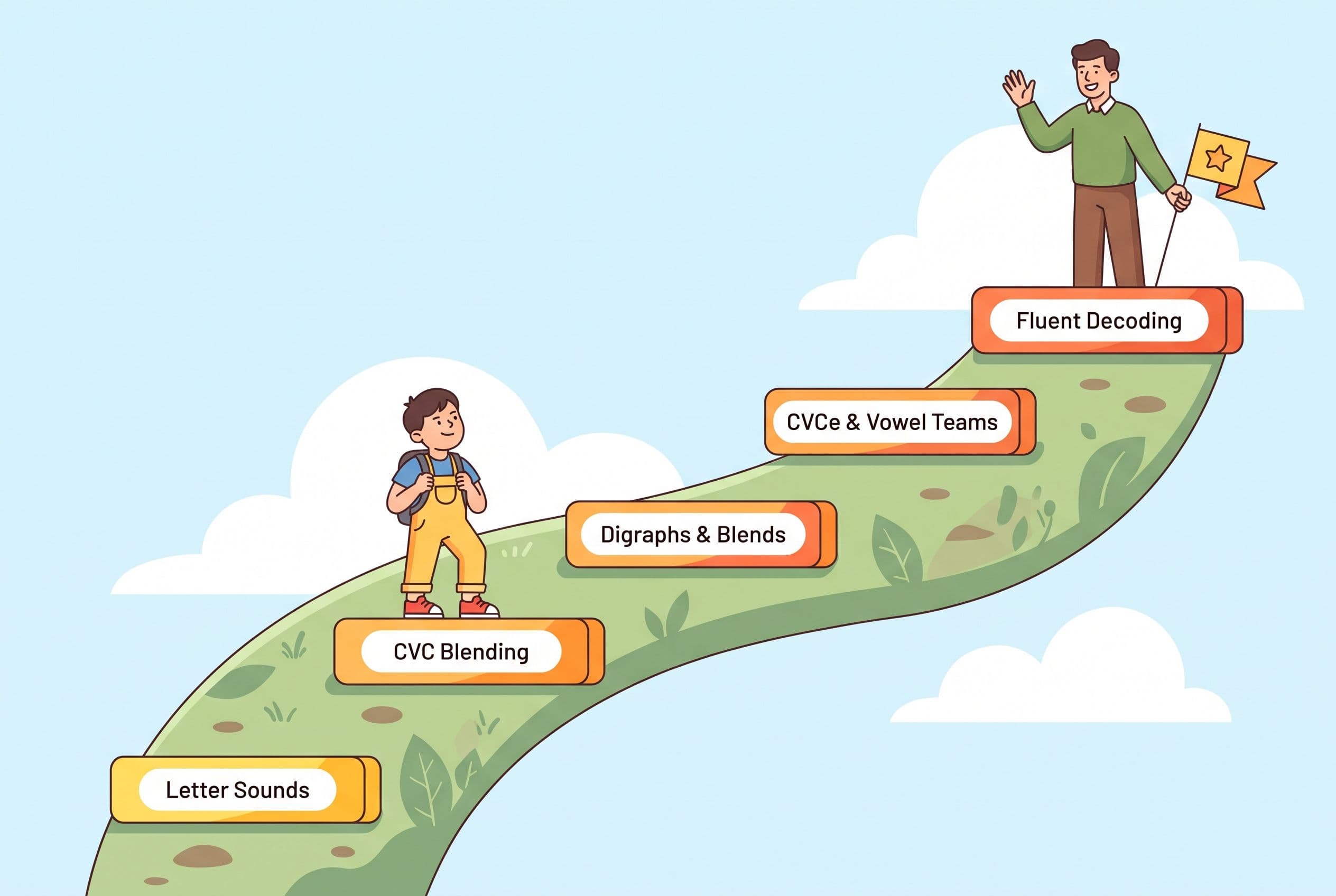
A struggling 1st grader doesn't need random phonics games. They need a structured, cumulative progression — with lots of review built in. One common and effective sequence looks like this: single consonants → short vowels → CVC blending → consonant digraphs → blends → CVCe words → vowel teams. The exact order can vary between good programs, but it should never be random or jumpy. If the app leaps from /s/ to sight words to long vowels in three screens, it's not following the kind of systematic progression that the research supports.
Real talk — I was at a playground in Raleigh last spring when a mom told me her kid's school had just switched from Lucy Calkins to a Science of Reading curriculum because of North Carolina's SB 387 — the Excellent Public Schools Act. She was confused and honestly a little annoyed. "He was doing fine before," she said. I asked if her son could read the word splint. He's in second grade. He could not. He stared at it and guessed "split." Close — but that's a guess, not decoding.
I spent twenty minutes on that playground bench explaining why the switch was happening — Emily Hanford's reporting in "Sold a Story" through APM Reports, the NAEP data, Dehaene's neuroscience showing the brain doesn't learn to read the way it learns to speak. She went home and listened to the Sold a Story podcast that night. Texted me at 11pm: "I had no idea. Why didn't anyone tell us this sooner?"
Nobody tells you. That's the problem. And the app store definitely isn't going to tell you. It's going to sell you a cartoon owl.
How to Tell What Your Struggling 1st Grader Actually Needs
Before I rank the apps, you need to figure out where the breakdown is. Not all struggling readers are struggling for the same reason.
Grab a piece of paper. Spend five minutes on this. It'll save you months.
Test 1: Letter-Sound Knowledge
Point to random letters (not in alphabetical order) and ask your kid to give you the sound, not the name. All 26 consonants and short vowels. If they can't give you at least 20 sounds accurately and quickly, that's your starting point. They need an app that drills grapheme-phoneme correspondence from the ground up.
Test 2: Blending
Say three separate sounds — /m/ /a/ /p/ — and ask your kid to blend them into a word. If they can't blend spoken sounds together, you've got a phonemic awareness problem — that's the phoneme-level layer of phonological awareness, and it sits below the level of phonics. (If your kid also struggles with rhyming or clapping syllables, the gap is even broader — that's phonological awareness at a wider level.) Kilpatrick's PAST (Phonological Awareness Screening Test) is the gold standard here — it takes about five minutes and tells you exactly where the breakdown is. You can find it in his book Equipped for Reading Success.
Test 3: CVC Decoding
Write five nonsense words: bim, taf, rud, pon, seg. Ask your kid to sound them out. If they can't decode nonsense words, they're not actually reading — they're memorizing. On DIBELS, typical students make strong gains in nonsense-word decoding by the end of kindergarten and into first grade. If your 1st grader can't decode simple CVC nonsense words, that's a clear decoding red flag.
These three tests tell you whether your kid needs:
- Foundation work (letter-sound mapping) → Apps that start at the very beginning
- Phonemic awareness and blending work → Apps with explicit blending drills and phoneme manipulation
- Decoding practice with decodable text → Apps that provide systematic phonics with connected reading
Most struggling 1st graders need all three. But knowing the weak spot helps you pick the app that hits hardest where it matters.
The 7 Best Reading Apps for 1st Graders Behind in 2026
I've ranked these based on three non-negotiable criteria:
- Does it use systematic synthetic phonics? (Not whole language. Not balanced literacy. Not "multi-cueing.")
- Does it follow a clear scope and sequence? (Structured progression, not random skill practice.)
- Does it work for kids who are behind, not just on track? (Intervention-level instruction, not enrichment.)
Let's go.
1. Teach Your Kid to Read — Best Overall for Struggling 1st Graders
I'm biased. I'll own that. This is our app. But I'm biased because I helped build it after watching my own kids go through the exact process that the research says works — and after watching dozens of other apps get it wrong.
Teach Your Kid to Read follows Orton-Gillingham principles with a systematic synthetic phonics approach. It starts with individual letter sounds, moves through CVC blending with explicit instruction (not just "tap the right word"), teaches digraphs and blends in the right order, and uses decodable text — not leveled readers stuffed with sight words and picture cues.
The bottom line: this app was built for the kid who's behind. Not the kid who's already reading and needs practice. The kid who stares at ship and says boat. The kid whose teacher says "he'll catch up" but you know in your gut that he won't.
It's the app I use with my own 4-year-old right now, and it's the one I recommend to every parent who asks me what to do when their 1st grader is struggling.
2. UFLI Foundations Virtual Teaching Resource
UFLI Foundations out of the University of Florida is a legit Science of Reading curriculum. Their virtual teaching resources follow the same scope and sequence as the in-person program. It's not technically an "app" in the App Store sense — it's more of a structured lesson plan with digital components. But if you're willing to sit with your kid and deliver the lessons yourself, it's excellent. The phonics sequence is rock-solid and it includes explicit blending routines.
The downside? It requires significant parent involvement. You're basically homeschooling a reading lesson every day. For some parents, that's a non-starter.
3. Explode the Code Online
The print version of Explode the Code has been around for decades and it's a staple in Orton-Gillingham-based tutoring. The online version preserves the systematic phonics approach — consonant-vowel-consonant patterns, minimal sight words, lots of decoding practice. It's not flashy. There are no cartoon rewards or dance parties. Your kid will find it boring compared to whatever game they play on their iPad.
Good. Boring means they're doing the work.
4. Bob Books Reading Magic
Bob Books are the decodable readers I started my oldest on seven years ago. The app version follows the same progression — simple CVC words, minimal illustrations (on purpose — no picture guessing), and a systematic build from short vowels to blends. It's limited in scope — it won't take your kid all the way to fluent reading — but as a starting intervention for a 1st grader who can't decode basic CVC words, it's a solid entry point.
5. Reading Horizons Elevate (Student Edition)
Reading Horizons uses a phonics-based method with what they call "42 sounds of English" and a marking system for vowel patterns. It's more structured than most apps and includes multisensory elements — kids mark vowels, trace patterns, and build words before reading them. The scope and sequence is solid. It's used in some school intervention programs.
The interface feels more "school software" than "fun app," which is fine by me. I don't need my struggling reader to be entertained. I need them to learn the code.
6. Homer (with major caveats)
Homer gets recommended everywhere and I need to be honest: parts of it are good and parts of it are exactly the kind of thing I warn parents about. The phonics pathway is decent — it teaches letter-sound correspondence and blending in a structured way. But it also mixes in a lot of "story time" content with picture-heavy books that encourage the guessing strategy. If you use Homer, stick to the phonics-specific lessons and skip the stories until your kid can actually decode. Don't let the cute interface fool you into thinking exposure to books equals reading instruction.
7. Phonics Hero
Australian-made, based on synthetic phonics (the UK and Australia are years ahead of us on this, honestly). It follows a clear phonics progression, uses decodable sentences, and doesn't rely on picture cues. The interface is a little dated compared to the big-budget apps, but the methodology is sound. It aligns well with what Linnea Ehri's research calls the "full alphabetic phase" of word reading — where kids decode words using complete grapheme-phoneme mapping, not partial cues.
What I Tell Every Parent Who Asks
Look, an app is a tool. It's not a miracle.
The best reading app for a 1st grader behind is one that uses systematic synthetic phonics, follows a scope and sequence, doesn't let your kid guess from pictures, and provides enough repetition to build automaticity. Teach Your Kid to Read checks every one of those boxes, which is why it's my top pick.
But the app alone won't do it. You have to show up. Every day. Even on days your kid cries. Even on days you want to cry.
When I was teaching my oldest to read, there were sessions at the kitchen table where she'd stare at the word frog for thirty seconds, tears in her eyes, and I'd sit there thinking, "Am I pushing too hard?" But I didn't let her guess. I didn't let her look at the picture. I said, "Sound it out. You know these sounds." And she did. /f/ /r/ /ŏ/ /g/. Frog. The smile on her face when she got it — that smile was earned.
That's what real reading instruction looks like. Not a cartoon celebration after tapping the right picture. An actual child decoding an actual word for the first time. That's the victory.
Your Action Plan: What to Do This Week
Here's your step-by-step. No excuses.
Step 1: Assess where your kid is right now. Use the three tests I described above (letter sounds, blending, CVC decoding). Write down what they can and can't do. Be honest.
Step 2: Download Teach Your Kid to Read. Start at the level that matches your kid's assessment — don't skip ahead because you think they "should" be further along. Start where they actually are.
Step 3: Commit to 15 minutes a day. Every day. My Tiger Rule is "We Never Skip." Birthdays. Christmas. Vacation. Fifteen minutes. That's it. If you can scroll Instagram for 15 minutes (you can, I've seen your screen time), you can sit with your kid and practice phonics.
Step 4: Track progress weekly. Every Friday, test five new nonsense words. Are they decoding more accurately? Faster? Track it in a notebook. You'll see progress in 2-3 weeks if you're consistent.
Step 5: When they're ready for connected text, use decodable readers — NOT leveled readers. Flyleaf Publishing and High Noon Books make decodable readers that match phonics progression. Fountas & Pinnell leveled readers are everywhere but they're whole-language aligned — they're full of words kids can't actually decode yet. Stay away from those.
The 40+ states that have now passed Science of Reading legislation since 2019 are proof that this approach works at scale. Mississippi showed some of the biggest 4th-grade NAEP reading gains in the country after major literacy reforms — including its Literacy-Based Promotion Act, intensive teacher training, and coaching supports. It works in classrooms. It works in tutoring. And it works on an app, if the app is built right.
Your kid isn't broken. They just haven't been taught the code yet.
Teach them.
Frequently Asked Questions
How do I know if my 1st grader is "behind" or just developing at their own pace?
Here's a benchmark: by the end of 1st grade, your child should be able to decode unfamiliar CVC and CVCe words, read simple decodable sentences fluently, and recognize high-frequency irregular words (like said, the, was). If they can't decode a nonsense word like bim or taf by mid-first grade, they're behind — not developing at their own pace. The "Wait and See" approach is one of the most damaging myths in education. Reading Rockets has grade-level benchmarks you can check against, but trust your gut. If something feels off, act now.
Can an app really replace a reading tutor for a struggling 1st grader?
An app built on systematic synthetic phonics can deliver the same method a qualified Orton-Gillingham tutor uses — explicit letter-sound instruction, structured blending, decodable text practice. What it can't do is diagnose a learning disability like dyslexia or adjust on the fly the way a trained human can. If your child has been using a research-based app consistently for 8-12 weeks with no measurable progress, that's a red flag that warrants professional evaluation. The International Dyslexia Association has a provider directory. But for the majority of kids who are behind because they simply weren't taught phonics properly? A good app absolutely fills the gap.
How long will it take for my 1st grader to catch up?
Every kid is different and I refuse to make a false promise here. But I can tell you that with 15 minutes of daily, systematic phonics practice, most kids show measurable improvement in decoding accuracy within 3-4 weeks. Catching up to grade-level fluency typically takes 3-6 months of consistent work. The key word is consistent. Skipping days, skipping weekends, "taking a break" over the summer — that's how kids fall further behind. The research from the NICHD under Reid Lyon showed that early, intensive intervention has the highest success rate. The earlier you start, the faster they close the gap.
My kid's school uses Fountas & Pinnell leveled readers. Should I be worried?
Yes. Fountas & Pinnell levels are based on a whole-language framework that encourages kids to use picture cues, sentence structure, and context to "figure out" words — rather than actually decoding them. Mark Seidenberg called this out in Language at the Speed of Sight (2017): the three-cueing system has no basis in reading science. If your school uses F&P levels, supplement at home with decodable readers and a phonics-based app. Your kid needs to learn to decode, not guess.
Are free reading apps as effective as paid ones?
Some are. UFLI Foundations offers free lesson resources that are excellent. But most free apps in the App Store are ad-supported, which means they're designed to keep your kid tapping — not learning. The gamification in free apps often rewards speed and correct guesses rather than accurate decoding. A paid app that follows systematic phonics and doesn't use ads or picture cues is worth every penny. Think of it this way: a year of a good reading app costs less than one hour with a private Orton-Gillingham tutor, who typically charges $80-$150 per session.
Part of these guides

Xia Brody
Co-Founder, Teach Your Kid to Read
Mom of 4 who has successfully taught her kids to read. Currently in the trenches with her 4-year-old while her two oldest (10 and 7) devour books on their own. Passionate about phonics-based methods and building a lifelong love of reading.
Related Articles
My First Grader Can't Read? The 90-Day Catch-Up Plan
If your 6-year-old is guessing at words, memorizing books, or melting down at the page, you don't have a motivation problem — you have an instruction problem. Here's the exact 90-day catch-up plan I'd run, starting tonight.
Read More →
Best Reading App for 4th Graders Behind + Free Plan
Your 9-year-old is guessing at words and hiding books in his backpack. Most reading apps are built for 5-year-olds and will waste his time. Here's what a real 4th grade reading intervention app has to do — and the exact daily plan I use.
Read More →
Best Reading App for 3rd Graders Behind in 2026: Full List + Free Trial
Your 3rd grader is behind in reading and you're running out of time. Here's what the science says about which reading apps actually work — and which ones are expensive digital babysitters dressed up as 'learning tools.'
Read More →