Best Phonics App for Letter Sounds: 6 Picks for 2026
What You'll Learn
- Why alphabet-song success can hide a serious letter-sound gap
- Which app teaches real phonics instead of picture guessing
- The one feature that makes a letter sounds app worth your kid’s screen time
- How to test whether your child actually knows sounds or just memorized cute animations
Reality Check
Your child can sing the alphabet and still not understand how reading works yet.
Ask them, “What sound does m make?” If they stare at you like you just asked them to file taxes, don’t panic and start ordering 14 workbooks at midnight. You don’t have a diagnosis. You have a teaching starting point. Cute singer? Yes. Reading-code mastery? Not yet.
I learned this the hard way with my own 3-year-old. She sang A-B-C-D all day long, dramatic toddler vibrato and everything, but when I pointed at B and asked for the sound, I got a blank stare. Total system shutdown. That’s when I realized alphabet names and grapheme-phoneme correspondence are different skills.
The Verdict: Best Phonics App for Letter Sounds in 2026
| Rank | App | What it teaches | Price | Best for |
|---|---|---|---|---|
| #1 | Teach Your Kid to Read | Systematic synthetic phonics, letter sounds, blending, no guessing | Lesson one free with no card and nothing to cancel; from lesson two, 7-day free trial, then US$9.95/month | Ages 4-7 |
| #2 | ReadingDoctor® Online | Letter-sound knowledge and decoding practice | Paid program, pricing varies | Ages 4-8, including struggling readers |
| #3 | GraphoGame | Game-based phonics with letter-sound mapping | Often free or low-cost by region | Ages 4-7 |
| #4 | PLD 2P Read 1d | Structured Synthetic Phonics-aligned activities | Paid app | Ages 4-6 |
| #5 | Teach Your Monster to Read | Early phonics and phonemic awareness through games | Often free on web, paid app versions | Ages 4-7 |
| #6 | Endless Alphabet | Vocabulary and letter play, but weak for decoding | Paid app | Ages 3-5 for exposure, not reading instruction |
If you want my straight answer, Teach Your Kid to Read is the best phonics app for letter sounds because it teaches sounds in a planned order, forces blending, and doesn’t train kids to guess from pictures. You can start lesson one free — lesson one is free with no card and nothing to cancel; from lesson two the whole program is a 7-day free trial, then US$9.95 a month.
Tiger Truth: Bad Apps Waste the Window
Look, I’m not anti-screen. I’m anti-junk screen.
Common Sense Media surveys have shown a huge jump in young children’s access to mobile devices and time spent with mobile media across the 2010s. Translation: the screen is already in your house. The question is whether it teaches reading or babysits your child with dancing letters.
Furlong, Serry, and colleagues’ 2025/2026 systematic appraisal of 309 phonics and phonological awareness apps found that only 27.5% earned expert recommendation. The common problems? Lack of explicit instruction in 81% of apps, inaccurate phoneme modeling, and random sequencing. Translation: most alphabet sounds app options look educational but don’t teach the foundation.
And yes, this matters early. The National Reading Panel report in 2000 found that systematic phonics instruction produces significant reading benefits, especially when children receive it early. Linnea Ehri’s 2005 work on phases of word reading also explains why kids must connect letters to sounds before they can build automatic word recognition.
No guessing. No “look at the picture.” No vibes.
The Deep Dive: 6 Phonics Apps Compared
1. Teach Your Kid to Read: Best Overall Phonics App for Beginners
Teach Your Kid to Read wins because it treats letter sounds as the entry point to decoding, not as a cute preschool side quest.
A good phonics app for beginners needs three things:
- It teaches sounds explicitly.
- It follows a planned sequence.
- It makes the child blend sounds into words.
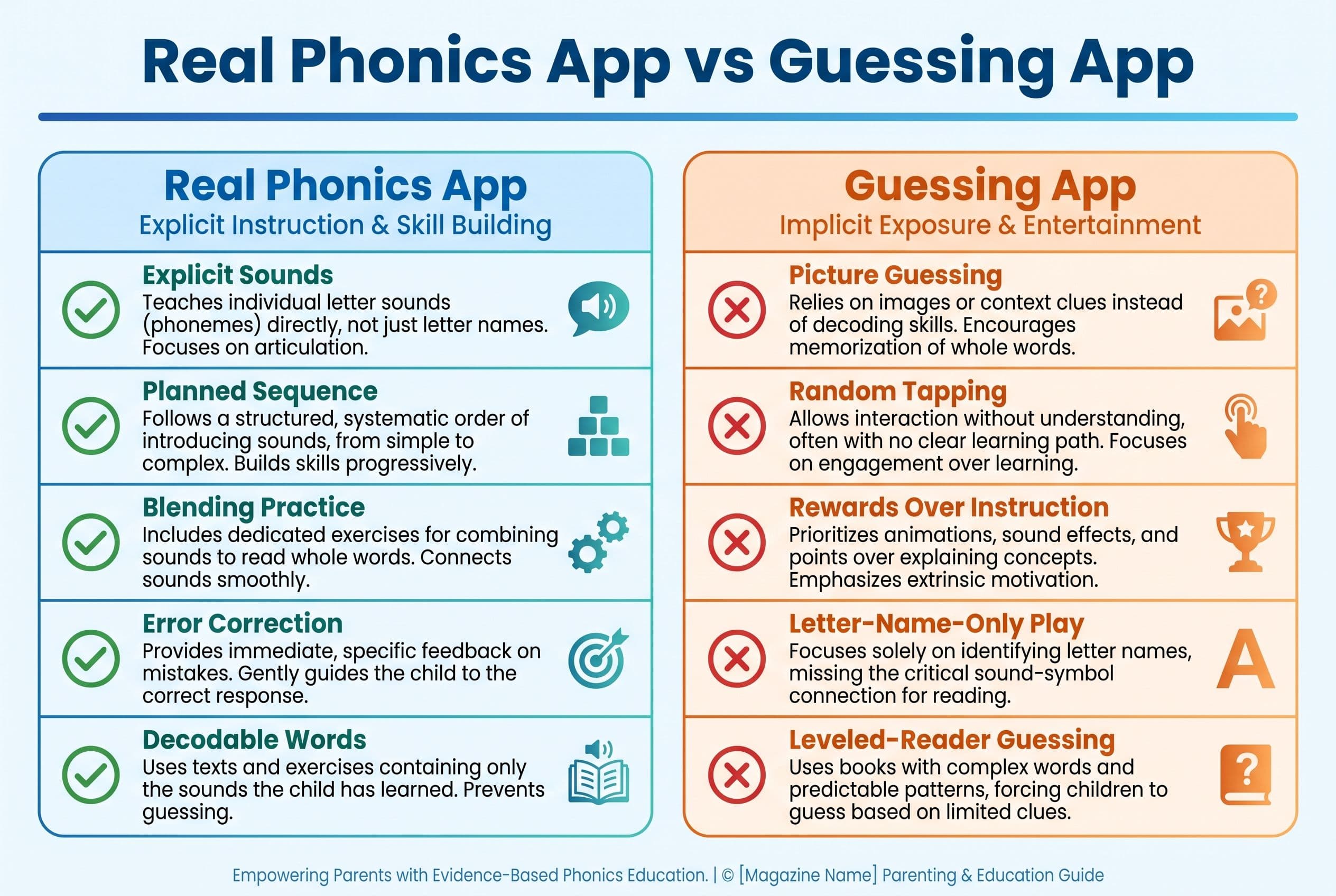
That sounds obvious, right? Apparently not. Plenty of apps throw animated letters on a screen, reward random tapping, and call it literacy. Drives me bonkers.
In our house, we ditched the alphabet song approach and started with just 5 letters at a time — sounds first, names later. By the end of month one, my daughter knew 8 letter sounds cold. Not “kind of knows them if she’s in the mood.” Cold. Names came later for us, and honestly, they didn’t matter much at the start.
Teach Your Kid to Read follows that same no-nonsense logic. It focuses on letter sounds, blending, and the sound-to-print connection. That makes it a strong learn letter sounds app for parents who don’t want to become literacy professors at 9 p.m. after dishes.
The real deal here is structure. Your child doesn’t hop randomly from s to q to a sight-word song about unicorns. They build mastery in small bites. That matters because orthographic mapping — the process David Kilpatrick explained in Equipped for Reading Success (2016) — depends on a child linking sounds in spoken words to letters in printed words.
What disqualifies other apps? Too many let the child succeed without reading. They can tap the shiny object, memorize the game path, or infer from the picture. Teach Your Kid to Read keeps the task focused: hear the sound, match the letter, blend the word.
Best for: ages 4-7, especially parents who want a clean phonics path without guessing habits.
2. ReadingDoctor® Online: Best for Targeted Letter-Sound Practice
ReadingDoctor® Online Letter-Sound Knowledge Activities earns a high spot because it takes letter-sound knowledge seriously. It doesn’t treat phonics like confetti.
This program has appeared in research and practice discussions around children with reading difficulties, and it focuses on explicit digital phonics instruction. If your child confuses similar sounds or can’t retain letter-sound pairs, this type of targeted work helps.
I like that it lines up with what we see in structured literacy programs: direct teaching, practice, review. That’s the part I care about most — clear sequence, lots of correct practice, no guessing.
The downside? Some parents may find it less warm and simple than an app built for daily home use. It can feel more intervention-style than “let’s do our 10 minutes before lunch.” That’s not bad. It just depends on your child.
Best for: ages 4-8, especially kids who need extra practice with sound-symbol links.
3. GraphoGame: Best Research-Backed Game Option
GraphoGame has a stronger research base than many shiny apps in the app store. McTigue and colleagues’ 2019 review found that outcomes varied by skill, language, and implementation, with stronger support for some foundational skills than for broad word-reading gains.
That’s still not nothing.
GraphoGame focuses on matching sounds to letters and letter groups. It gives repeated practice, which kids need. Reading isn’t magic. It’s practice plus correct instruction, repeated until the brain builds the pathway.
Here’s the kicker: game-based doesn’t bother me when the game supports the instruction. I only get cranky when rewards replace instruction. If your child spends 7 minutes dressing a monster and 40 seconds hearing letter sounds, that’s not a phonics app. That’s digital dress-up with a literacy sticker slapped on it.
GraphoGame stays closer to the phonics task. It can be a solid alphabet sounds app for kids who need repetition but resist plain drills, especially when an adult checks that the child is actually hearing and using the sounds.
Best for: ages 4-7, especially kids who like game formats but still need real sound-letter practice.
4. PLD 2P Read 1d: Best Structured Synthetic Phonics Pick
PLD 2P Read 1d deserves attention because Furlong, Serry, and colleagues identified it as a top-performing phonics and phonological awareness app in their systematic study. It aligns with Structured Synthetic Phonics principles, which means it teaches children to blend sounds into words in a planned sequence.
Structured Synthetic Phonics is not fancy. It’s just the grown-up term for “teach the code clearly, then make the child use it.” Hands down, that beats guessing.
This app can work well for parents who want a more school-like sequence. It may not feel as parent-friendly as Teach Your Kid to Read, but the instructional bones are strong.
If your child already knows a few sounds and needs blending practice, PLD 2P Read 1d can help. If your child is brand new and melts down when an app feels too formal, start gentler.
Best for: ages 4-6, especially children ready for structured blending work.
5. Teach Your Monster to Read: Best for Motivated Game Lovers
Teach Your Monster to Read is popular for a reason. Kids like it. Parents like that it feels less like nagging.
It introduces phonics, early decoding, and phonemic awareness through a game world. Some research discussions mention it as a technology-based intervention with positive impact on phonemic awareness growth. That’s good.
But I’ll be blunt: you still need to watch for whether your child learns the sounds or learns the game.
Sit nearby for the first few sessions. Ask, “What sound did that letter make?” If your child can answer without the app helping, great. If they can only win by tapping around until something works, pause and reteach.
The U.S. Department of Education and U.S. Department of Health and Human Services 2016 Early Learning and Educational Technology Policy Brief said technology works best for young children when adults interact with them during use. That’s US policy guidance, but the parenting point travels: co-viewing beats parking your kid with an iPad and hoping literacy happens.
Best for: ages 4-7, especially kids who need motivation and tolerate game worlds well.
6. Endless Alphabet: Best for Letter Exposure, Not Reading Instruction
Endless Alphabet is cute. I’ll give it that. The animations are playful, and kids may pick up vocabulary.
But cute doesn’t equal decoding.
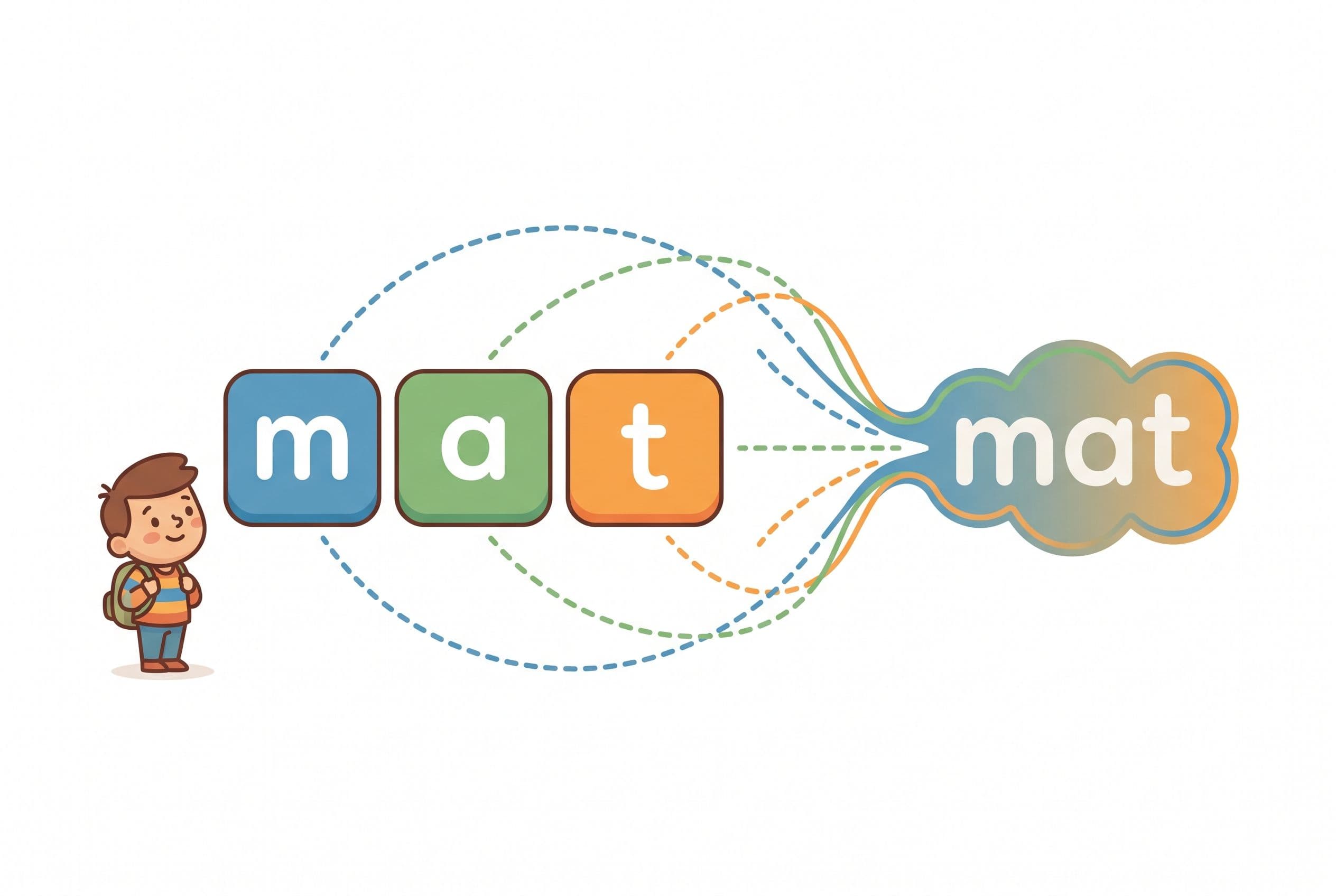
If you want the best phonics app for letter sounds, this one doesn’t make my top instructional picks. It’s more of a vocabulary and letter-play app than a true phonics app for beginners. Your child may drag letters into place and laugh at monsters, but that doesn’t mean they can hear /m/, identify m, and blend m-a-t into “mat.”
This is the “fun trap” parents fall into. The app looks educational. The child looks busy. Everyone feels productive. Then kindergarten (age 5) hits, and the child still can’t decode CVC words they’ve been taught to read.
Use it as extra exposure if you already own it. Don’t make it your main learn letter sounds app.
Best for: ages 3-5 for playful vocabulary exposure, not phonics mastery.
What Makes a Letter Sounds App Worth Using?
A strong letter sounds app teaches the reading code. It doesn’t just entertain.
Use this quick checklist:
- Explicit sound modeling: The app says /m/, not “muh.” That extra schwa sound makes blending harder.
- Planned sequence: It teaches a small set of sounds, then reviews them.
- Blending practice: Kids use sounds to read words like sat, map, and tip.
- No picture guessing: Pictures can support meaning, but they can’t replace decoding.
- Fast feedback: The app corrects errors right away.
- Parent visibility: You can tell what your child practiced and whether they got it right.
Silverman and colleagues’ 2025 meta-analysis in Review of Educational Research reviewed 119 studies and found that educational technology improved decoding, language comprehension, reading comprehension, and writing, with decoding showing some of the strongest gains. That doesn’t mean every app works. It means the right app, used correctly, can help.
A 2021 meta-analysis of 36 studies also found educational apps produced a moderate positive average effect of +0.31 standard deviations on achievement, with effects roughly twice as large for preschoolers as for school-age children and strongest for foundational skills like letter-sound knowledge and decoding.
Bottom line: apps can help. Bad apps can also waste time like a tiny glowing slot machine.
How to Choose the Best Phonics App for Letter Sounds
Here’s the action plan I’d give a friend sitting at my kitchen table while my 1-year-old throws blueberries on the floor.
- Test 5 sounds first. Show lowercase m, s, t, a, p. Ask for the sound, not the name.
- Check phonemic awareness. Say “sat.” Ask your child to tell you the first sound. If they can’t, add oral sound games before heavy app time.
- Start blending early. You don’t need to wait for 10-15 sounds. If your child knows /s/, /a/, and /t/, model sat. Then add more sounds and keep reviewing like a tiny phonics drill sergeant.
- Pick one main app. Don’t rotate six apps. Kids need repetition, not a digital buffet.
- Use it 10 minutes daily. We Never Skip. Birthday? 10 minutes. Vacation? 10 minutes. Grandma visiting? Grandma can clap after blending.
- Sit with your child twice a week. Listen for wrong sounds like “buh” instead of /b/.
- Add decodable books. Bob Books, Flyleaf Publishing, or High Noon Books beat leveled guessing books for beginners.
- Track mastery. Your child should be able to use the sounds they’ve been taught in simple words, not just chant them like a party trick.
- Use a quick screen if you’re worried. The PAST test by David Kilpatrick can help show where phonological awareness breaks down when it’s given correctly, but it’s a screening tool, not a dyslexia diagnosis. DIBELS also tracks early skills like nonsense word fluency; benchmarks vary by edition, school, and time of year, so check your district’s actual benchmark sheet or ask a teacher or reading specialist.
If you want the fastest low-stress starting point, use Teach Your Kid to Read as your main app, then practice 3 decodable words on paper afterward. Lesson one is free with no card and nothing to cancel; from lesson two the whole program is a 7-day free trial, then US$9.95 a month.
My No-Guessing App Rules
I don’t care how adorable the owl mascot is. If the app trains guessing, I’m out.
Here are my house rules:
- If the app says, “Look at the picture,” we stop.
- If the child can pass by tapping randomly, we stop.
- If rewards take longer than instruction, we stop.
- If sounds include extra “uh” noises, I correct them out loud.
- If the app never asks the child to blend, I treat it as alphabet exposure only.
This one drives me crazy: some apps teach letter names first because parents like hearing their child recite the alphabet. I get it. It feels impressive at the playground. But reading starts when the child connects print to sound.
Stanislas Dehaene’s Reading in the Brain (2009) makes this point beautifully: the brain doesn’t naturally read. We train it. Spoken language develops naturally for most children; reading does not. That’s why a learn letter sounds app has to teach the code directly.
Best App by Child Type
If your child is brand new
Choose Teach Your Kid to Read. Start small. Five sounds. Short lessons. Daily review. No drama.
If your child has reading difficulty signs
Look at ReadingDoctor® Online or an age-appropriate structured literacy intervention chosen through assessment. For older struggling readers, programs like Barton Reading & Spelling or Wilson Reading System may come up in school or specialist conversations. Wilson Reading System is generally designed for grade 2 and above, so don’t slap it onto a preschooler just because you’re scared. Match the help to the child.
Also visit the International Dyslexia Association if you see persistent trouble with rhyming, sound deletion, blending, or remembering letter sounds.
If your child needs games to cooperate
Try GraphoGame or Teach Your Monster to Read, but sit nearby. Don’t let the game become the teacher while you become tech support.
If your child already loves letters
PLD 2P Read 1d can give structure. Pair it with decodable readers so your child uses those sounds in real words.
Final Ranking
Here’s my no-nonsense order:
- Teach Your Kid to Read — best overall for real letter sounds and beginner phonics
- ReadingDoctor® Online — best targeted practice
- GraphoGame — best research-backed game format
- PLD 2P Read 1d — best Structured Synthetic Phonics alignment
- Teach Your Monster to Read — best motivation, with parent supervision
- Endless Alphabet — best for playful exposure, not decoding
Reading is a survival skill. I know that sounds intense, but I mean it. A child who cracks the code early walks into books with confidence. A child who guesses and memorizes can carry decoding gaps that show up hard when texts get longer, vocabulary gets bigger, and picture clues disappear. Vocabulary, language comprehension, background knowledge, and good teaching matter too — and yes, kids can improve with the right help at any age. But why wait for panic mode?
So pick a real phonics app. Sit with your kid. Demand sounds. Demand blending. Keep it short, keep it daily, and don’t confuse entertainment with instruction.
If you’re ready to start, Teach Your Kid to Read gives you lesson one free with no card and nothing to cancel; from lesson two the whole program is a 7-day free trial, then US$9.95 a month.
FAQ
What is the best phonics app for letter sounds?
Teach Your Kid to Read is my top pick because it teaches letter sounds through systematic synthetic phonics, not guessing. ReadingDoctor® Online and GraphoGame are also strong options, especially for targeted practice or game-based repetition.
Should kids learn letter names or sounds first?
Decoding requires sounds. That’s the big thing. But you don’t have to hide letter names in a locked cabinet like forbidden candy. You can say, “This letter is em; its sound is /m/.” In my house, we emphasized sounds first because my child already had the alphabet-song performance down cold but didn’t know what the letters actually did in words.
How long should my child use a phonics app each day?
Start with 10 minutes a day. Young kids don’t need marathon lessons. They need short, accurate, repeated practice with an adult checking that they aren’t guessing.
Can a phonics app replace reading instruction?
No. A good app can support instruction, but your child still needs an adult listening, correcting, and adding decodable books. Think of the app as a drill partner, not the whole reading plan.
How do I know if my child is behind?
If your 5-year-old can’t identify common letter sounds or blend simple CVC words after consistent instruction and practice, check phonemic awareness and talk to the school or a qualified reading specialist. Tools like Kilpatrick’s PAST test and DIBELS can support screening when used correctly, but they don’t replace a full evaluation.
Part of these guides

Xia Brody
Co-Founder, Teach Your Kid to Read
Mom of 4 who has successfully taught her kids to read. Currently in the trenches with her 4-year-old while her two oldest (10 and 7) devour books on their own. Passionate about phonics-based methods and building a lifelong love of reading.
Related Articles
Reading Eggs vs HOMER Australia: Best Prep App?
Choosing between Reading Eggs and HOMER for your 4–6 year old? Here’s the blunt phonics-first comparison Australian parents need before Prep, Foundation or Kindy.
Read More →
Reading Apps for 5-Year-Olds: 6 Skill-Level Picks
Most reading apps for 5-year-olds look cute. Too many teach guessing, tapping, and screen-zombie habits instead of real decoding. Here’s how I’d pick a phonics app by skill level if I were sitting at your kitchen table.
Read More →
Best App for Kids Who Know Letters But Can't Read
Your child knows the alphabet but still can't read words? That's not laziness. It's a blending problem, and the right phonics app can help you fix it fast.
Read More →